Operating Instructions
47
SELECT Key: Used to select the various displays
which can appear on the screen.
UP Key: Used to increase setpoint temperature
when the setpoint symbol is on the screen.
DOWN Key: Used to decrease setpoint temperature
when the setpoint symbol is on the screen.
ZONE 2 DEFROST Key: Used to start the Defrost
cycle of the Zone 2 evaporator.
ZONE 1 DEFROST Key: Used to start the Defrost
cycle of the Zone 1 evaporator.
ENTER Key: Used to enter new information into the
controller.
NOTE: The
ENTER key must be pressed within 6
seconds after releasing the
UP or DOWN key to
complete the setpoint change.
WHISPER MODE Key: Used to lock out high speed
operation to maintain low speed (low noise)
operation.
Zone 1 In-Range Icon: This icon is displayed when
the temperature of the Zone 1 compartment is
in-range. The in-range setting is adjustable. It can
be turned off, or it can be set at 6, 10, 14, or 18 F
(3, 6, 8, or 10 C) above and below the thermostat
setpoint. The default setting is off.
Zone 2 In-Range Icon: This icon is displayed when
the temperature of the Zone 2 compartment is
in-range. The in-range setting is adjustable. It can
be turned off, or it can be set at 6, 10, 14, or 18 F
(3, 6, 8 or 10 C) above and below the thermostat
setpoint. The default setting is off.
With the unit switched off, the controller screens
will be dark; nothing will be on the display. When
the unit is switched on, all symbols and readouts
will be displayed for about 10 seconds. Make sure
that all display segments are operational.
Standard display is set to Return Air Temperature
at the factory. Each controller can be programmed
to show return air or setpoint as the standard
display.
When unit is switched off, it is normal for display
to remain on for about 30 seconds.
With power off or battery disconnected, all
settings are saved in the controller memory and
become active when unit is switched on.
During the normal operation, the standard display
is on the screen.
Return Air Temperature is factory standard
display setting (can be changed). Other operating
data can be displayed.
To view other operating data, repeatedly press and
release the
SELECT key.
The following data may be displayed:
• Discharge Air Temperature
• Setpoint Temperature
• Press SELECT key for next display.
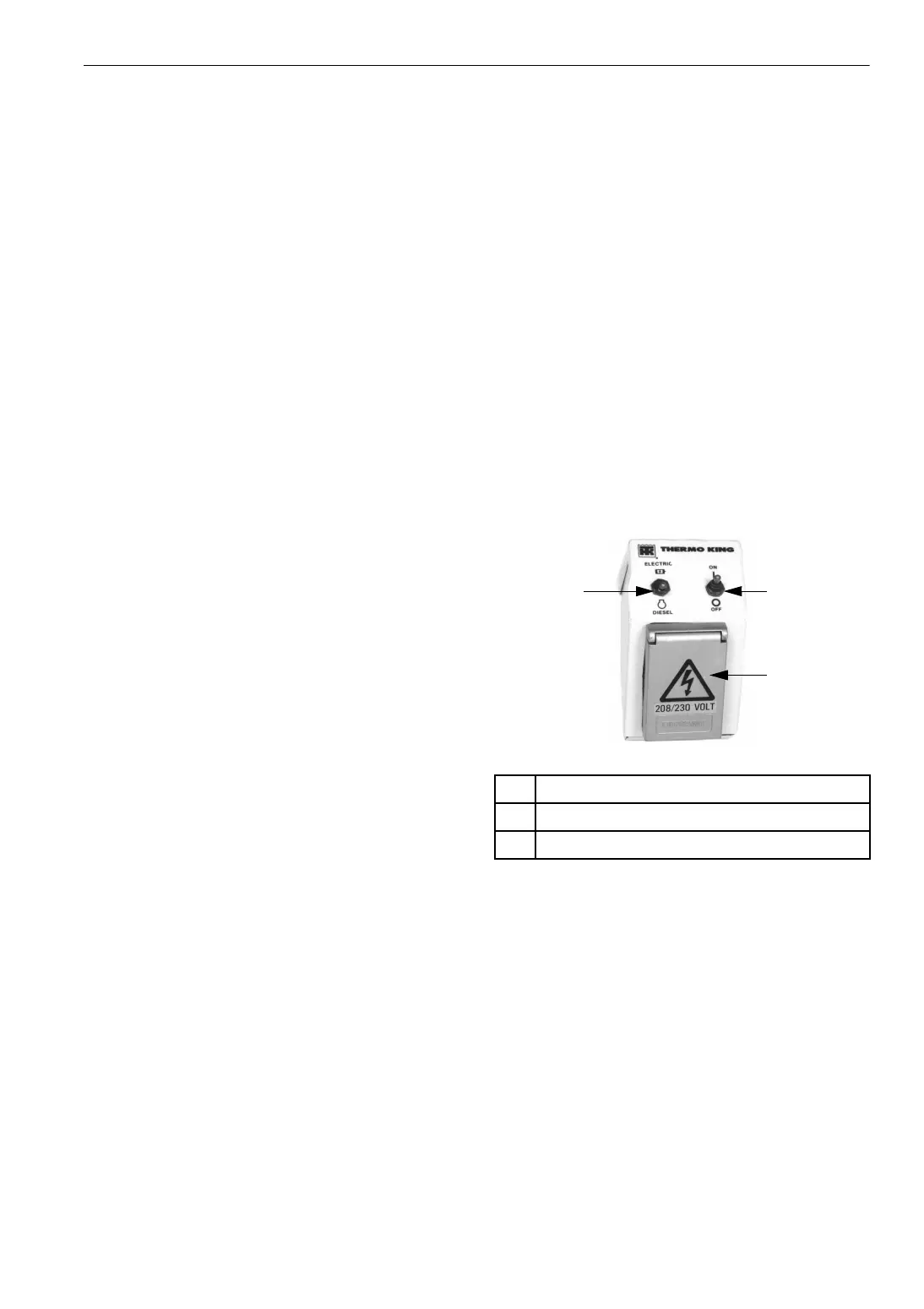
The remote control box is replaced with an
electric standby power receptacle on units that are
equipped with the cab control box.
Electric Standby Power Receptacle
On/Off Switch: This switch has the same function
as the matching switch in the control box. It is
used to turn the unit on and off.
Diesel/Electric Switch: This switch selects diesel
or electric operation. To operate the unit with this
switch in the Electric position, the unit must be
connected to an electric power source that has the
correct voltage, phase, and frequency.
Electric Power Receptacle: Use the receptacle to
connect the unit to an appropriate electric power
source for Electric Standby operation.
1. On/Off Switch
2. Diesel/Electric Switch
3. Electric Power Receptacle
Figure 17: Electric Standby Power Receptacle
1
3
2
AKA01



 To Next Page