Usingthetabletbuttons
Thistopicprovidesinstructionsonhowtousethetabletbuttons.
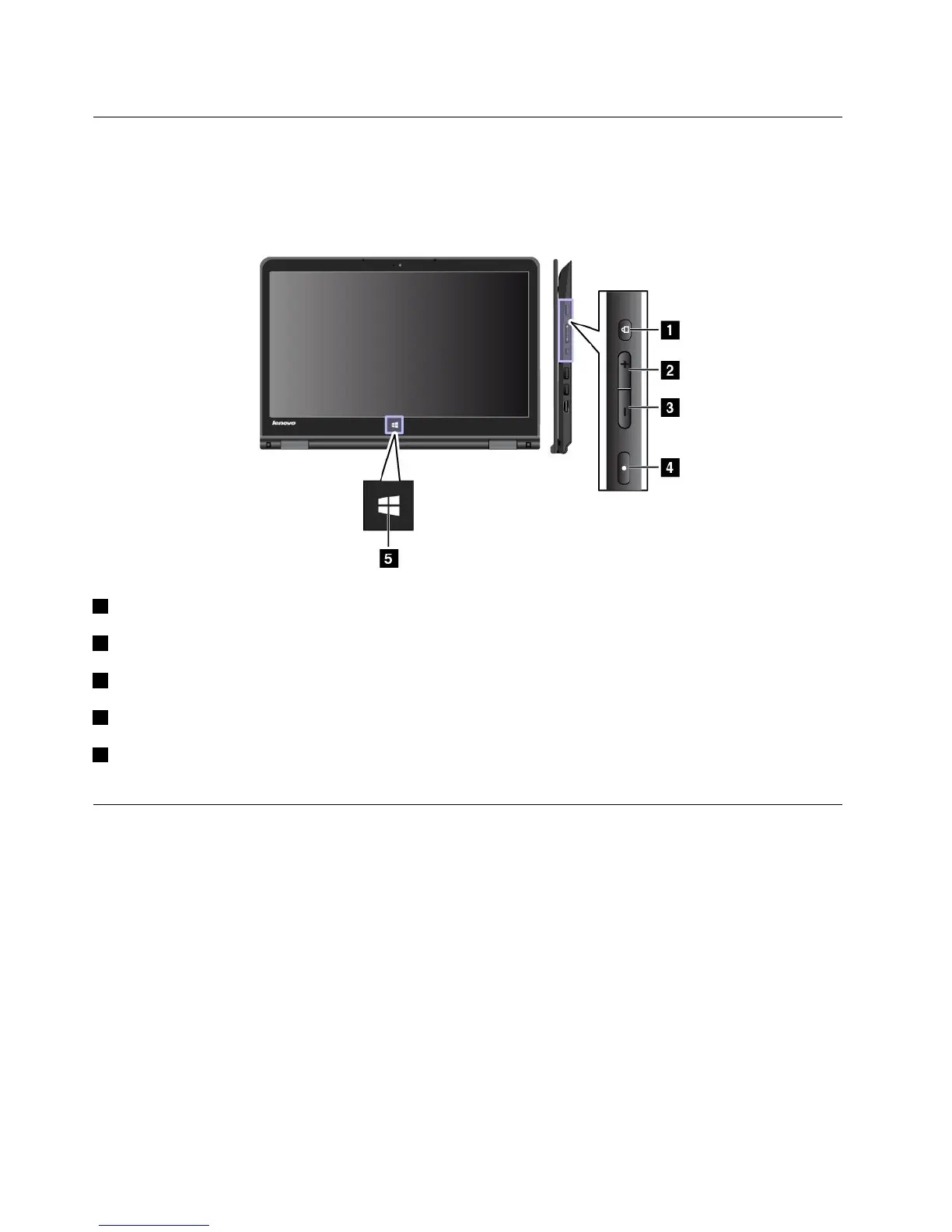
Thecomputerisequippedwithtabletbuttonsasshowninthefollowingillustration.Youcancontrolsome
functionsofyourcomputerthroughthetabletbuttons,withouttheuseofthekeyboard.
1Powerbutton:Pressthepowerbuttontoturnonthecomputer.
2Speakervolume-upbutton:Pressthespeakervolume-upbuttontoincreasethespeakervolume.
3Speakervolume-downbutton:Pressthespeakervolume-downbuttontodecreasethespeakervolume.
4Screen-rotation-lockbutton:Pressthescreen-rotation-lockbuttontolockthescreen-rotationfunction.
5WindowsStartscreencontrol:PresstheWindowsStartscreencontroltoswitchbetweenthecurrent
workspaceandtheStartscreen;ortowakeupthecomputerfromsleepmode.
Usingthemulti-touchscreen
Thistopicprovidesinstructionsonhowtousethemulti-touchscreenthatareavailableonsomemodels.
Notes:
•Yourcomputerscreenmightlookdifferentfromthefollowingillustrations.
•Dependingontheappyouuse,somegesturesmightnotbeavailable.
20UserGuide



 To Next Page