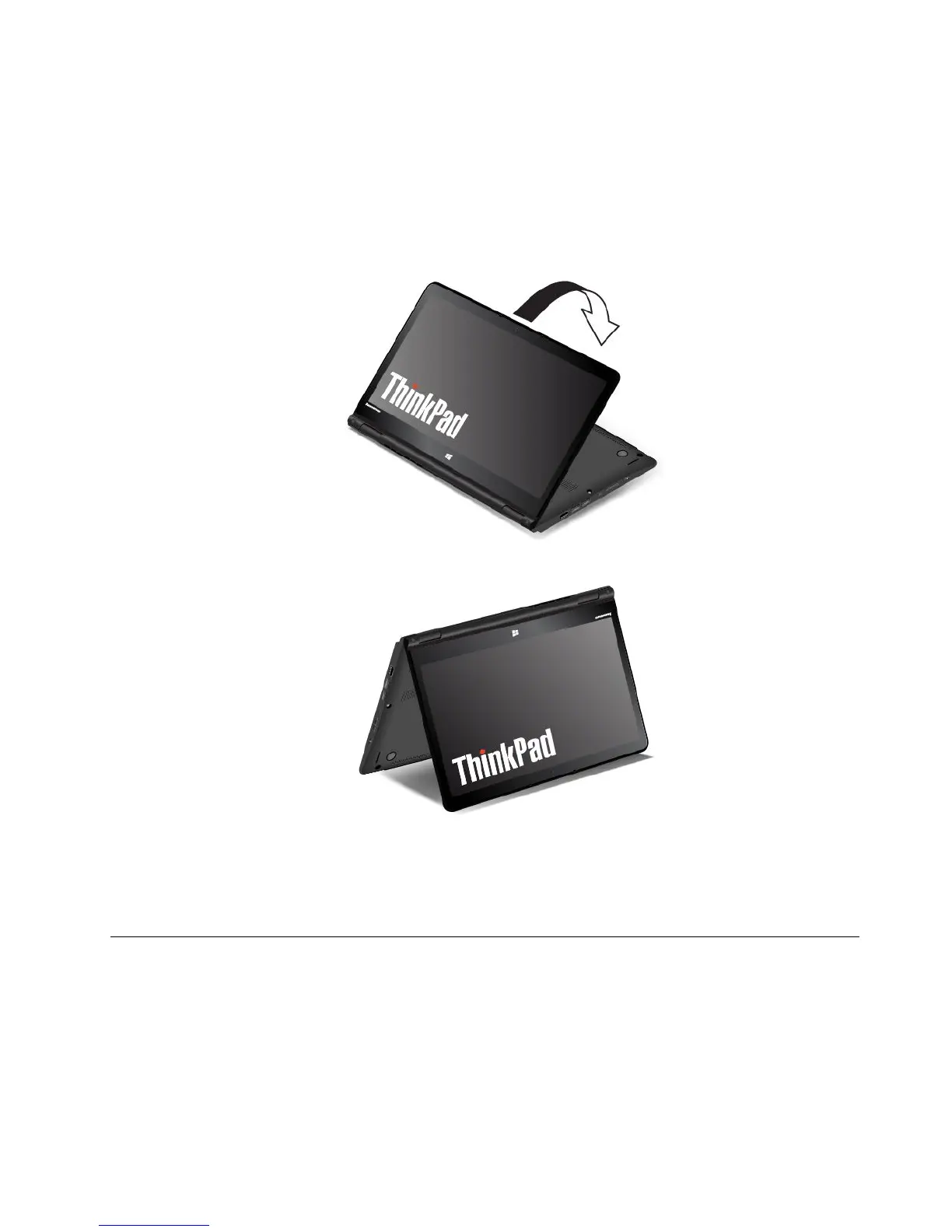
Ifyourcomputerisinthetabletmode,dothefollowingtoturnthecomputerfromthetabletmodeintothe
tentmode:
Note:Yourcomputermightlookslightlydifferentfromtheillustrationsinthistopic.
1.Slowlyrotateyourcomputerdisplayanticlockwisetoanyanglewithinarangeof190degreesto359
degrees.
Note:ThedegreesreferstotheangledegreesbetweentheLCDandthekeyboard.
2.Positionyourcomputerasshown.Yourcomputerisnowinthetentmode.
Inthetentmode,thekeyboardandthetouchpadareautomaticallydisabled.However,youcancontrol
somefunctionsofyourcomputerthroughthetabletbuttonsandthemulti-touchscreen,withouttheuse
ofthekeyboardandthetouchpad.Formoreinformation,referto“Usingthetabletbuttons”onpage20
and“Usingthemulti-touchscreen”onpage20.
Usingthekeyboard
Yourcomputerkeyboardfeaturestheframetravelfunction.Thistopicprovidesinformationonthebehavior
ofthekeyboard.
Notes:
•Yourcomputermightlookslightlydifferentfromtheillustrationsinthistopic.
Chapter2.Usingyourcomputer29



 To Next Page