•:
ForWindows7:OpensControlPanel.
ForWindows8.1:OpenstheSettingscharm.
•:
ForWindows7:OpensWindowsSearch.
ForWindows8.1:OpenstheSearchcharm.
•:Viewstheprogramsthatyouhaveopened.
•:
ForWindows7:OpensComputer.
ForWindows8.1:Viewsalltheprograms.
2Windowskey
PresstheWindowskeytoswitchbetweenthecurrentworkspaceandtheStartscreen.
ForinformationaboutusingtheWindowskeywithotherkeys,refertothehelpinformationsystemofthe
Windowsoperatingsystem.
ThinkPadpointingdevice
TheThinkPadpointingdeviceenablesyoutoperformallthefunctionsofatraditionalmouse,suchas
movingthepointer,left-clicking,right-clicking,andscrolling.WiththeThinkPadpointingdevice,youalso
canperformavarietyoftouchgestures,suchasrotatingandzoominginorout.
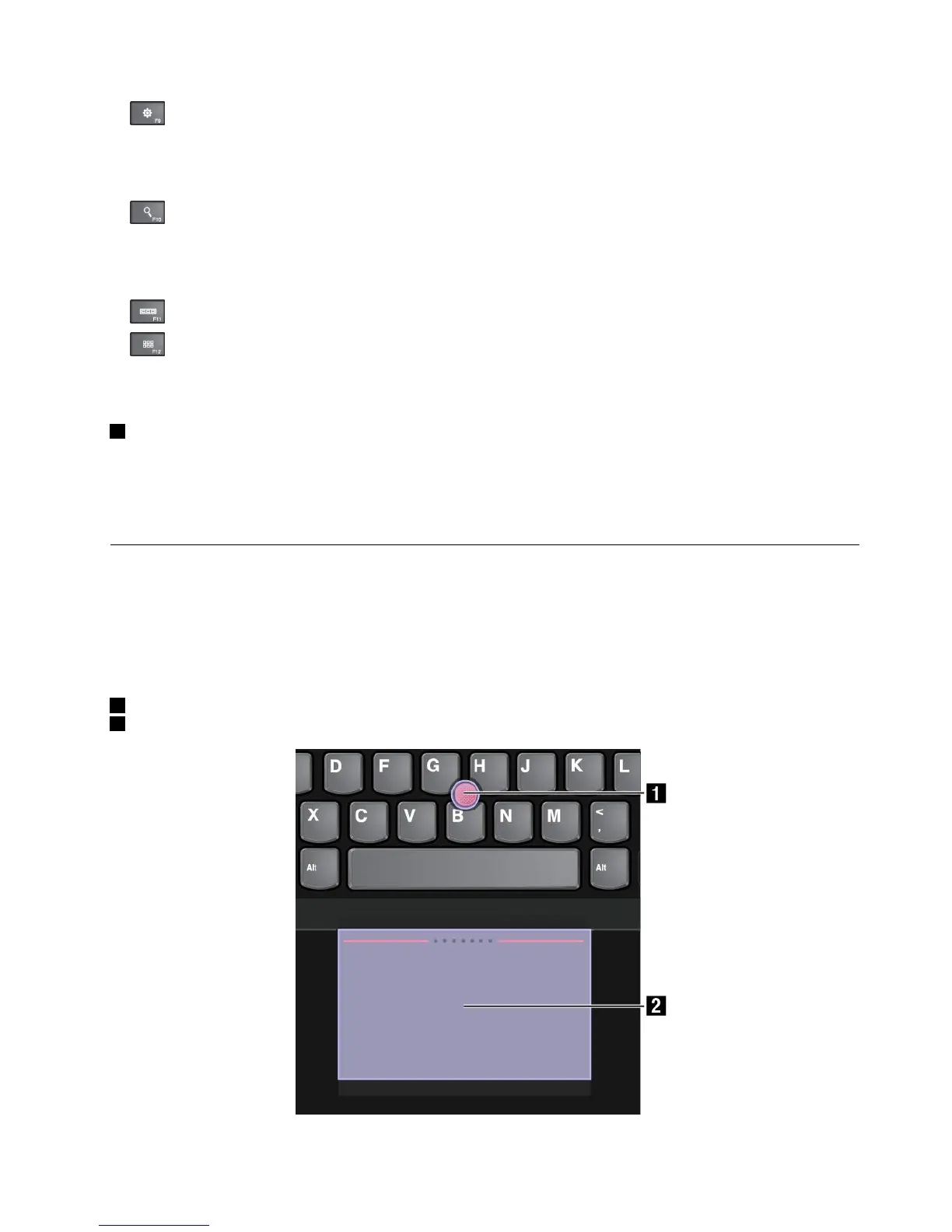
TheThinkPadpointingdeviceconsistsofthefollowingcomponents:
1Pointingstick
2Trackpad
Chapter2.Usingyourcomputer33



 To Next Page