Time Electronics User Manual
5051 Plus and 7051 Plus Multifunction Calibrators v2.1
xx51+ Multifunction Calibrators Page 46 of 64
7.9.5. Duty Cycle
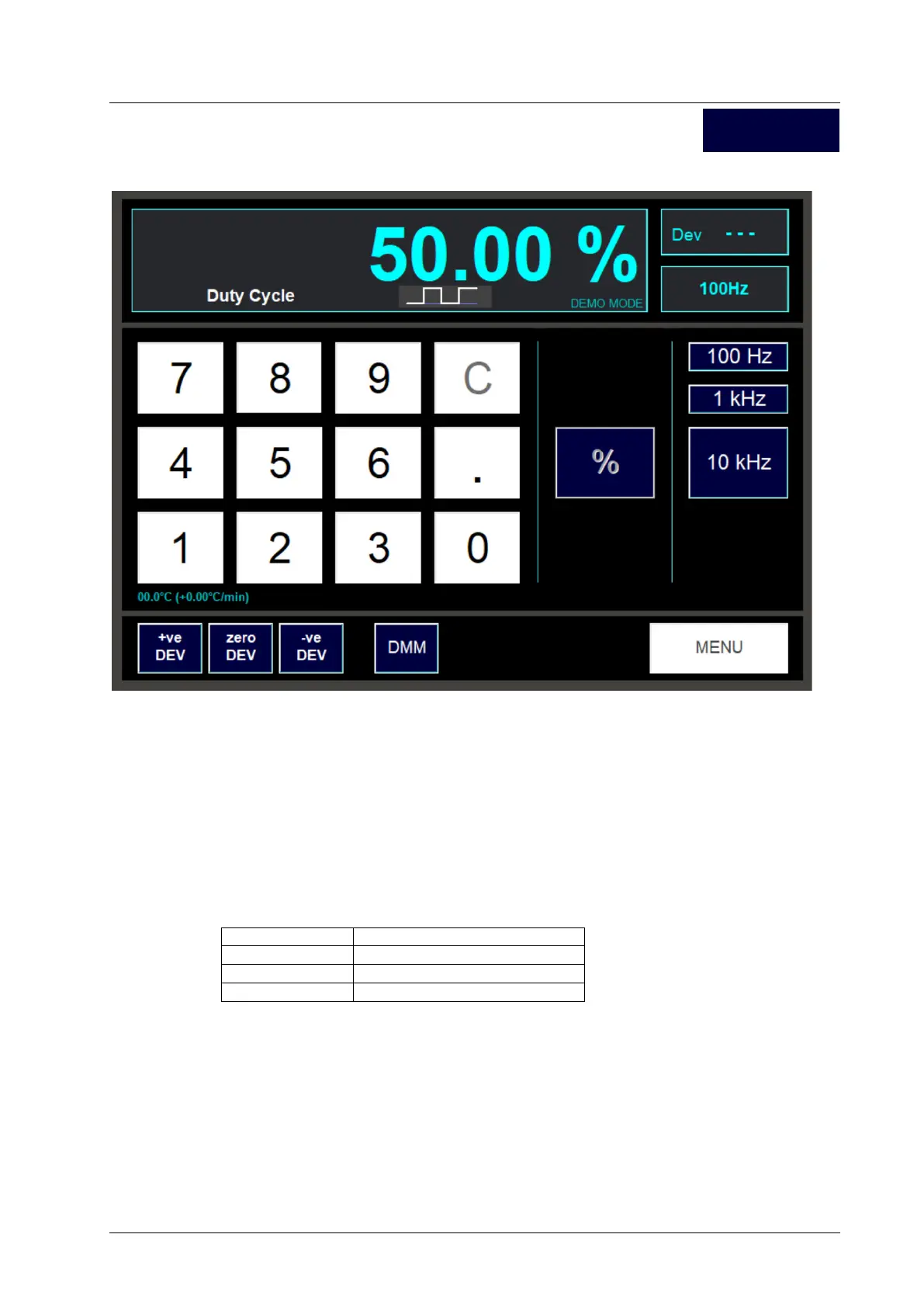
This function allows selection of duty cycle output between 0% and 100% at 3 selectable frequencies.
7.9.5.1. Setting the Output
Enter the duty cycle required as percentage using the digit buttons, then press the % button to set the
output. The readout at the top of the screen will display the duty cycle set. A small graphic below the
digital readout provides a guideline to the appearance of the waveform.
7.9.5.2. Selecting the Output Frequency
To select the output frequency, click one of the 3 frequency buttons on the right-hand side of the
screen. The present frequency is shown in a small box in the right corner of the screen.
At each frequency the setting resolution of the duty cycle varies:
The resolution of the selected frequency is indicated by the number of digits after the decimal place in
the readout at the top of the screen.
7.9.5.3. Deviating the Output
The duty cycle may be varied using the Dev buttons in the same way as for DCV and other functions.
For more information see the DCV section.
7.9.5.4. Exiting the Duty Cycle Screen
Pressing the Menu button will return to the Scope Cal function selection screen.
Duty Cycle



 To Next Page