Time Electronics User Manual
5051 Plus and 7051 Plus Multifunction Calibrators v2.1
xx51+ Multifunction Calibrators Page 51 of 64
7.11. Operating the xx51 as a Multimeter
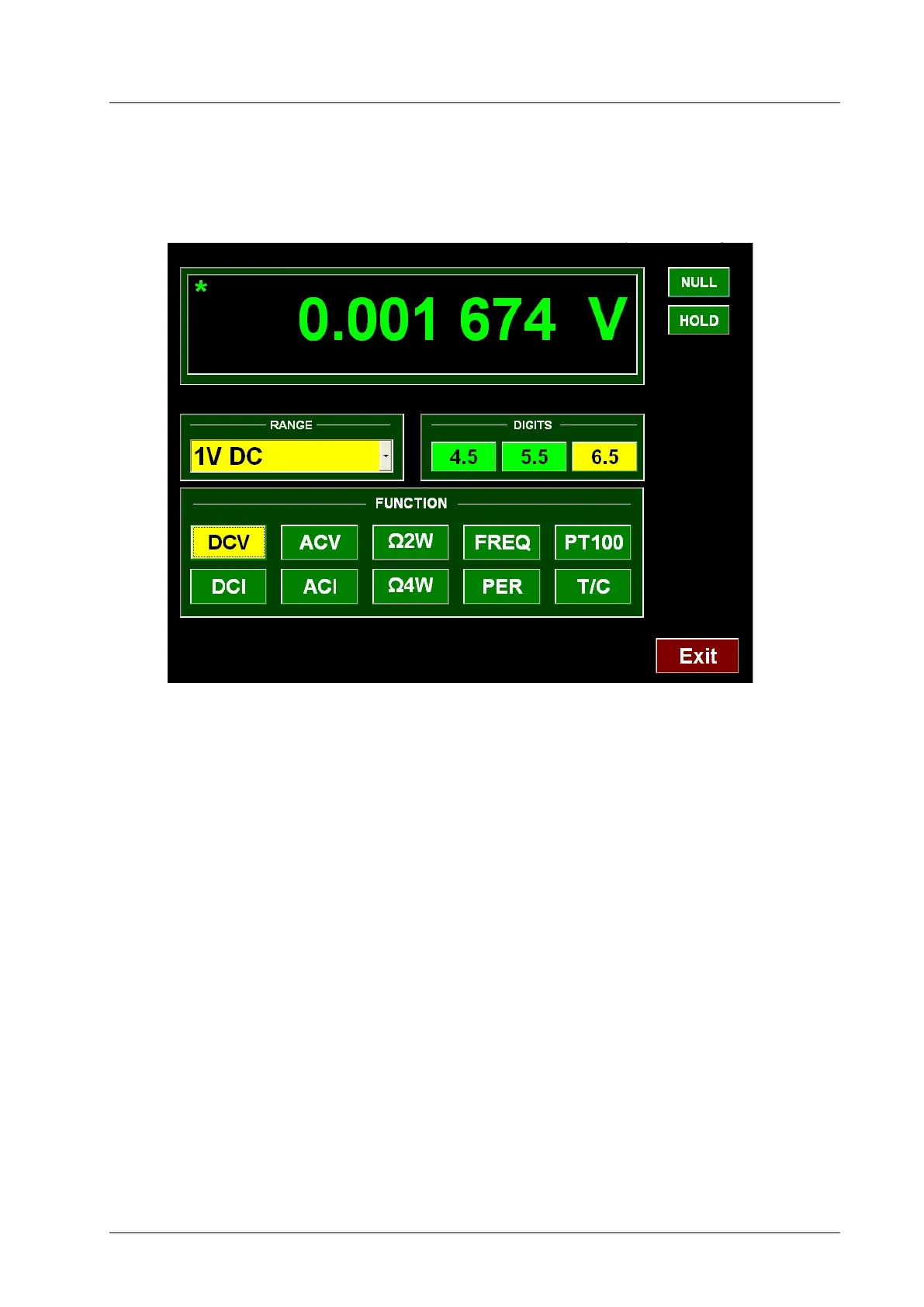
To use the xx51 as a multimeter, double-click the xx51 DMM icon on the Windows desktop. A screen
will appear as below:
Use only the ‘DMM’ terminals of the xx51 for measurements in Multimeter mode. The LED beside the
Input terminals will light to indicate that the xx51 is in Multimeter mode.
While the xx51 is in Multimeter mode it will take readings continuously at regular intervals. Each time
a reading is taken a green star at the top left of the reading window will flash.
7.11.1. Selecting Measurement Function
The following functions are available:
• DC Volts (DCV)
• AC Volts (ACV)
• DC Current (DCI)
• AC Current (ACI)
• Resistance (Ω2W)
• 4 Wire Resistance (Ω4W)
• Frequency (FREQ)
• Period (PER)
• Thermocouples (T/C)
• PT100 (PT100)
The selected function is indicated by the highlighted button in the screen area labelled “Function”. To
change function, click the required function button.



 To Next Page