Time Electronics User Manual
5051 Plus and 7051 Plus Multifunction Calibrators v2.1
xx51+ Multifunction Calibrators Page 50 of 64
7.10. System Information
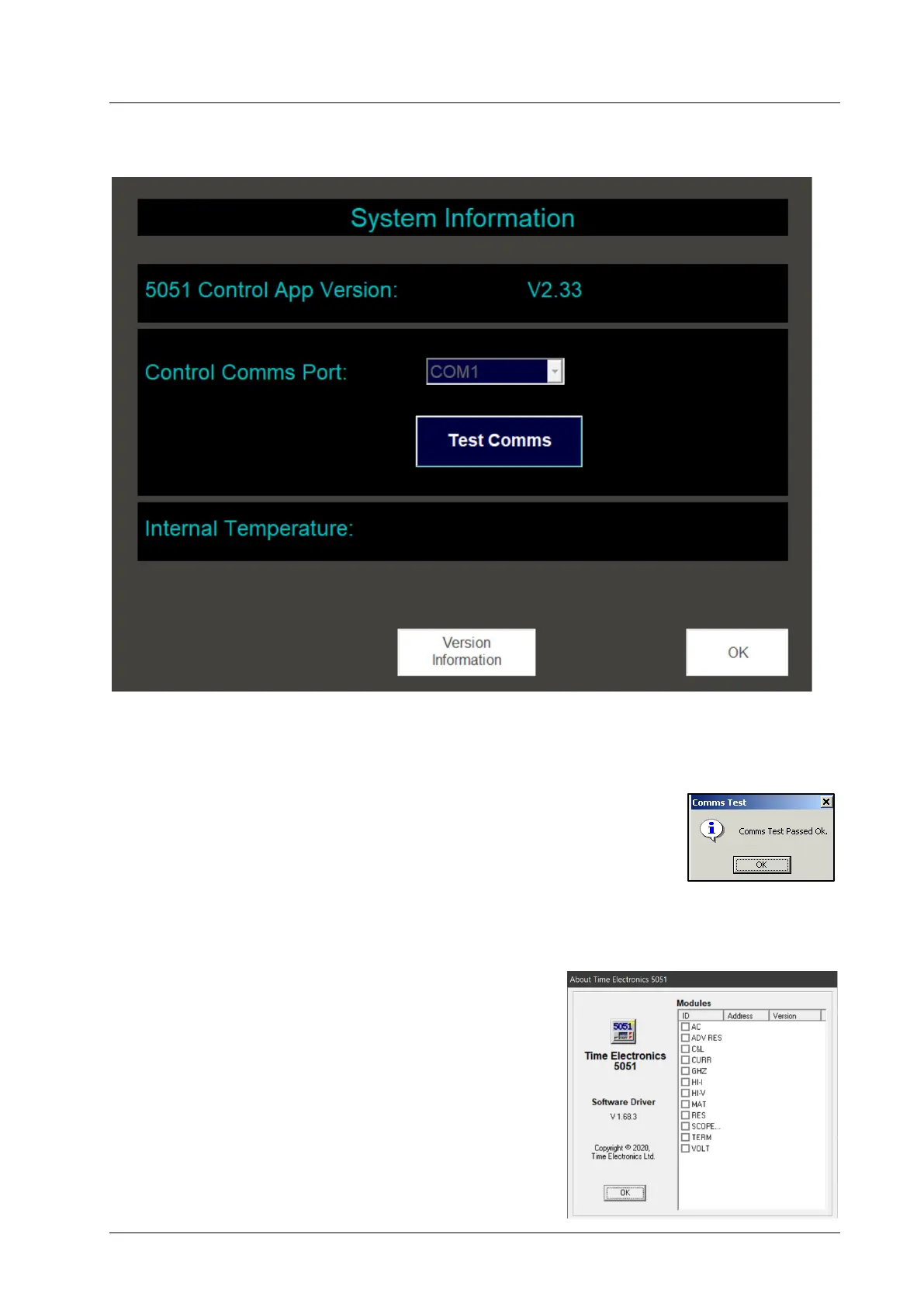
Pressing the options button will display this screen:
In the green band near the top of the screen is displayed the version number of the control program
itself (e.g. V1.61 in the screenshot above).
The blue rectangle in the middle of the screen shows the internal comms port
used to communicate with the xx51’s own hardware. The comms port is fixed and
cannot be changed. Pressing the Test Comms button will test communication
with the hardware. If the test is OK, then this window will be displayed:
At the bottom of the screen are shown the internal temperatures of the xx51’s voltage source module
and the resistance source module.
By pressing the Version Information button on this screen, more
detailed version information about the xx51 will be displayed:
The left hand side of the window shows the version of the
software driver installed.
In the main white area of the window are shown the version
numbers of the xx51’s modules. The ID column shows the
module’s identity code. The Address column shows its internal
address, and the Version column shows the module’s firmware
version number.
V-Source 28.3ºC
Resistance 22.6ºC



 To Next Page