3-51
Chapter 3
INSTALLATION AND SETTING PROCEDURES (HARDWARE)
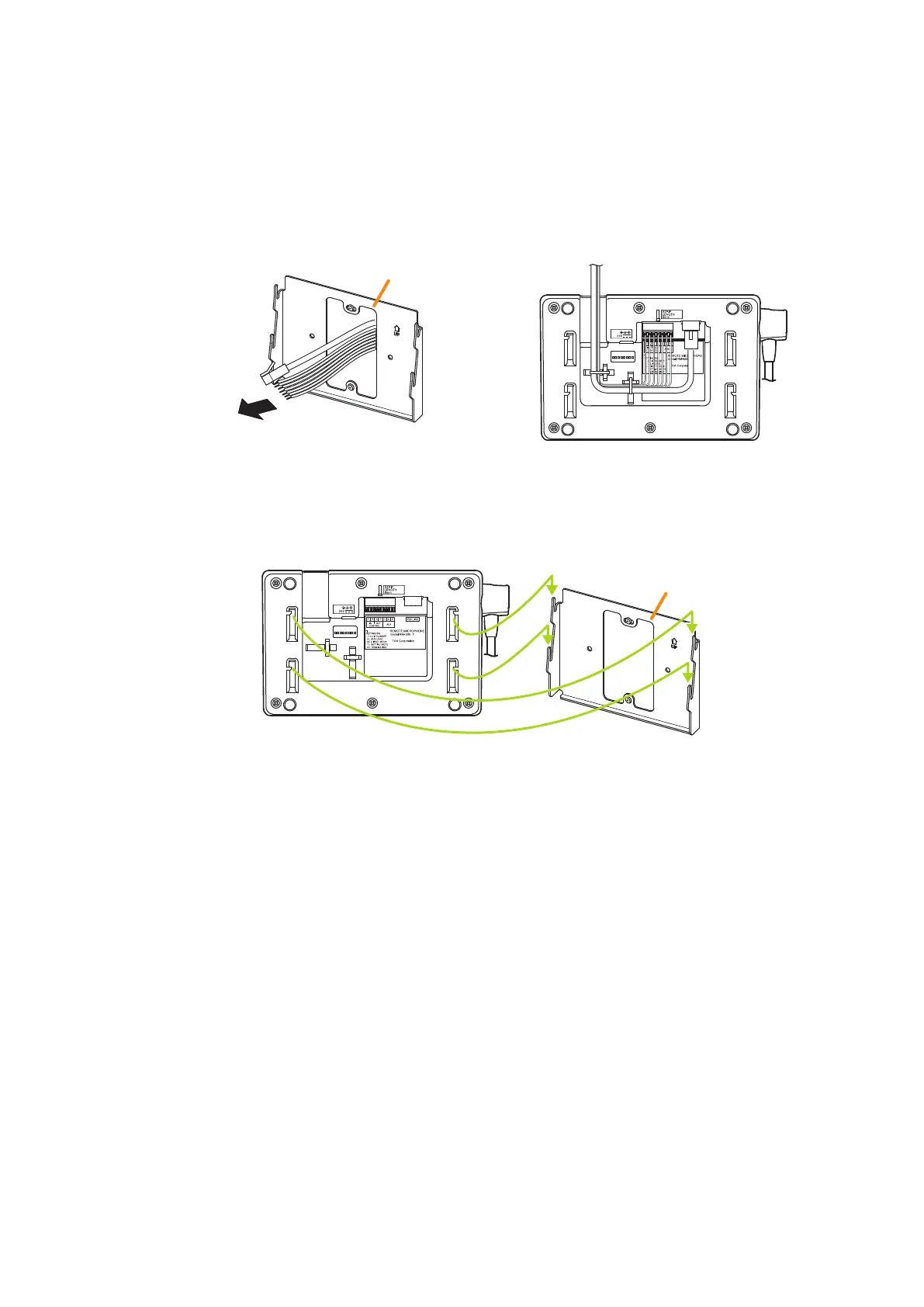
Step 2. Connect the cable from the VX-3000F to the RM-500.
Two methods are available for cable wiring: Wiring through the wall and Exposed wiring from the upper
or lower side of the RM-500.
For the cable connection to the push-in terminal block, see p. 3-58.
Step 3. Hang the RM-500 onto the WB-RM500.
Securely insert 4 mounting holes in the RM-500 into 4 protrusions of the WB-RM500 aligning them
with each other.
[When wiring through the wall]
Extract the cable from the wall, pass it through
the opening in the WB-RM500, then connect it to
the push-in terminal block.
[When making exposed wiring]
Connect the cable to the RM-500’s push-in
terminal block, then extract it through the gap
between the RM-500 and the WB-RM500.
To the RM-500's push-in terminal block
WB-RM500
WB-RM500
RM-500
Note
After installation, make sure that the joints at all 4 places are correctly t and have no looseness or
rattling.
RM-500



 To Next Page