28
COMPONENT NAMES AND FUNCTIONS
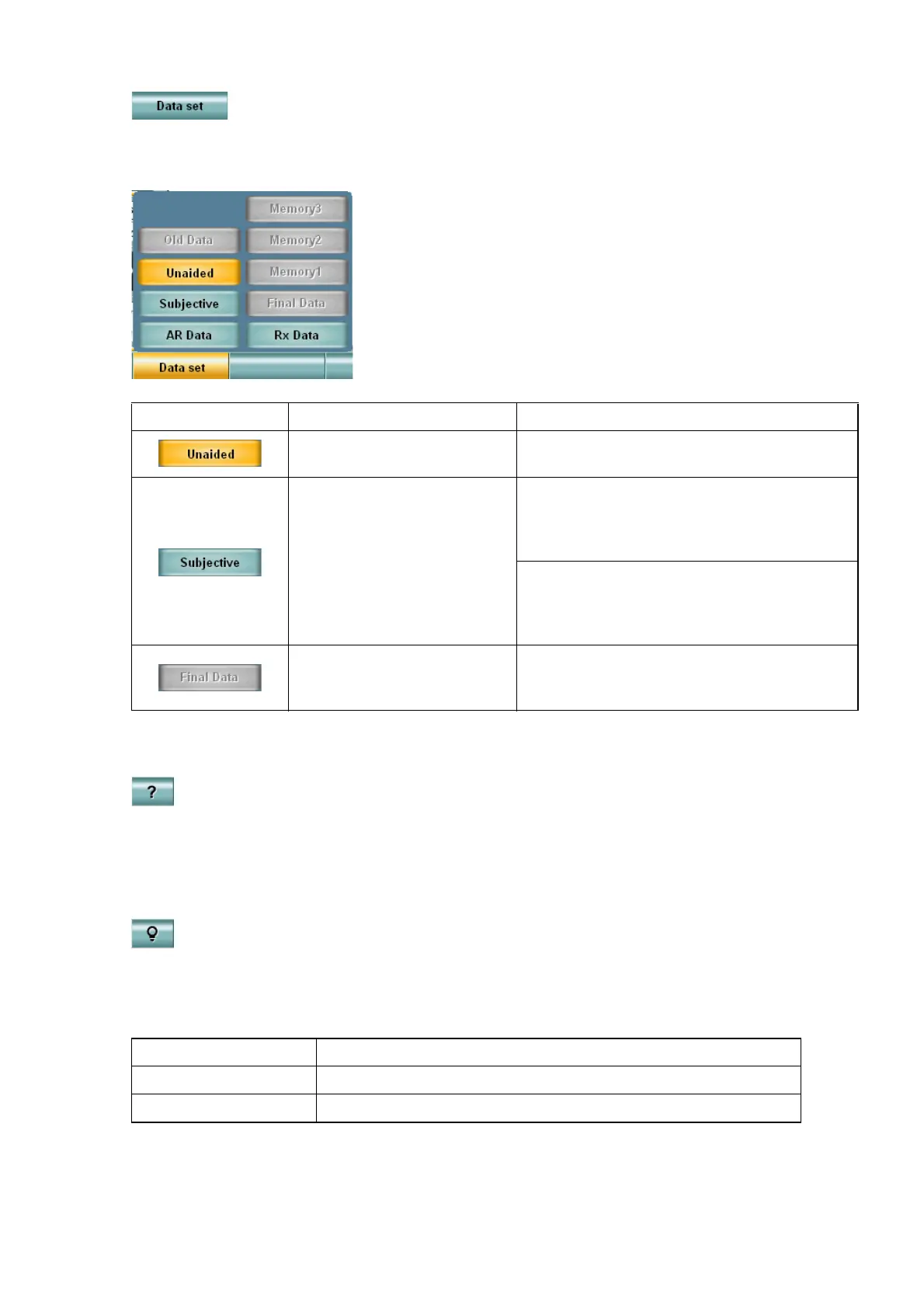
• Function 5: [Data set]
The data of the selected item is displayed in the main data area and a lens is set to the CV-5000.
Touch the [Data set] button, and the menu is displayed.
• Function 8: [?]
Displays "Help" about the test being executed in the chart page area.
Touch the [?] button again, and "Help" is closed.
• [Shift] + Function 8: [Illumination ON/OFF]
By using the [Shift] switch together, the function button 8 can work as the [Illumination ON/OFF]
button.
Use this button when you want to turn off the illumination in the near- and far-point tests.
Example of display Meaning Operation by touching
This data is displayed in the
main data area.
No operation
This data exists and can be
displayed.
This data is displayed in the main data
area and a lens is set to the CV-5000.
The data in the main data area is moved to
the data reference area.
By using the [Shift] switch together, the
selected data in [Final Data] and [Memory
1 ~ 3] are overwritten by the main data
being displayed.
This data is displayed in the
data reference area or does
not exist.
The data in the main data area is copied on
the selected button. The selected data is
displayed in the main data area.
Test mode Function
Far-point test mode Turns on/off the illumination of the chart presentation device.
Near-point test mode Turns on/off the illumination of near-point chart.



 To Next Page