Calibration
Excavator Hitch
53
Excavator Indicate System P/N: 1022461-01
2. Align the bucket pivot, and the bucket teeth.
3. On the GX Series display, tap the Power ButtonControl Machine
setup, select the applicable machine file for the job, and tap Edit.
4. Tap Next to navigate to the Excavator Hitch screen.
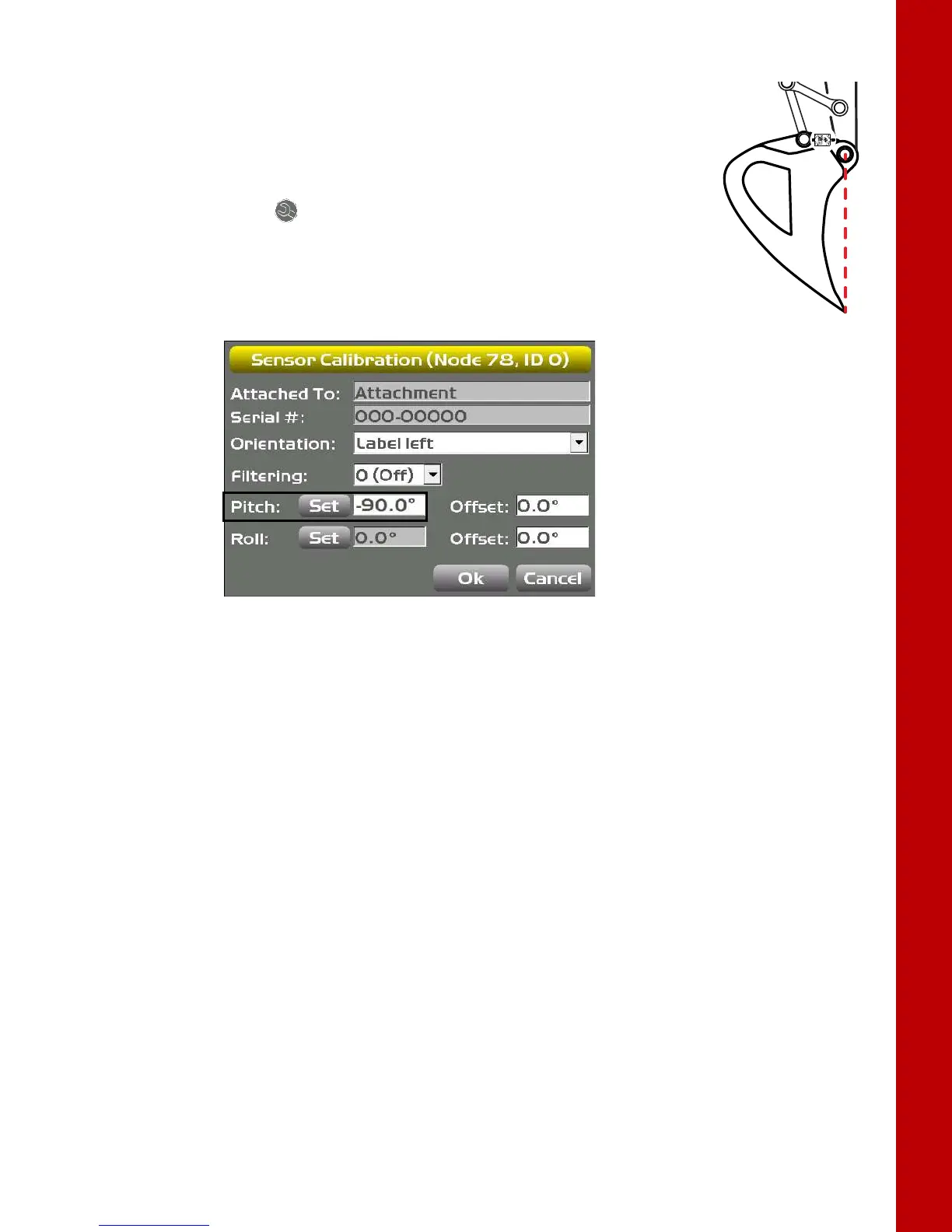
5. Tap the Wrench icon for the bucket sensor.
6. Tap Set next to Pitch, enter the Pitch value as -90.0 degrees, and tap Set
again (
Figure 72).
Figure 72: Set the Pitch Value to -90.0°
7. If this is the last sensor physically connected to the machine, see “CAN Termination” on page 23.
Attachment Edge
Perform the following attachment edge calibration procedures for all attachment types. These
calibrations must also be performed for each individual attachment when using multiple attachments.
1. On the GX Series display, tap the Power ButtonControlMachine setup.
2. Tap Next until the Excavator attachments screen appears
3. Select the attachment that is on the machine.
4. Tap Edit. The Excavator attachment setup screen appears.
5. Tap Next.



 To Next Page