14
COMPONENTS
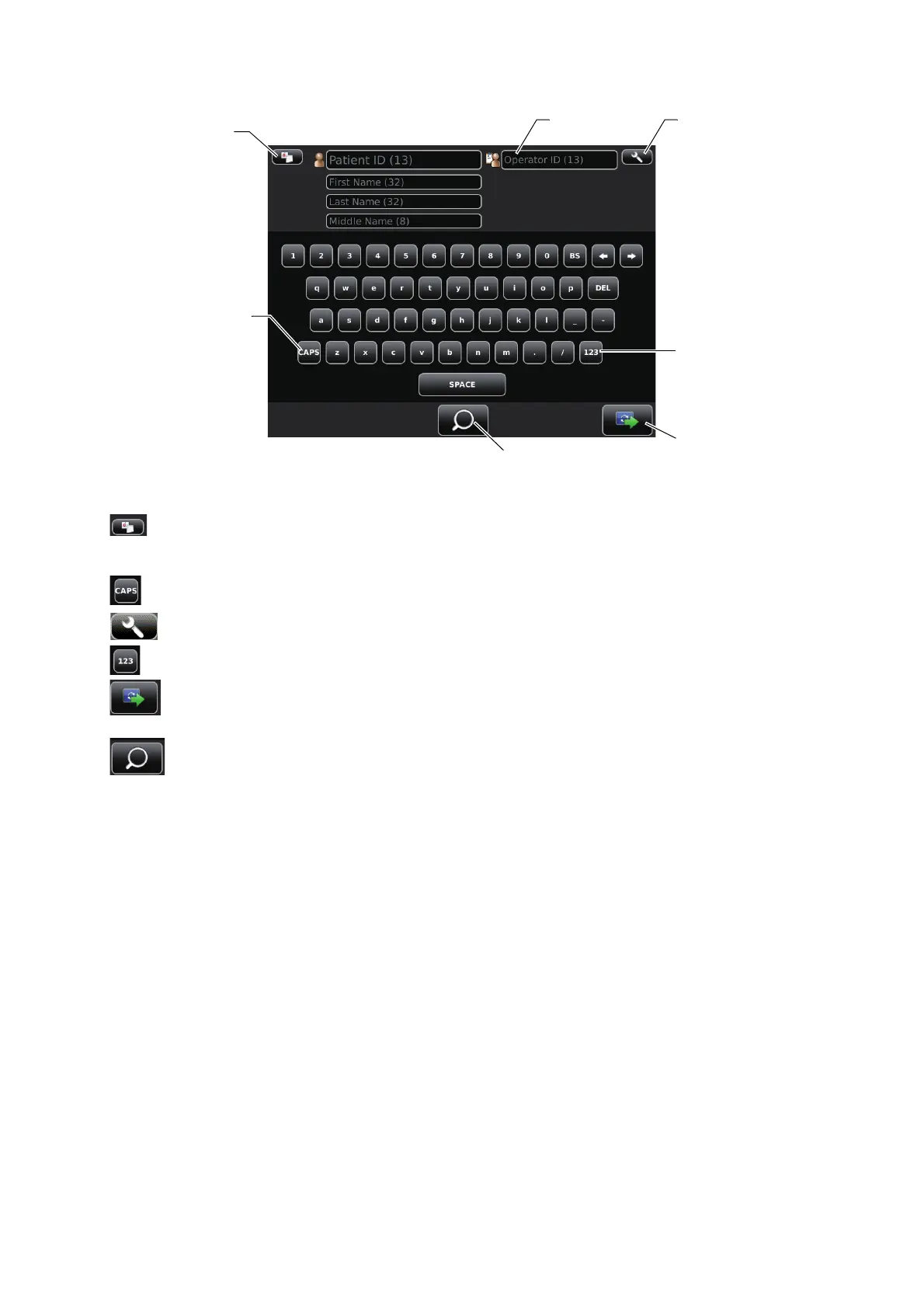
PATIENT SCREEN (ID INPUT)
Patient list button.......................................Displays the Patient screen (DICOM work list).
This button displays when the setting in the Setup screen is
ON in "Use DICOM" of "NETWORK SETTINGS". (P.61)
Caps Lock button........................................The letters on software keyboard changes Capital/small.
Settings button ........................................Displays the Setup screen.
Ten key changeover button.........................Layout of software keyboard changes QWERTY/Ten key.
Next button ............................................Patient selecting is complete and photography setting screen
is set.
Query patient button..............................Query the inputted patient in the DICOM work list. This button
displays when the setting in the Setup screen is ON in "Use
DICOM" of "NETWORK SETTINGS". (P.61)
Caps Lock button
Ten key changeover button
Next button
Settings button
Operator ID
Query patient button
Patient list button



 To Next Page