46
OPTIONAL OPERATIONS
OPTIONAL OPERATIONS
FREE STYLE COURSE PHOTOGRAPHY
In the free style course, it is possible to capture an eye as soon as the power turns on; selecting the
patient's ID, photography point or patient's eye is not required.
1 Insert the power cable plug into the commercial power (the 3-pin AC grounding receptacle,)
press on the . Make sure that the title screen is displayed and then the capture
screen is displayed.
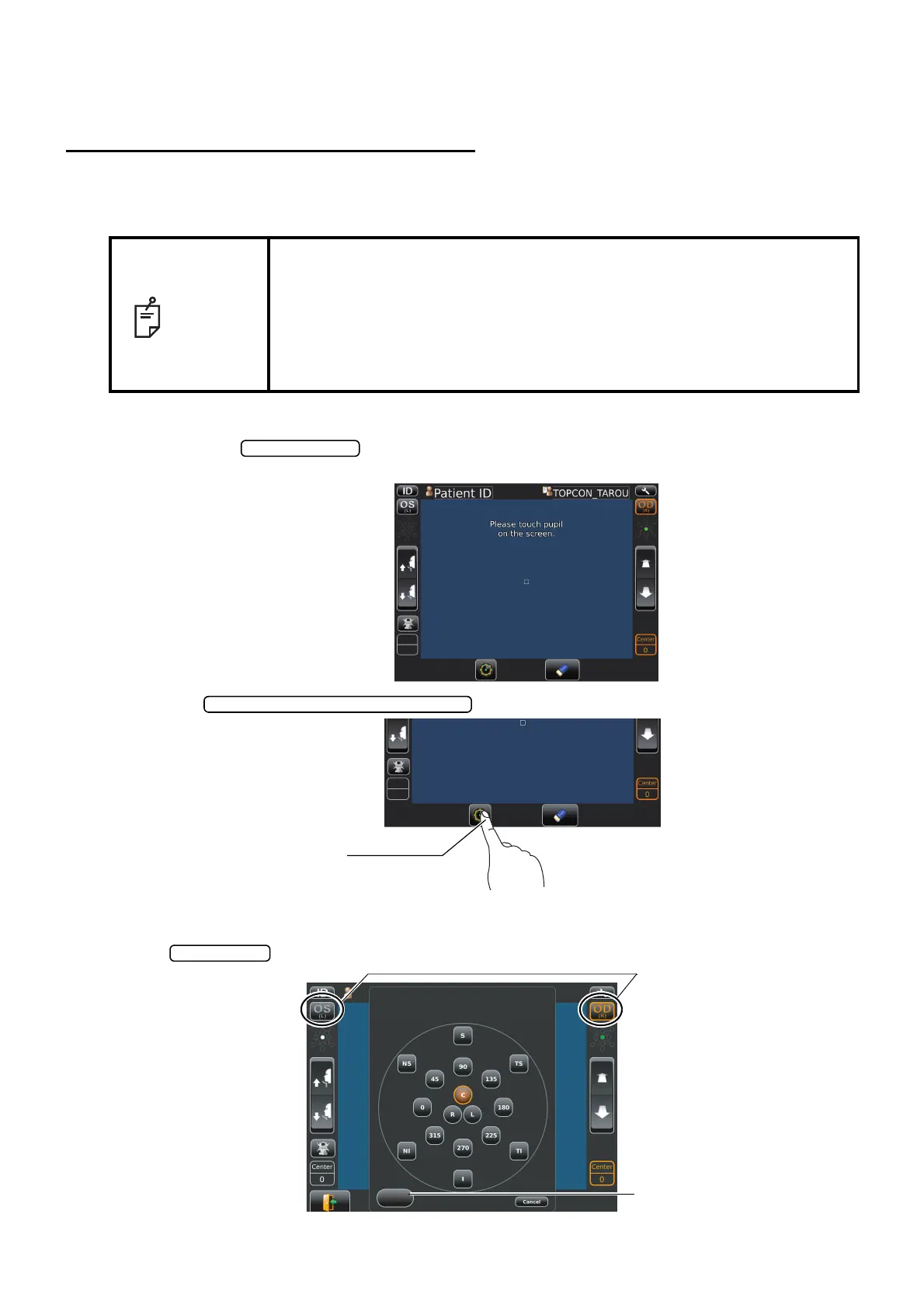
2 Tap the to change the position.
3 Photographing position selecting screen appears. Tap the desired position on the screen, and
change the L/R eye by OS/OD button if necessary. If Panorama photography is required, tap
the button. For the detail of Panorama photography, see P.48.
NOTE
• To change to free style course form the sequence course the setup
screen is used.
• Regarding how to change, see P.55-59.
• In free style course, it is possible to set photographing position as desired.
• As it is impossible to keep the result of desired position and panorama
photography simultaneously in free style course; print/output either result
then repeat the photographing procedure from the beginning.
Photographing position selecting button
Photographing position
selecting button
When a captured region button is tapped, you can
see the captured data in that region.
Note
Panorama
OS/OD (L/R) button
Panorama button



 To Next Page