Axis Direction Keyboard Key JogShuttle
X-
Axis
Positive Up Arrow Clockwise
Negative Down Arrow Counterclockwise
Z-
Axis
Positive Right Arrow Clockwise
Negative Left Arrow Counterclockwise
Jogging in PathPilot
From the PathPilot interface, in the Manual Control area, the
Jog group has the following functions:
l The Jog button, which toggles between continuous
velocity mode and step mode.
l The Jog Speed slider, which controls the machine’s jog
rate (whether in continuous velocity mode or in step
mode).
The jog rate is measured as a percentage of the
machine's maximum jog rate.
Jogging with the Keyboard
Pressing the keys results in the following actions:
l [KEY] jogs the axis at the current jog rate.
l [KEY]+Shift jogs the axis at the maximum jog rate.
Jogging with the (Optional) JogShuttle
The optional JogShuttle has the following functions:
l An inner wheel and outer ring that jog the currently
selected axis.
Rotating either clockwise jogs the axis in the positive
direction.
Rotating either counterclockwise jogs the axis in the
negative direction.
l Four axis selection buttons, which toggle the currently
selected axis. On this machine, two of the axis selection
buttons – Y-axis and A-axis – won't result in any motion
if selected.
Note: The currently selected axis displays in
PathPilot: in the Position Status group, there's a
green light to the left of the Axis DRO field.
When it's on, it indicates the active axis.
l A step button, which toggles the selected jog step size.
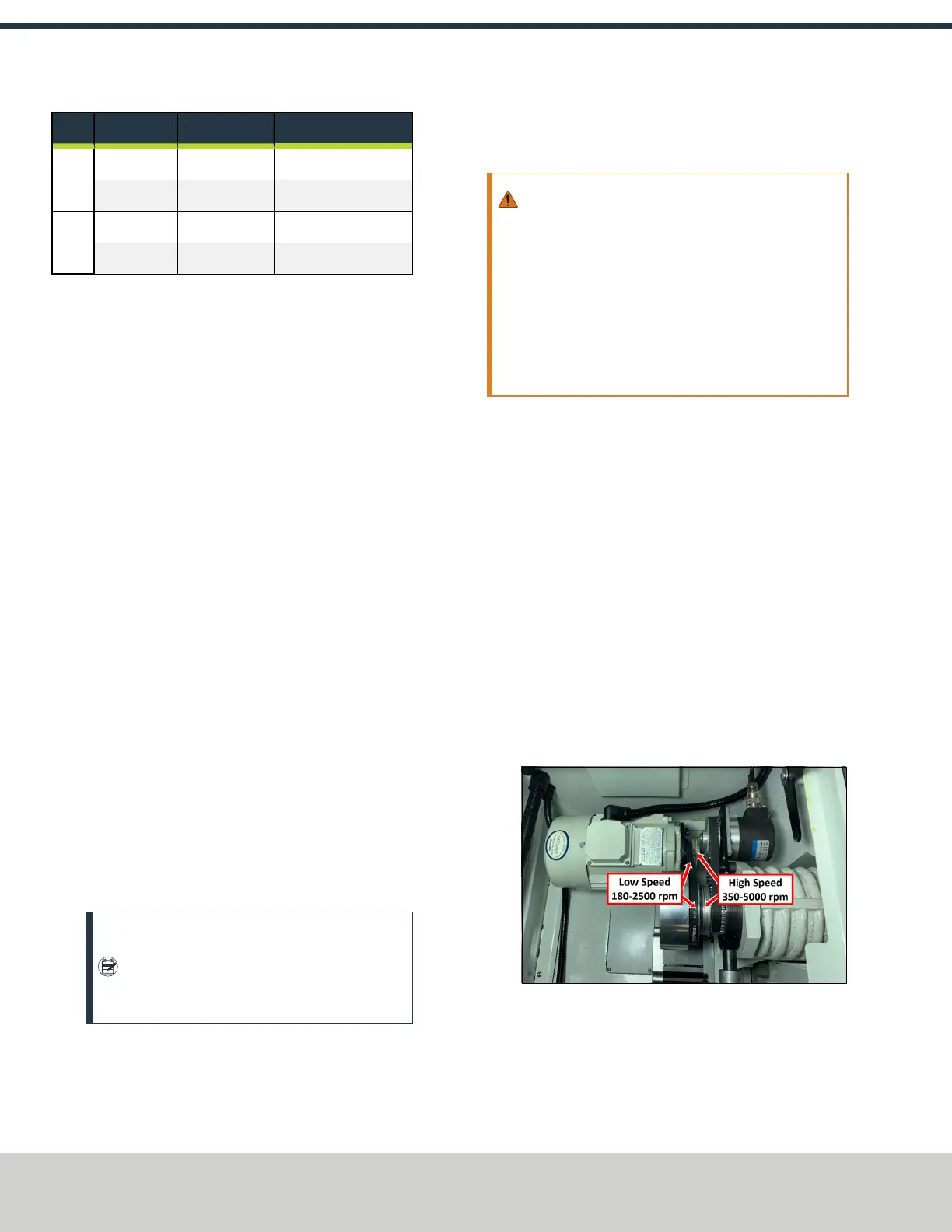
6.5 CHANGE THE SPINDLE SPEED RANGE
This machine has two spindle speed ranges:
l
High 350 rpm to 5000 rpm
l
Low 180 rpm to 2500 rpm
WARNING! Entanglement / Entrapment Hazard. The
machine operates under automatic control — it can
start at any time and crush, cut, entangle, or pinch
body parts.Always keep clear of positions on the
machine where unexpected or unintended machine
motion could cause harm. Before operating this
machine in any way, you must verify that all
operators know the location of the machine's
Emergency Stop button.
To change the spindle speed range:
1. Power off the machine and the PathPilot controller.
a. Push in the Emergency Stop button on the operator
box, which removes power to motion control.
b. From the PathPilot interface, select Exit.
c. Turn the Main Disconnect switch to OFF on the side
of the electrical cabinet.
d. Follow correct lockout/tagout procedures.
2. Open the spindle cabinet door.
3. Loosen the 8 mm socket head cap screw on the far side
of the motor mount with a 6 mm hex wrench.
4. Lift the spindle motor up (it tilts toward you, pivoting
about the remaining screw). The spindle belt slackens,
which allows you to move the belt from one pulley to the
other.
Figure 6-6: Example of the spindle belt in the low
position.
5. With the spindle belt in its new position, retighten the 8
mm socket head cap screw that you loosened in Step 3.
©Tormach® 2021
Specifications subject to change without notice.
Page 46 UM10753: 8L Operator's Manual (Version 0321B)
For the most recent version, see tormach.com/support
6: BASIC OPERATIONS



 To Next Page