TR-Electronic GmbH 2008, All Rights Reserved Printed in the Federal Republic of Germany
Page 146 of 155 TR - ECE - BA - DGB - 0073 - 07 06/27/2017
9.2.2 Programming
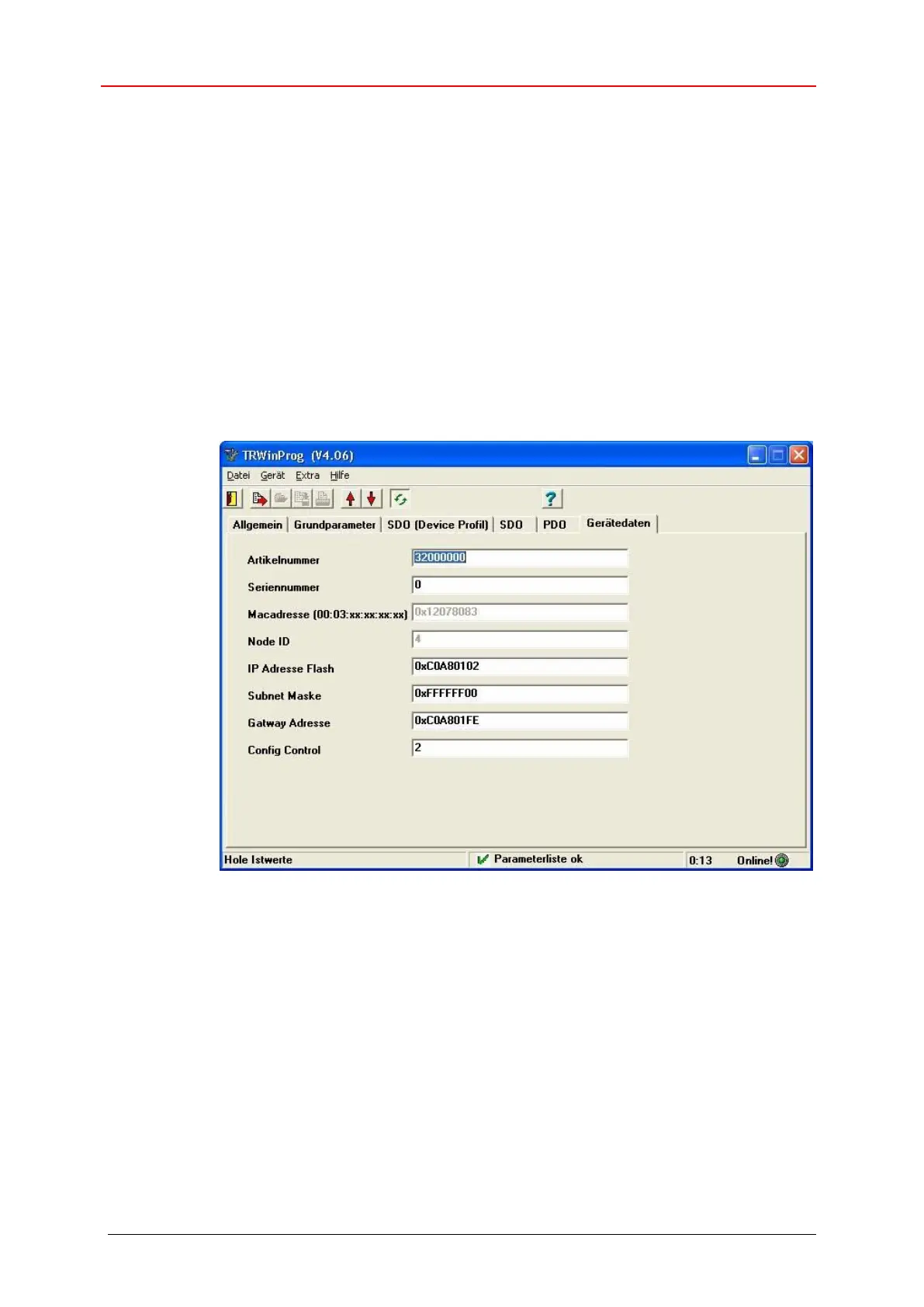
If the measuring system is connected correctly with the PC, about the menu
Device --> Online the device can be switched into the online mode. Hereupon,
the measuring system replies with the adjustable parameters. In the tab Device
data the desired IP parameters can be adjusted. The storage of the IP parameters
can be performed about menu Device --> Data write to device.
The IP parameters must be entered as HEX values.
Example:
IP address 192.168.1.2 = 0xC0 A8 01 02
The item ConfigControl (F5/3) accesses directly the TCP/IP Interface
Object 0xF5, attribute 3 Configuration Control. So it is not necessary to set
these control bits manually before.










 To Next Page