Printed in the Federal Republic of Germany TR-Electronic GmbH 2008, All Rights Reserved
06/27/2017 TR - ECE - BA - DGB - 0073 - 07 Page 147 of 155
9.3 Read/Write of attributes with Rockwell Control “RSLogix5000”
For the following project example the Rockwell Control System “RSLogix5000” V16
was used, with “ControlLogix Controller 1756-L55”.
It is assumed that the hardware configuration has already taken place, an
EtherNet/IP™ project exists and you should be able to create variables to store
receive data.
9.3.1 Procedure
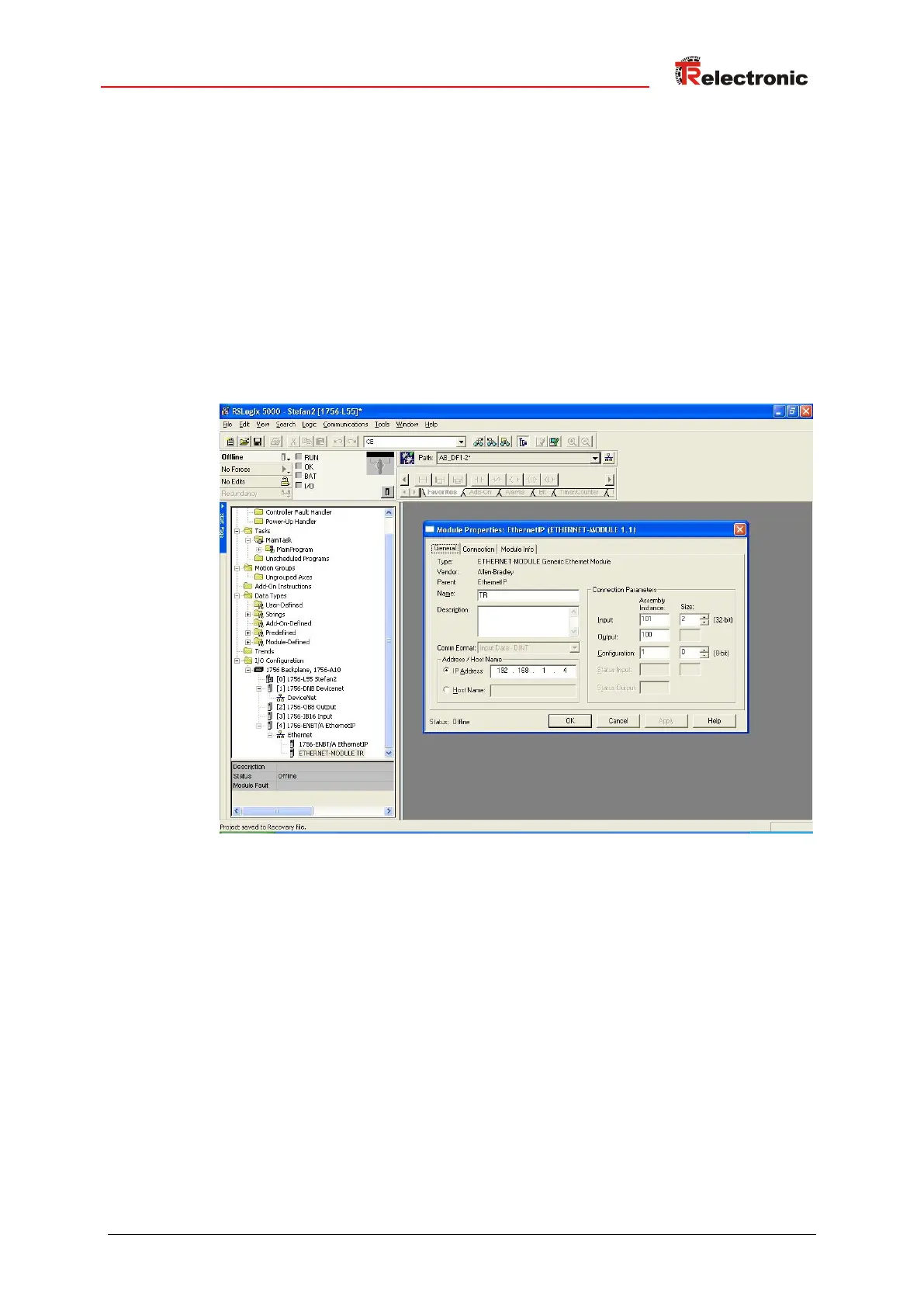
1. Create a new module under the folder structure I/O Configuration and choose
the entry ETHERNET-MODULE Generic Ethernet Module.
2. Perform the following adjustments in the Module Properties dialog box:
● Comm Format: Input Data - DINT
● Input: 101, Size: 2, corresponds attribute Position 64 of the Assembly
Object
● Output: 100, corresponds attribute Heartbeat of the Assembly Object
● Configuration: 1, Size: 0, not supported
● IP Address: active IP address of the measuring system
Under the folder structure I/O Configuration --> Ethernet the module created
newly is displayed with the stored name.










 To Next Page