Printed in the Federal Republic of Germany TR-Electronic GmbH 2008, All Rights Reserved
06/27/2017 TR - ECE - BA - DGB - 0073 - 07 Page 71 of 155
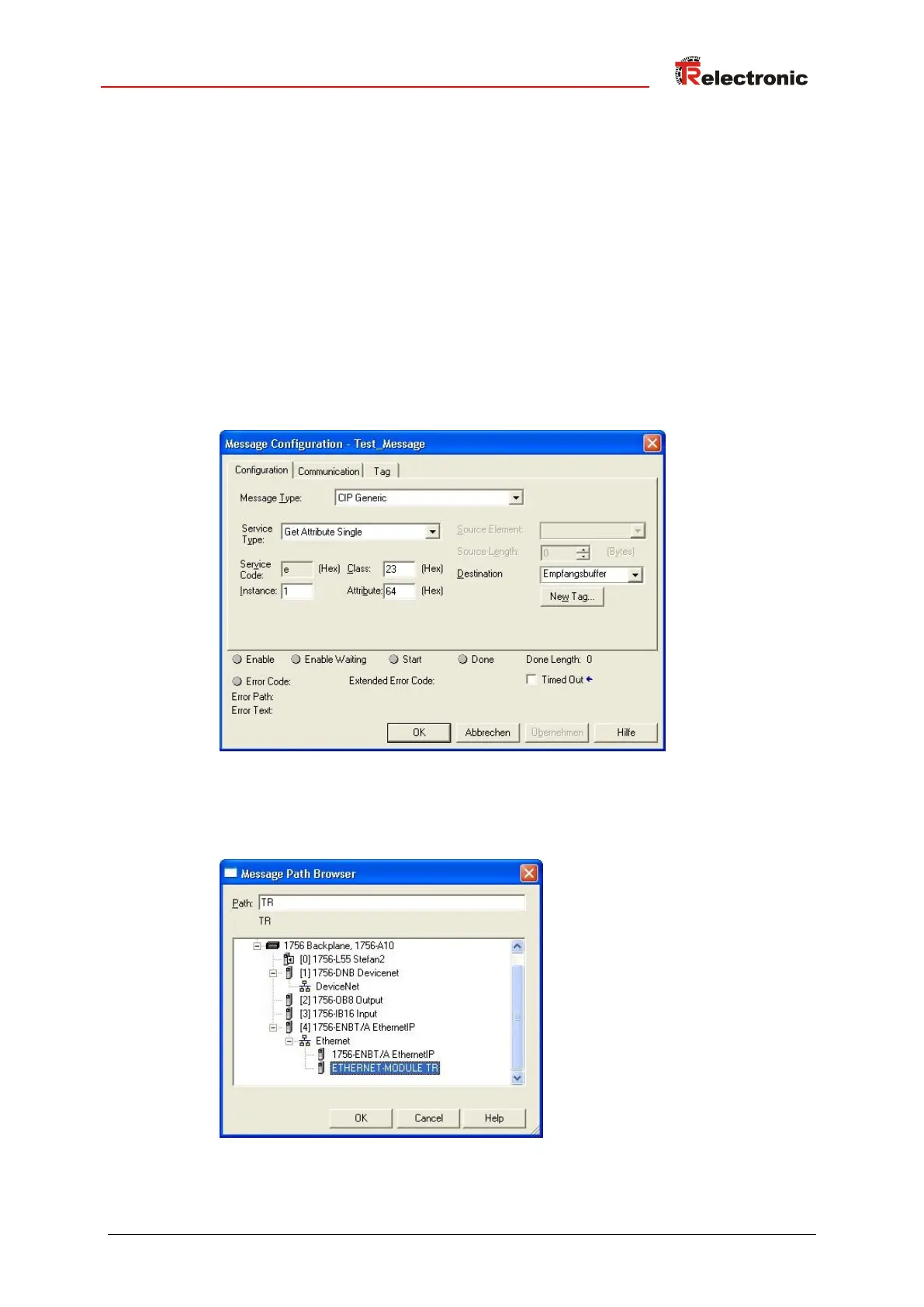
5. Die Message in der Message Configuration Dialog Box im Reiter
Configuration wie folgt konfigurieren. Nachstehendes Beispiel liest den
Positionswert, Attribut 0x64 Position Value, aus dem Position Sensor
Object 0x23 aus:
● Message_Type: CIP Generic
● Service Type: gewünschter Service, hier z.B. Get Attribute Single für
das Lesen eines einzelnen Attributes.
● Service Code: 0x0E für Lesen
● Instance: 1 = Instanz des Position Sensor Objekts
● Class: 23 = Position Sensor Objekt
● Attribute: 64 = Positionswert
● Destination: zuvor erstellte Variable für das Ziel
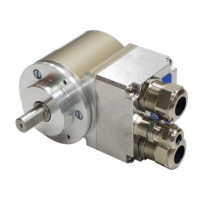
6. In der Message Configuration Dialog Box im Reiter Communication die
Verbindung zum angelegten Modul herstellen:










 To Next Page