TK 61009-12-OP-EN
47
In the display unit tab, the user can select the unit of measure (degree
Fahrenheit or degree Celsius) of the temperature values to be displayed in
Wintrac.
Update and Download Via Wintrac
Accessing Configuration Parameters
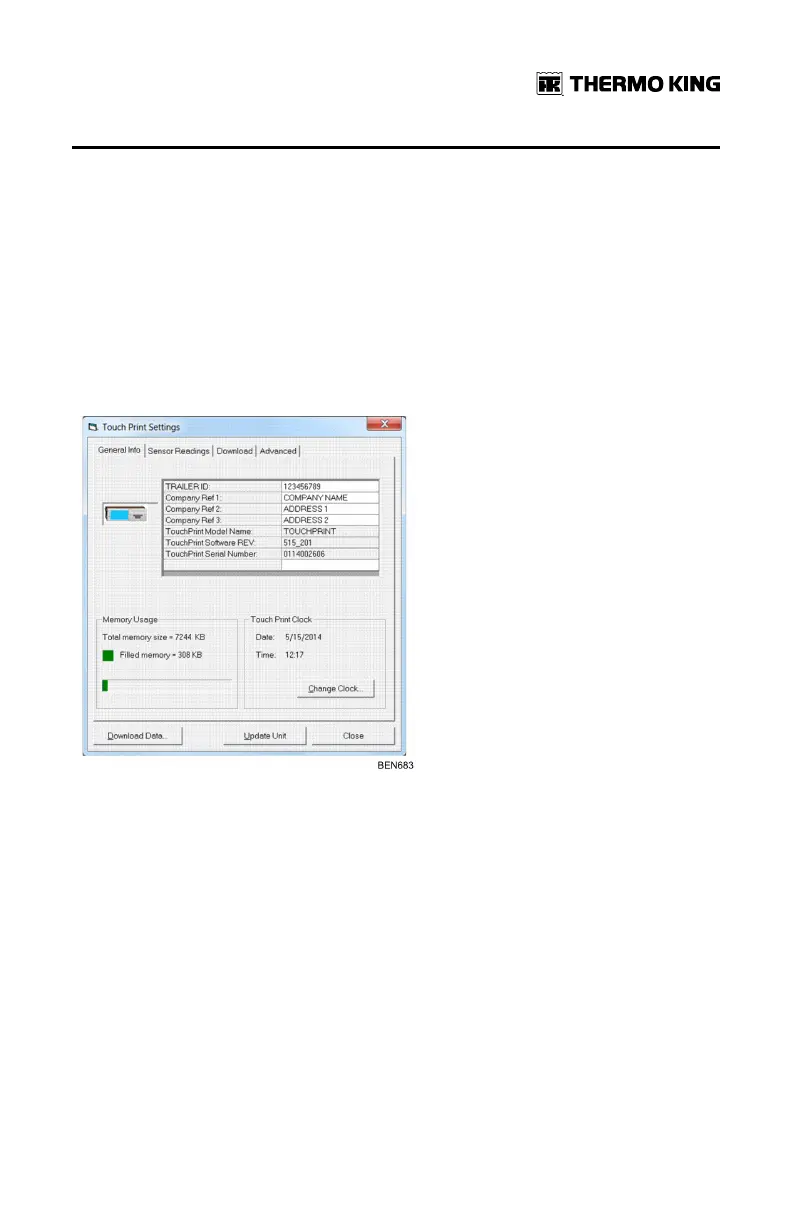
Once the COM port is configured, the user can seek the TouchLog device to
establish the connection. When successful, the TouchLog General Info tab
will open.
The first 4 parameters (Trailer ID and Company reference 1, 2, 3) are editable.
To do so, the user click in the cell of currently displayed value.
The Memory Usage is also display in kilobytes. The Total memory available
for data storage is 7244 KB.
The menu also allows to visualize the current date and time registered in the
TouchLog. If necessary, the user has the possibility as well to update the
clock via the Change clock button that will prompt a new window in the form
of a calendar.
In the sensor readings tab, the user can see the current value of the 6
configurable inputs.
Any sensor name can be modified either to one of the standard choices
(front, rear, side, front door and rear door) or to the user defined option. In
WWiinnttrraacc CCoommmmuunniiccaattiioonn aanndd DDaattaa EExxppoorrtt


 To Next Page