58
TK 61009-12-OP-EN
Frequently Asked Questions
Unable to Enter the Menus using Touchscreen
The Touchscreen is a Capacitive Touch keyboard with 8 keys, 6 on the
display and 2 on the side.
These 8 keys have different functions, refer to “User Menu,” p. 32 and
“Service Menu,” p. 37 for more details.
The display shows all enabled channels to 0.1 degree resolution together
with text which indicate the current state of each enabled on/ off input. If 3 or
less inputs are enabled, the display will change to show in bigger format this
information.
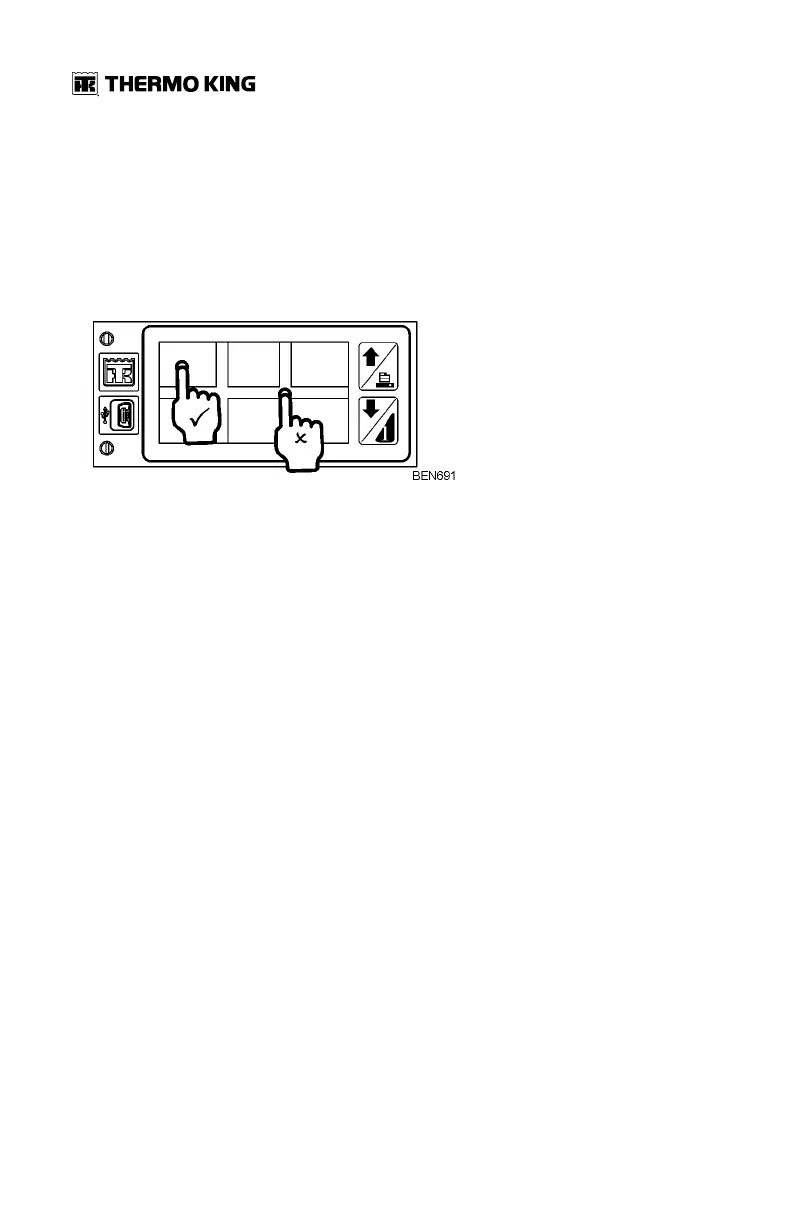
In order to enter each of the menus, you will need to place your finger within
the appropriate square area (The area in-between the squares is inactive).
These squares are not very apparent when looking at the menus, but once
the user is aware of this, it is usually very intuitive to use.
Failure to Load Paper
Thermo King thermal paper must be used (part number 2050875). Use of
non-approved paper rolls may damage the printer and void the warranty on
the product.
Password Entry
By default the password is 10320 or 32010.
1. Press the right hand facing arrow to start to insert password.
2. Press the Up and Down arrows to enter each number, and pressing the
right hand facing arrow to move from one digit to the next.
3. Press Enter key to finish.


 To Next Page