TK 61009-12-OP-EN
61
When establishing a connection between your Wintrac and TouchLog,
seeCCoonnnneeccttiioonn OOKK,, oonn CCOOMM44 ((IInn tthhiiss ccaassee)).
Communicate with Wintrac (Drivers are Installed
Already)
1. Power the TouchLog (12 or 24V) and connect from a USB port in the
laptop to the mini USB port in TouchLog (Long Cable 420970, does not
come with the TouchLog).
2. In MMyy CCoommppuutteerr – Right Click, MMaannaaggee- Right click, under DDeevviiccee
MMaannaaggeerr//PPoorrttss you need to see MCB…(COMx). If you do not see MCB,
there is something wrong with the connection, check the cable. The
COMx is the port you need for wintrac.
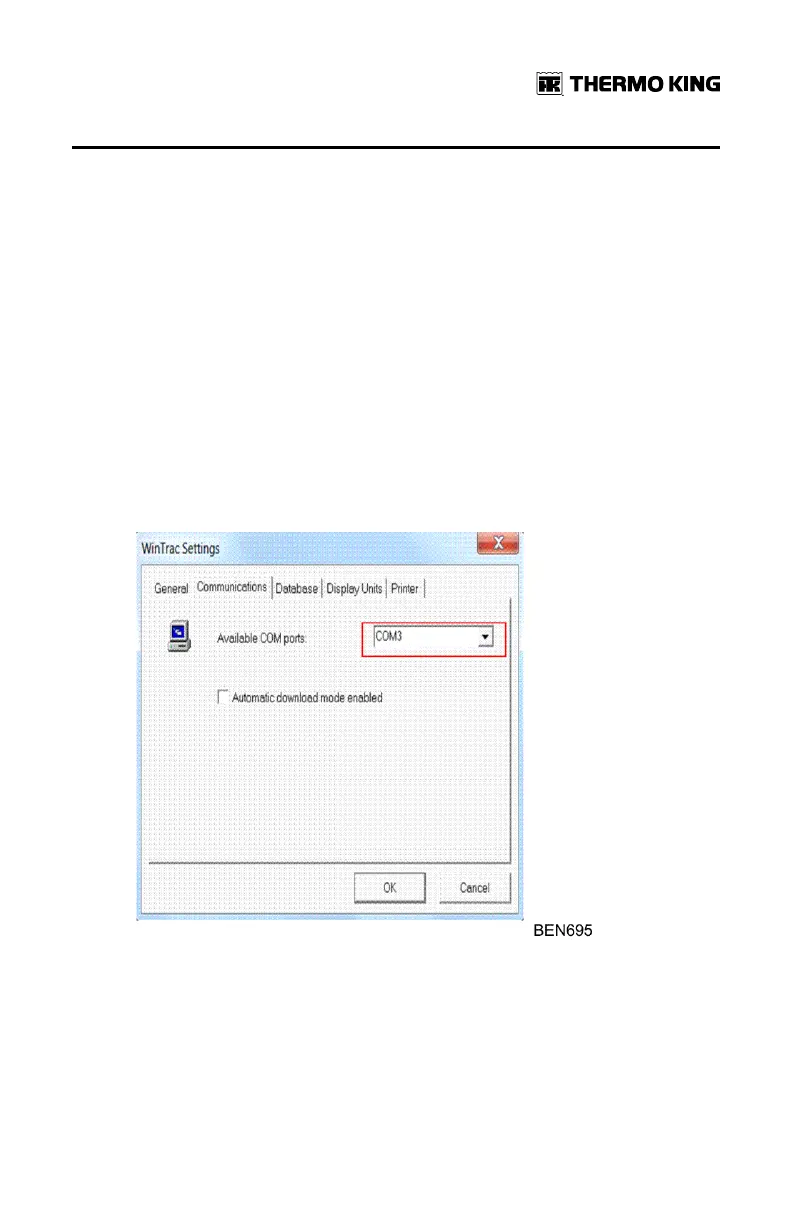
3. In WWiinnttrraacc SSeettttiinnggss / CCoommmmuunniiccaattiioonnss check which is the active COM
port from the computer, it needs to be the same number as mentioned in
STEP 2.
4. You can now DOWNLOAD data from TouchLog or CHANGE the settings
or configuration of the TouchLog.
FFrreeqquueennttllyy AAsskkeedd QQuueessttiioonnss


 To Next Page