TK 61009-12-OP-EN
35
Export in PDF/TXT
The user can decide which file format to export the data to the USB
Flash drive. By pressing on that icon, the logo will change
indicating the format pdf or txt, By default, the file format selected
is pdf.
Alarm Menu
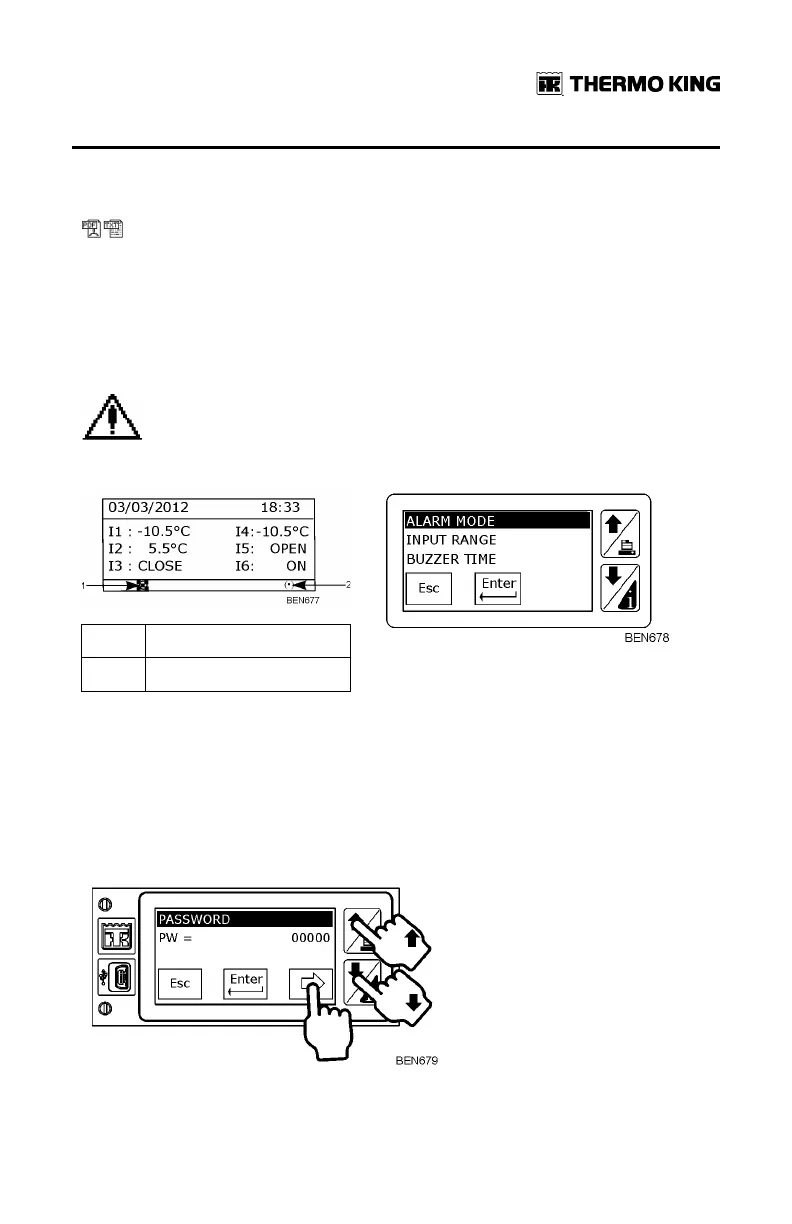
Alarm menu will display the active alarms.
1.
Recording Symbol
2.
Alarm Symbol
This alarm menu is password protected. By default the password is 10320 or
32010.
1. Press the right hand facing arrow to start to insert password.
2. Press the Up and Down arrows to enter each number, and pressing the
right hand facing arrow to move from one digit to the next.
3. Press Enter key to finish.
BBaassiicc OOppeerraattiioonnss


 To Next Page