General Information
65
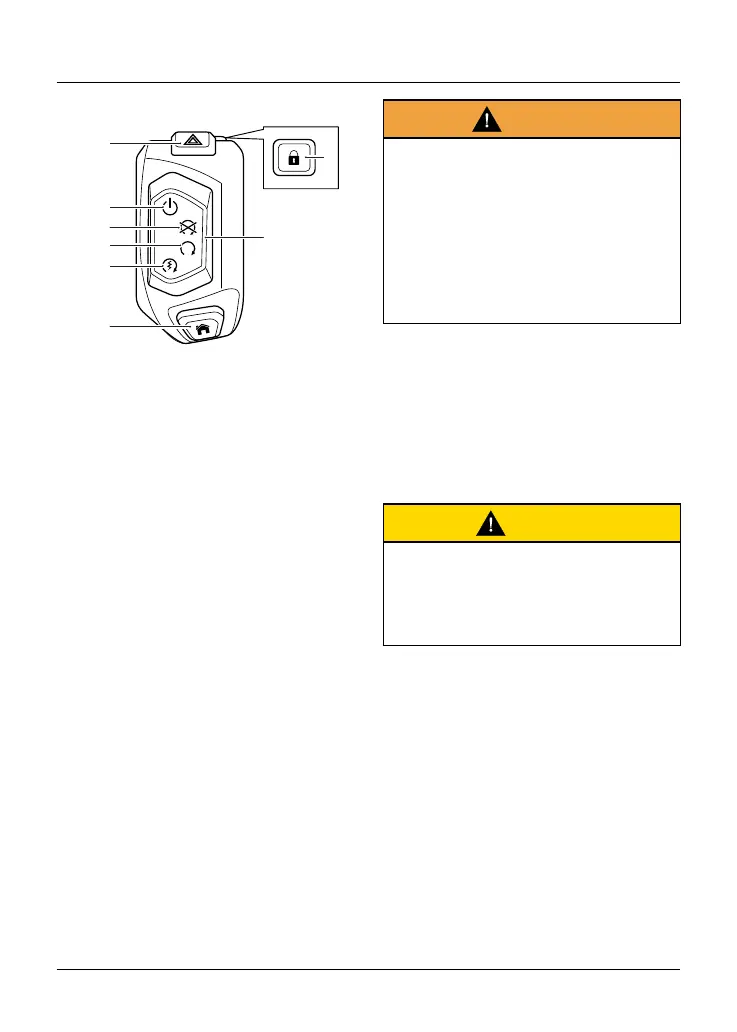
Right Handlebar Switches
8
7
6
5
1
4
3
2
1. Hazard warning lights button
2. Steering lock button
3. Engine start/stop switch
4. Power ON/OFF position
5. STOP position
6. RUN position
7. QUICK START position
8. HOME button
Hazard Warning Lights Button
To turn the hazard warning lights on
or off, press and release the hazard
warning light button.
The ignition must be switched on for the
hazard warnings lights to be activated,
but the hazard lights will remain active
if the ignition is switched off until the
hazard warning light button is pressed
again.
Steering Lock Button
To lock the motorcycle, turn the
handlebar fully to the left and press the
steering lock button.
Warning
For reasons of security and safety,
always make sure the steering lock
is on when leaving the motorcycle
unattended.
Any unauthorized use of the
motorcycle may cause injury to
the rider, other road users and
pedestrians and may also cause
damage to the motorcycle.
Power ON/OFF Position
The Power ON/OFF position switches
the electrical circuits and the
instrument display between on or off.
This allows access to the instrument
display without starting the engine.
Caution
Do not leave the switch in the Power
ON position for a long period of time
as this may cause damage to electrical
components and will discharge the
battery.
STOP Position
The STOP position stops the engine.
Note
Although the engine stop position
stops the engine, it does not turn off
all the electrical circuits and may cause
difficulty in restarting the engine due to
a discharged battery.










 To Next Page