Section 8 Troubleshooting
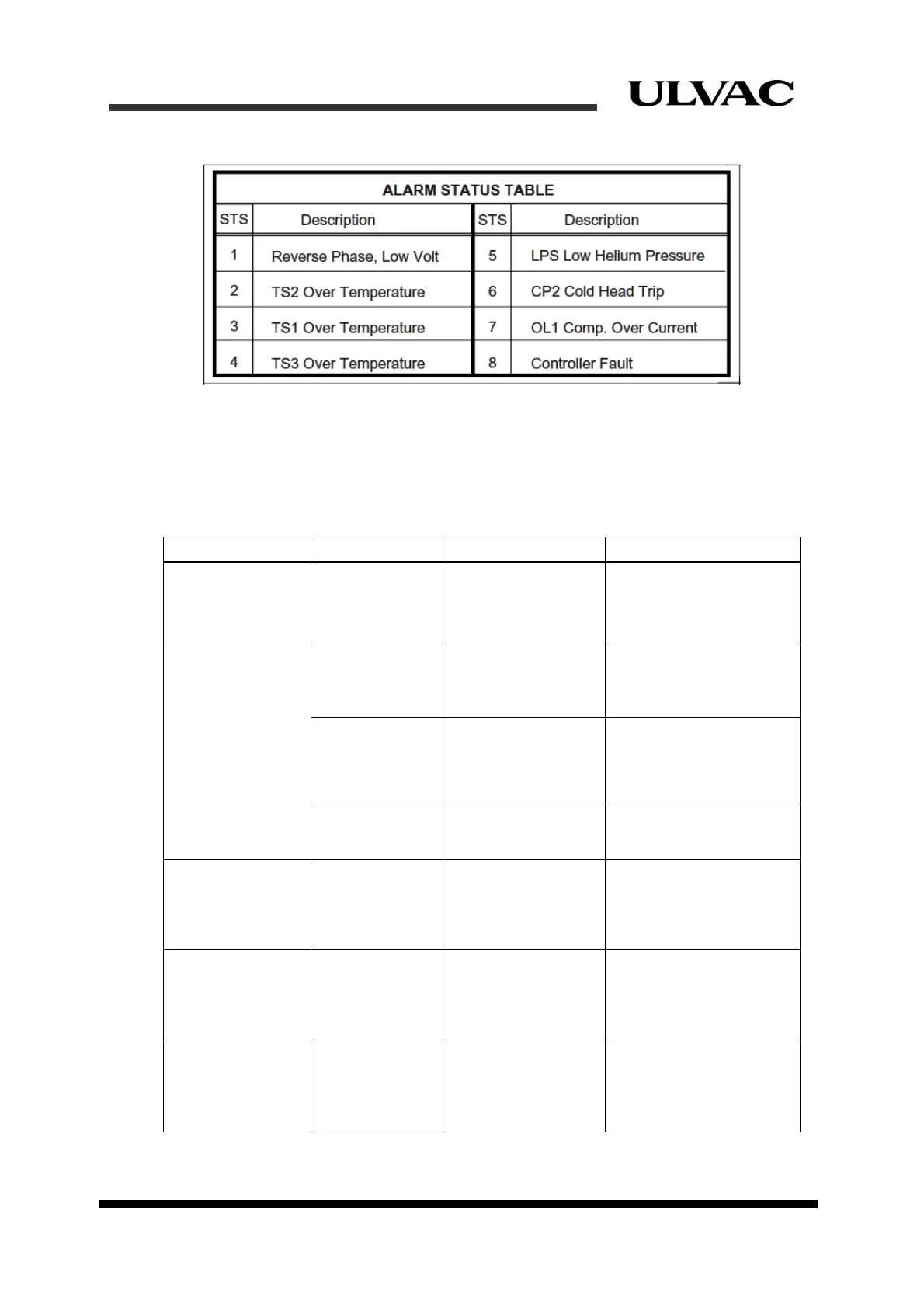
Figure 8-2 Alarm status code table
8.2 Troubleshooting procedures
1. Troubles occurred before operation
Table 8-1 List of troubleshooting before operation
Problem status Possible cause Corrective action
In power OFF
state, Elapsed
Time Meter display
is dark.
Value indication
is too pale to
read or OFF.
Battery for Elapsed
Time Meter went low
(Battery life: more
than 6 years).
Replace the Elapsed
Time Meter.
Call for servicing
※
.
“PWR” indicator
does not light up.
Power failure Input power voltage
is lower than rated
voltage, or open
phase (S-T).
Check power supply and
correct it.
Power failure or
CP1
malfunction.
CP1 protector trip. Turn CP1 ON. If it trips
again call for servicing
※
.
Failure of power
supply (DC24V)
inside controller.
Blown fuse or power
supply failure.
Call for servicing
※
.
“RDY” indicator is
OFF.
“STS” indicators
indicate ALARM
status and
buzzer
activated.
Does not meet
requirements to start
operation or there is
a failure.
See detailed alarm codes
in the following section
(8.3) and take corrective
action.
“PWR” indicator
and/or “STS”
indicator blinks.
“STS” indicators
indicate ALARM
status and
buzzer
activated.
Input power voltage
reduction, open
phase, or equipment
failure.
Check input power cable,
breaker and power supply
at equipment side. If
there is no problem with
either, call for servicing
※
.
Both “RDY” and
“STS” indicators
do not light up.
Compressor
needs reset.
Abnormal behavior
of compressor
caused by power
failure or other
reasons.
Push “RST” button or Call
for servicing
※
.
※If the problem is not solved, please contact our Service Engineering Division or the
nearest customer support center.
8-2
ULVAC CRYOGENICS INCORPORATED



 To Next Page