32
Section 3: UNINET IColor PrintHub
UNINET IColor PrintHub is used to interact with the printer for gathering ink levels, maintenance,
alignment, cost calculation, and several other functions. UNINET IColor PrintHub automatically installs
with your printer driver and can be accessed through the printer driver preferences or as a program on
your Windows start menu.
1. Connect the printer via USB and turn on the power. The UNINET IColor PrintHub accesses most
of the information it uses from the printer itself so the printer must be turned on and
communicating for the program to be useful.
2. Go to Start / Programs / UNINET IColor Technology / UNINET IColor PrintHub.
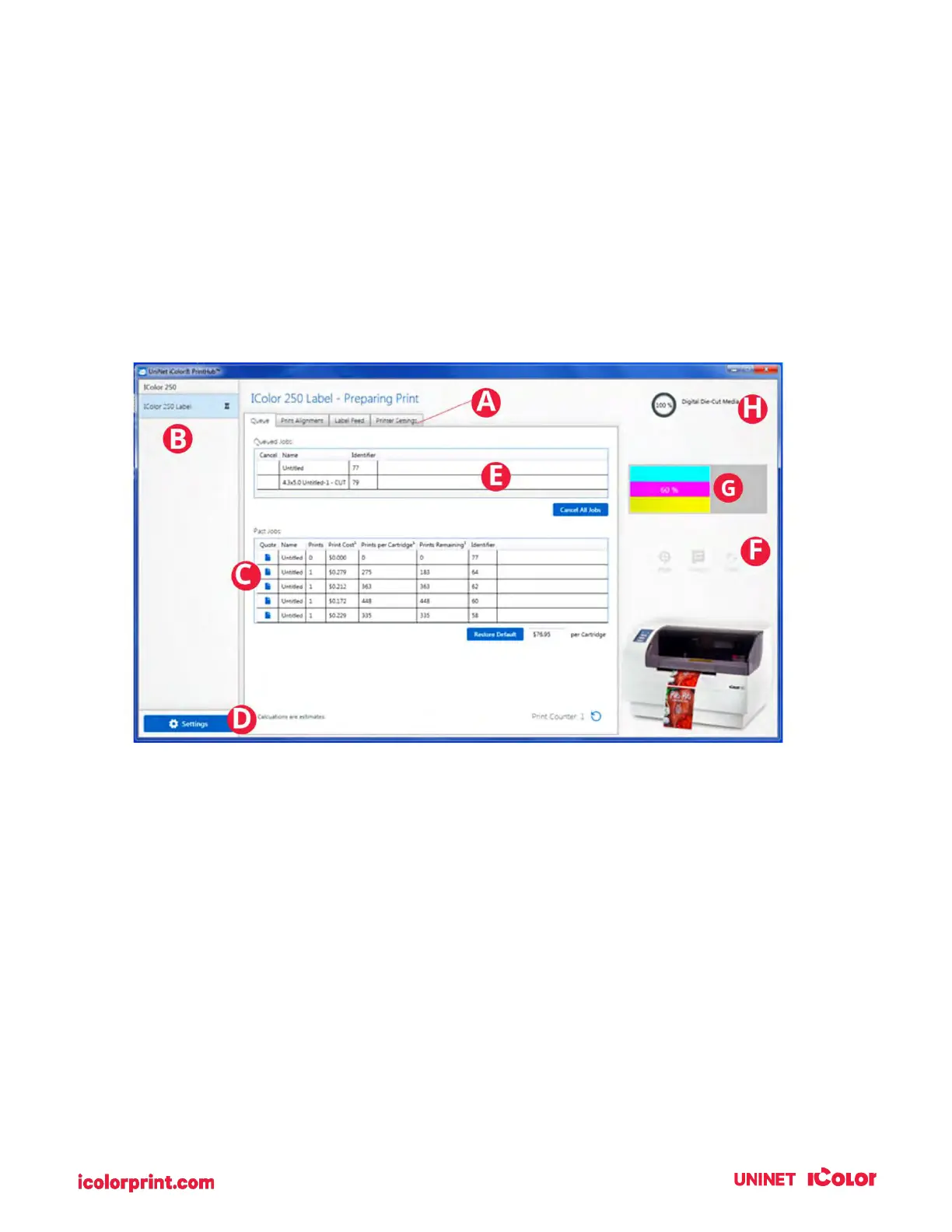
A. Adjust alignment, sensor mode, output mode, and advanced settings.
B. If you have multiple UNINET printers connected, they will be listed here.
C. Past jobs will show the last 5 jobs along with cost information. Click the document icon to view a
cost report.
D. Application Settings
E. Print Queue shows the currently printing job.
F. Frequent Activities
G. Current Ink Levels (Ink is displayed in 10% increments. For example, 100% to 90% to 80%, etc.)
H. Digital Die-Cutting Media Status and Remaining Amount (If installed)



 To Next Page