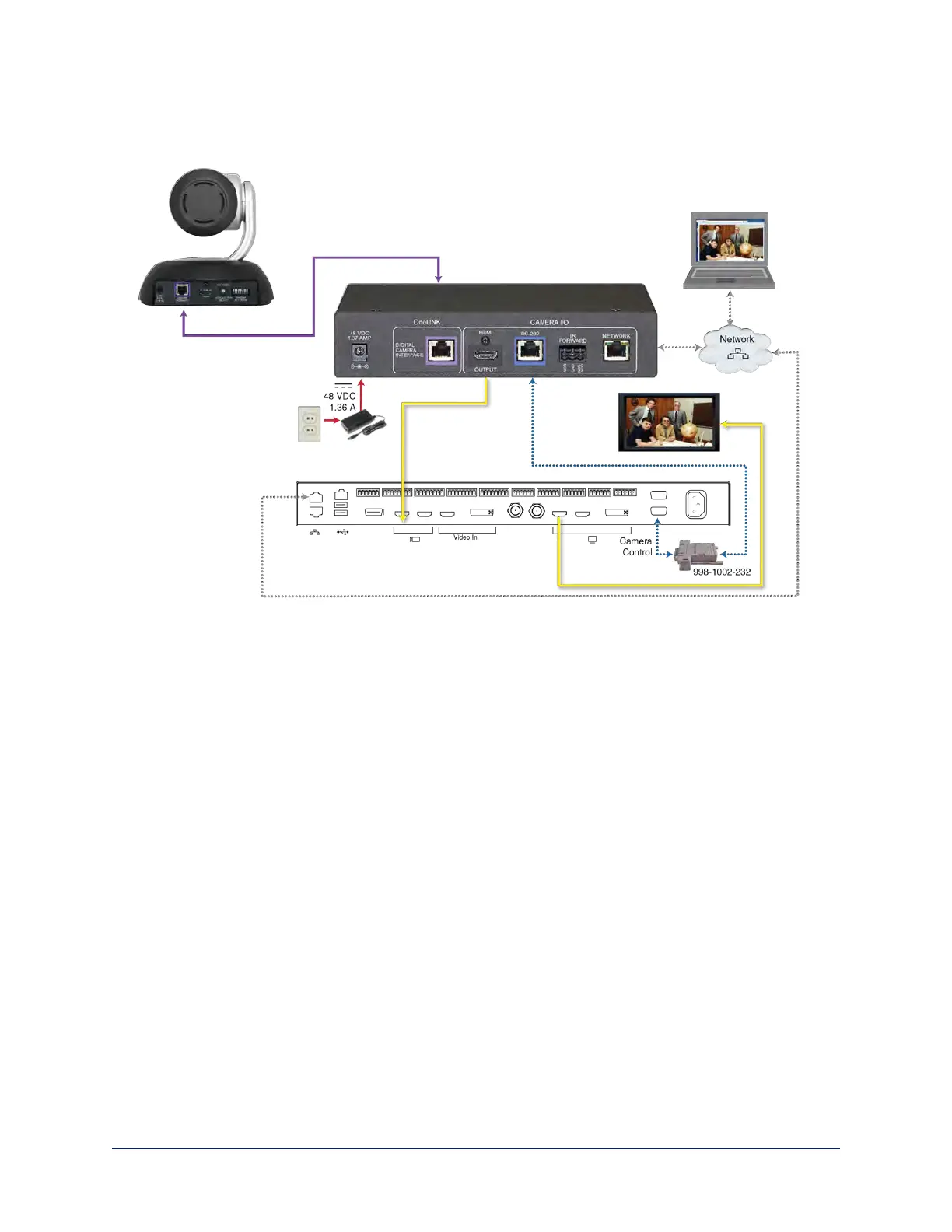
RoboSHOTHDBT Camera and Cisco SX80 Codec
Other Vaddio HDBaseT cameras connect in the same way.
Hardware Note: RS-232 Connections
For RS-232 connections to Cisco gear using DE-9 connectors, use the 998-1002-232 RJ-45 to DE-9
adapter. Its wiring differs from the 998-1001-232 adapter shipped with many Vaddio products.
For RS-232 connections to Cisco gear using the Cisco split cable, use the appropriate null-modem cable to
the RJ-45 side of the split cable. Connect the null-modem cable as indicated on the cable labels.
Hardware Note: Connection and Configuration Changes
After connecting or configuring the equipment, reboot the OneLINK device, camera, and codec. Note that
rebooting the OneLINK device does not affect the camera and codec; they must be rebooted separately.
20
Integrator's Complete Guide to the OneLINK HDMI Camera Extension



 To Next Page