C
HAPTER
2. I
NSTALLATION
& C
HECKOUT
2-9
02.9628.0010 CONFIDENTIAL
7-Oct-97
2.3 Installing
VL4
Accessories
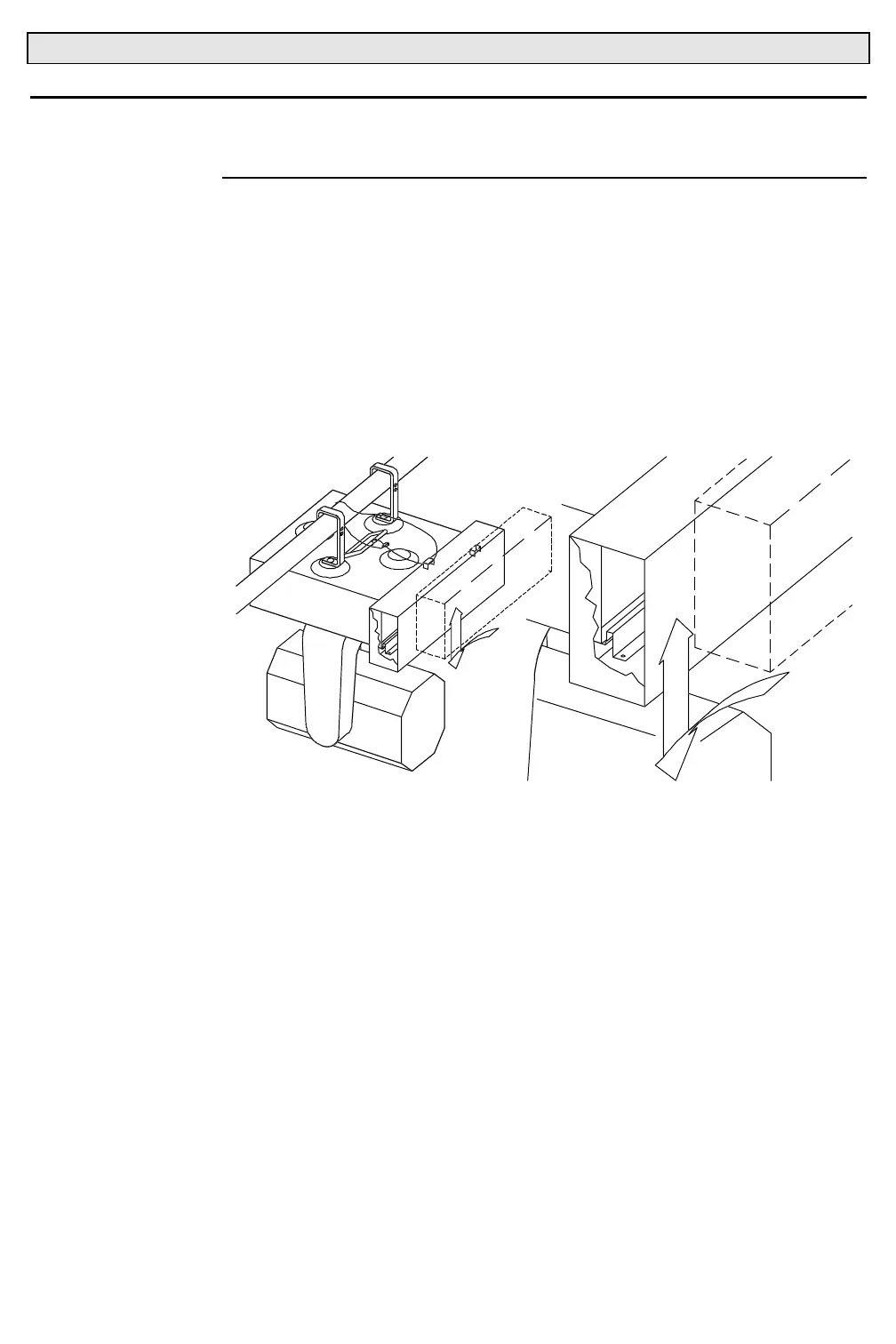
2.3.1 Installing Sound Baffles
Some hang locations require a reduced noise environment. Fan noise in
luminaires can be greatly reduced by using the
VL4
luminaire sound baffle.
No hardware is used to secure the sound baffles to the luminaires when the
luminaires are hung from trusses. The sound baffles are secured to the
luminaire with safety cables. For ground installations, safety cables are not
required. For all uses of the sound baffles, the baffle fits over the fan
opening and air filter. It is necessary to remove the air filter from
VL4
luminaires before installation.
4ECA009
To install sound baffle:
Step 1. Route safety cable through eyelet in sound baffle.
Step 2. Align sound baffle with air intakes.
Step 3. Push down bottom flanges of baffle between bottom lips of fan
intakes and air filters.
Step 4. Push up top flanges of baffle between top lips of fan intakes and
air filters.
Step 5. Ensure that baffle fits snugly.



 To Next Page