Advanced Digital Video Platform Hybrid-DVR User’s Guide
6.4 CONFIGURING SYSTEM
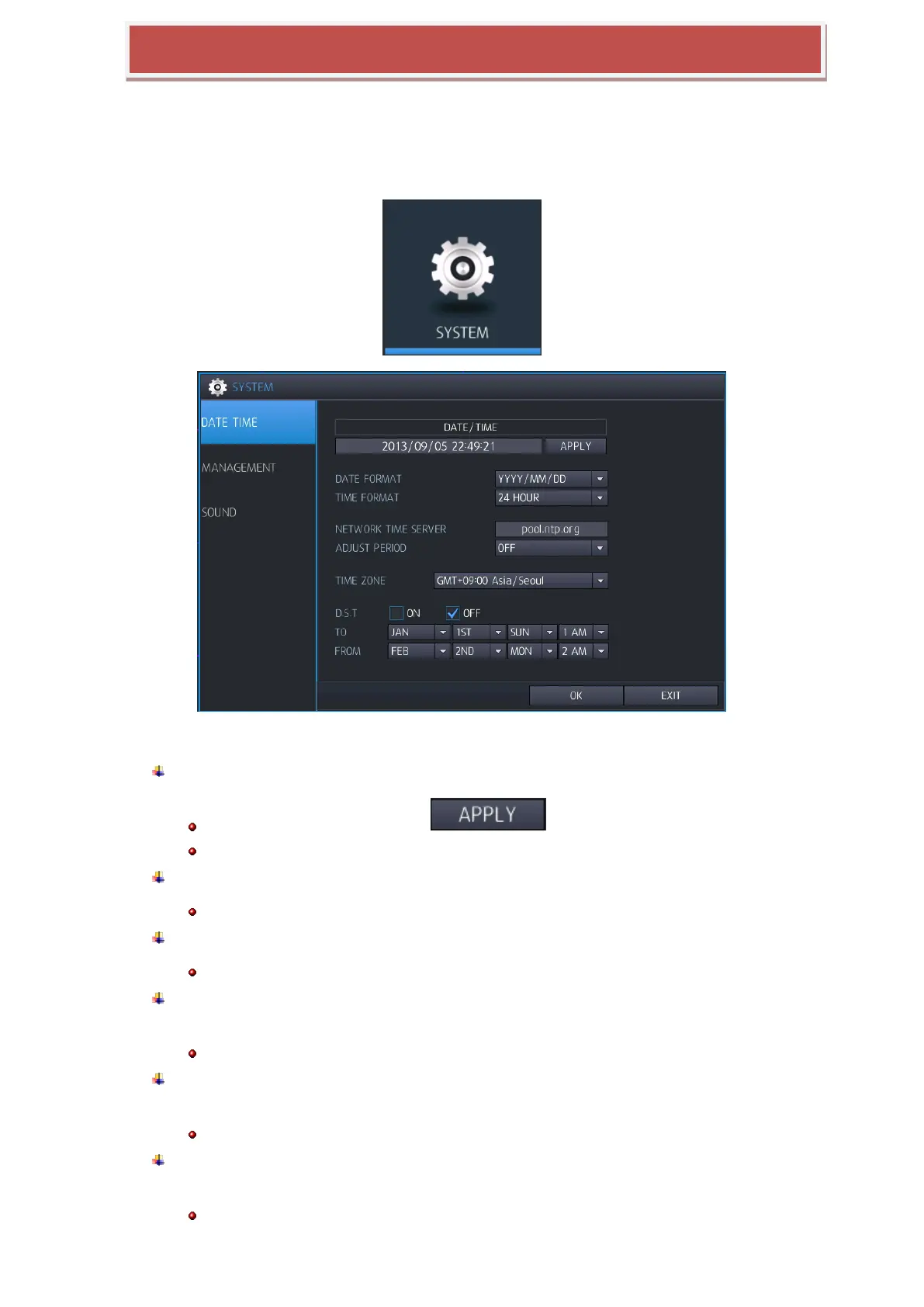
To set-up the various system options, highlight SYSTEM and press ENTER.
6.4.1 DATE/TIME
DATE&TIME: Allows the operator to set or modify the current date & time.
After changing data/ time, be sure to press ( ) to confirm
When data and time set up, same time is duplicated, record data will be error.
DATE FORMAT: Determines how the date is displayed.
YYYY/MM/DD(Default), MM/DD/YYYY, DD/MM/YYYY
TIME FORMAT: Determines how the time is displayed.
24 Hour(Default), AM/PM
NETWORK TIME SERVER SETUP: If the HYBRID-DVR is connected to the Internet, you
can synchronize the time and date with sever.
Default Server: pool.ntp.org
ADJUST PERIOD (INTERVAL): Configuration synchronize interval with Network Time
server.
Network time server synchronization just starts after HYBRID-DVR configure power on/operation interval setup.
TIME ZONE SETUP: Should be set according to the region that the HYBRID-DVR is
installed.
When Time zone set up, if same time duplicate on configuration, data error would be happened.



 To Next Page