Advanced Digital Video Platform Hybrid-DVR User’s Guide
6.7.2 EVENT
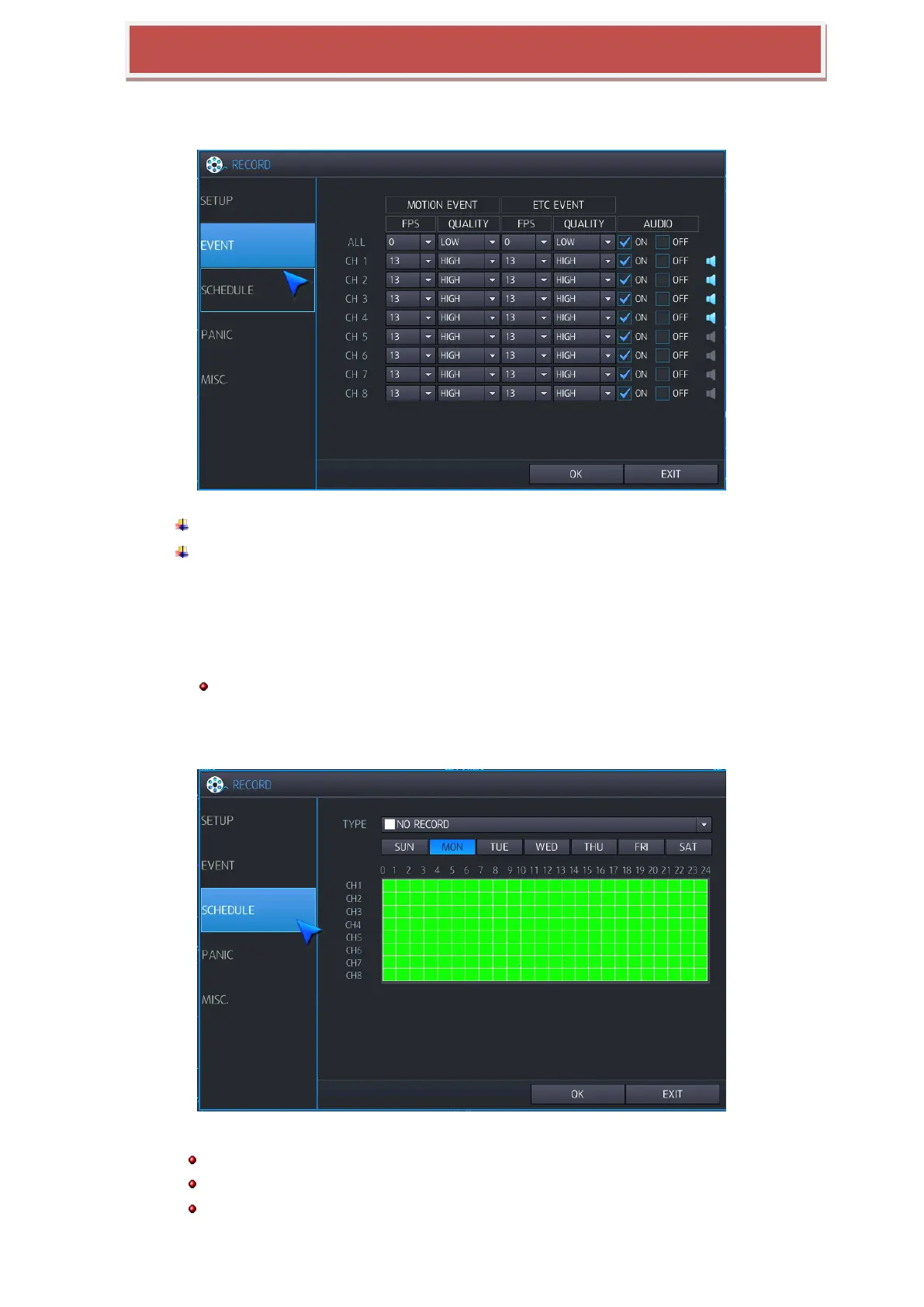
When event triggered, you can configure recording condition like follows;
MOTION EVENT: You can configure recording condition when motion triggered.
ETC EVENT: You can configure recording condition at Alarm / V-Loss occurred.
FPS: NTSC: You can configure frame rate as 0 / 1 / 2 / 4 / 5 / 8 / 15 /30 at NTSC Mode or 0 /
1 / 2 / 4 / 5 / 7 / 13 / 25 at PAL mode.
QUALITY: You can configure video quality as 5 levels as Low / Standard / High / Highest /
Super.
Audio: If you select “ON”, audio data will be recorded.
Recoding resolution for the event record mode follows the size in the CONTINUOUS record setting.
6.7.3 SCHEDULE
You can configure schedule recording mode as Day / Week.
Daily: set up one schedule and apply to every day.
Weekly: set up 7 schedules from Monday to Sunday, and use it for every week.
Select daily ,weekly in menu(record-> MISC)



 To Next Page