Advanced Digital Video Platform Hybrid-DVR User’s Guide
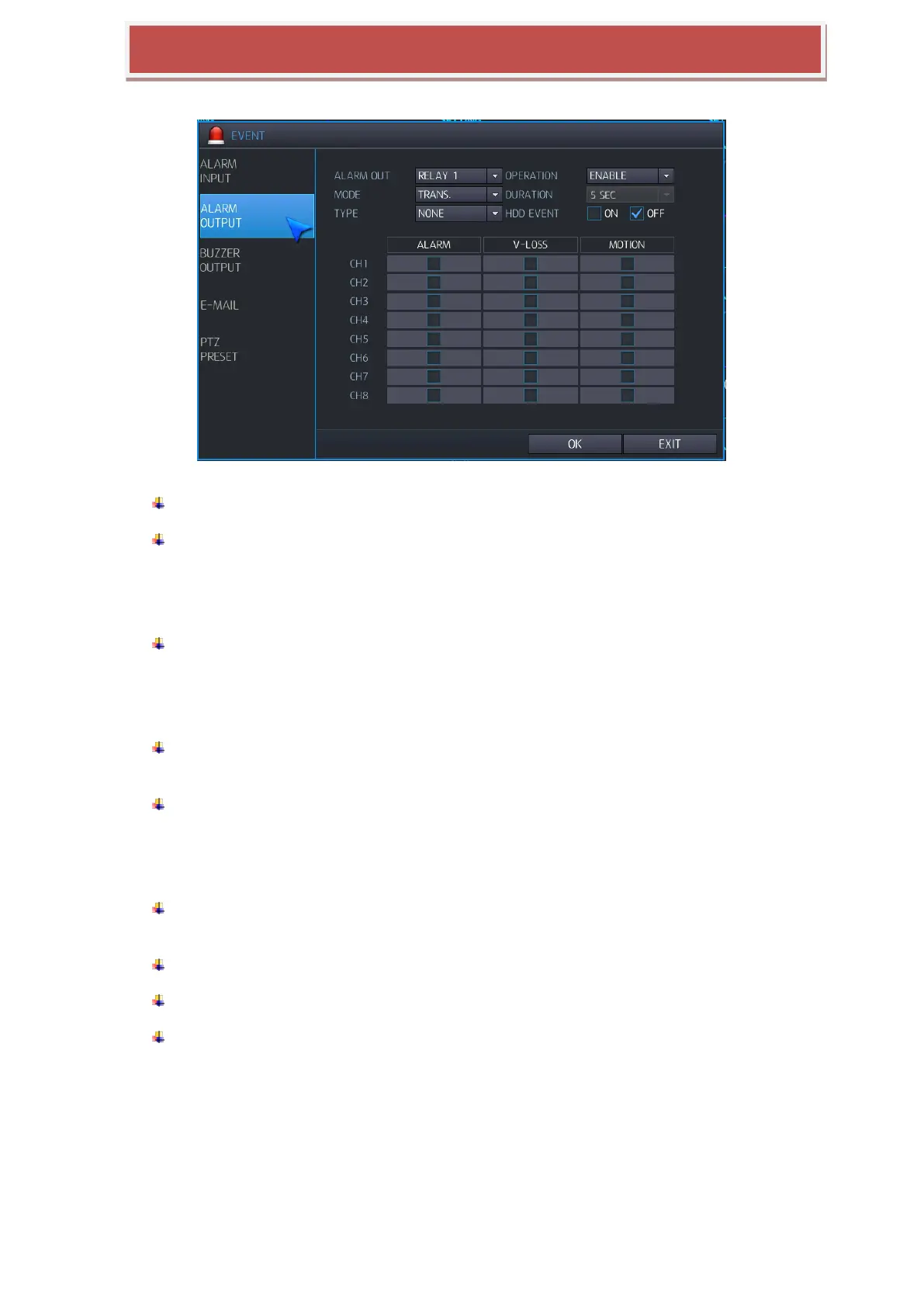
6.5.2 ALARM OUTPUT SETUP
You can cofniture activation of Relay output.
ALARM OUT : You can select Relay for the operation to be configure
OPERATION: You can configure output status of Relay.
DISABLE: Relay is not working
ENABLE: Relay is working once event is triggered.
MODE: You can configure activation of Relay output.
TRANSPARENT: Keep Relay output until event triggering stopped.
LATCHED: Keep relay output for duration time from the event triggered lately.
DURATION: If the alarm output mode is configured as Latched. You can configure
duration time for relay output.
TYPE : Define the transition of the signal of Alarm output
N/O (Active Low): When event triggered, the relay will go to „Close‟ state from the „Open‟.
N/C(Active High): When event triggered, the relay will go to „Open‟ state from the „Close‟
HDD EVENT: If you select “ON”, when HDD related Event is triggered, relay output will be
started.
ALARM: When sensor input, relay output will be started.
VIDEO LOSS: When video loss occurred, replay output will be started.
MOTION: When motion triggered, replay output will be started.



 To Next Page