Advanced Digital Video Platform Hybrid-DVR User’s Guide
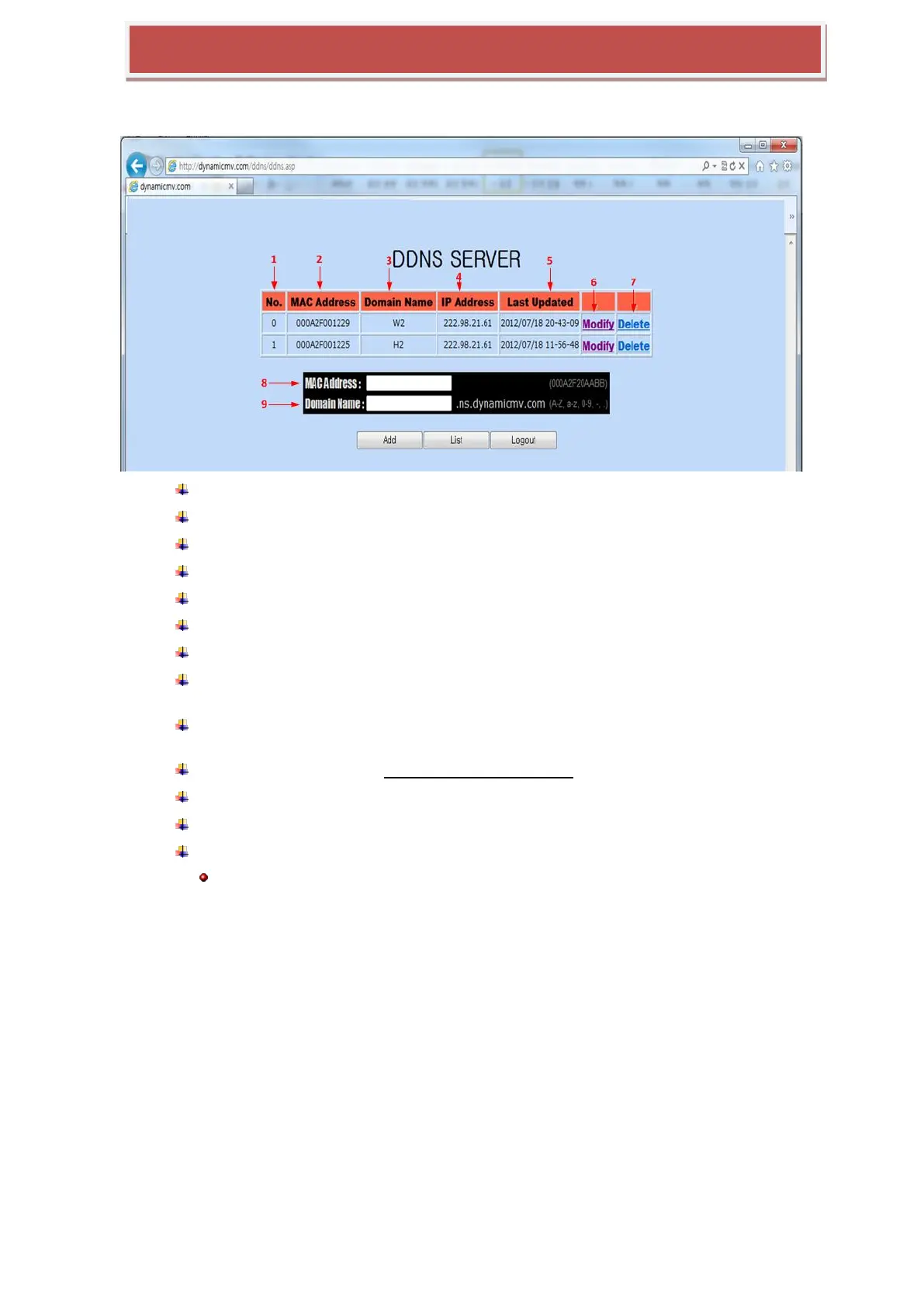
7.3.3 Input HYBRID-DVR information.
You need to register domain name to get the service and input MAC address into DDNS server.
1 : List number of registered HYBRID-DVR
2 : Mac address of registered HYBRID-DVR
3 : Domain name of registered HYBRID-DVR.
4 : IP address of registered HYBRID-DVR.
5 : latest time that HYBRID-DVR sent the info to DDNS server.
6 : Update of Last Update
7 : Delete of Domain name registered in DDNS server.
8 : Input Mac Address of HYBRID-DVR that you want to register newly into DDNS
server.
9 : Input Domain name of HYBRID-DVR that you want to register newly into DDNS
server.
The Domain name type is “user.ns.dynamicmv.com”.
ADD : You can register HYBRID-DVR to the DDNS server pressing ADD button.
LIST : The HYBRID-DVR list registered will be displayed.
LOGOUT : User can log out
Note) It will take around 10 to 15 minutes to confirm the registration at the Server.



 To Next Page