Advanced Digital Video Platform Hybrid-DVR User’s Guide
6.7 CONFIGURING RECORD
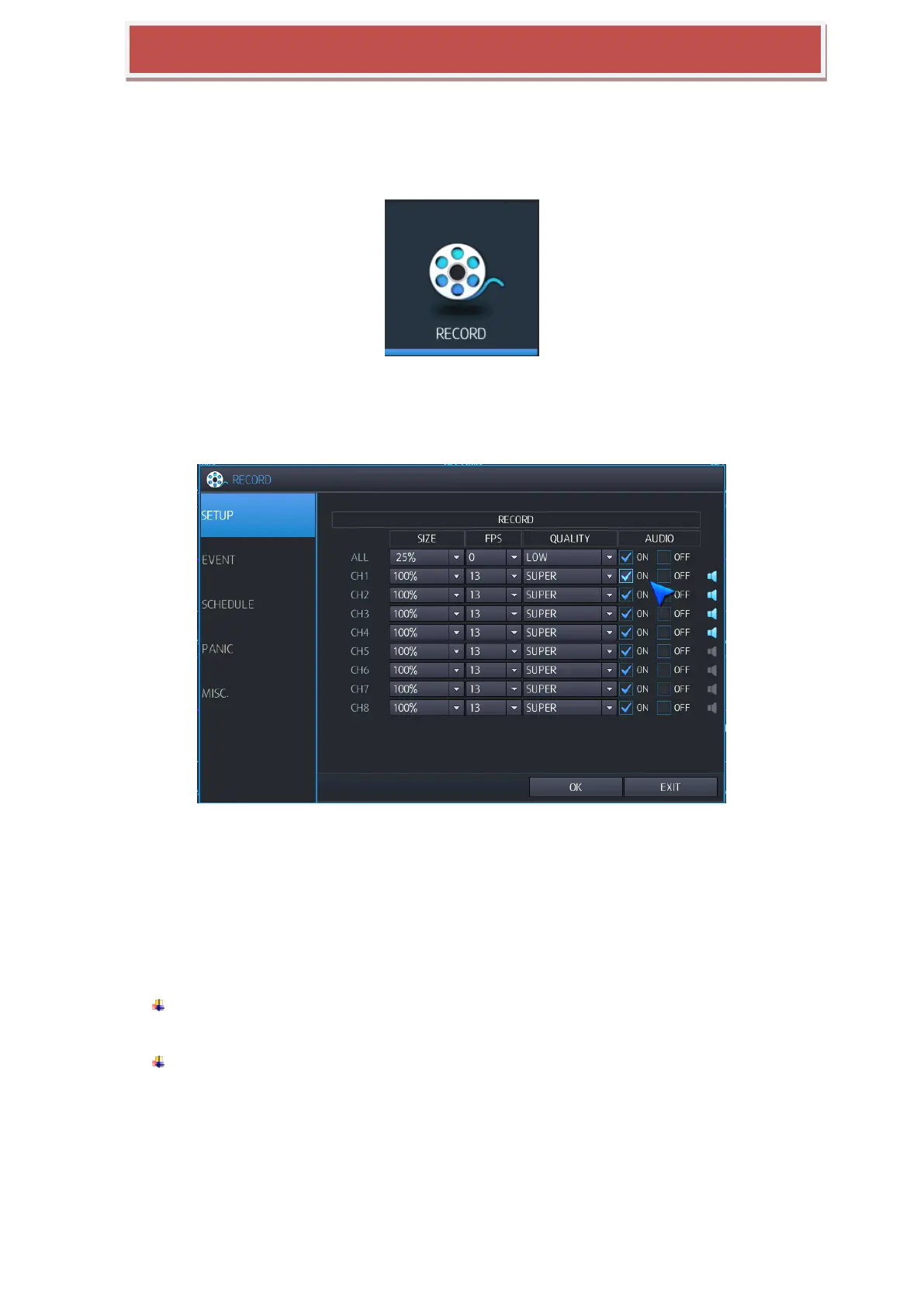
To set-up the various recording options, highlight RECORD and press ENTER.
6.7.1 SETUP
Recording configuration is set up here.
SIZE: You can select what resolution of video will be recorded as follows.
Resolution: FULL HD(1080p) : 100% : 1920x1080 / 50% : 1920x544 / 25% : 960x544
HD(720p) : 100% : 1280x720 / 50% : 1280x360 / 25% : 640x360
Analog(SDI) : 100% : 944x480 / 50% : 944x240 / 25% : 472x240
ALL: Set the resolution for all channels
FPS: You can select recording frame rate as 0 / 1 / 2 / 4 / 5 / 8 / 10 / 15 /30 at NTSC mode
or 0 / 1 / 2 / 4 / 5 / 7 / 10 / 13 / 25 at PAL mode.
QUALITY : You can select recording video quality as 5 levels like; Low / Standard / High /
Highest / Super
LOW : 2Mbps / Standard : 3Mbps / High : 4Mbps / Highest : 5Mbps / Super : 6Mbps
AUDIO: Audio: If you select “ON”, audio data will be recorded.



 To Next Page