Advanced Digital Video Platform Hybrid-DVR User’s Guide
7.1.2 WEB CONFIGURATION PAGE
In the web configuration page, you can set the HYBRID-DVR operations remotely.
Tested Web Browser List
Microsoft Internet Explorer○
R
Mozilla Firefox○
R
Google Chrome Browser○
R
Opera Browser○
R
Apple Safari○
R
Features
Configuring the HYBRID-DVR setup remotely
After giving the ADMIN‟s password and clicking „LOGIN‟, you can move into the page where you can configure
the setup menu of HYBRID-DVR.
NOTE) Default Password for ADMIN: 1234
NOTE) Only ADMIN account can access the menu configuration pages.
NOTE) When no operation more than 5 minutes is, the configuration page will be logged out automatically.
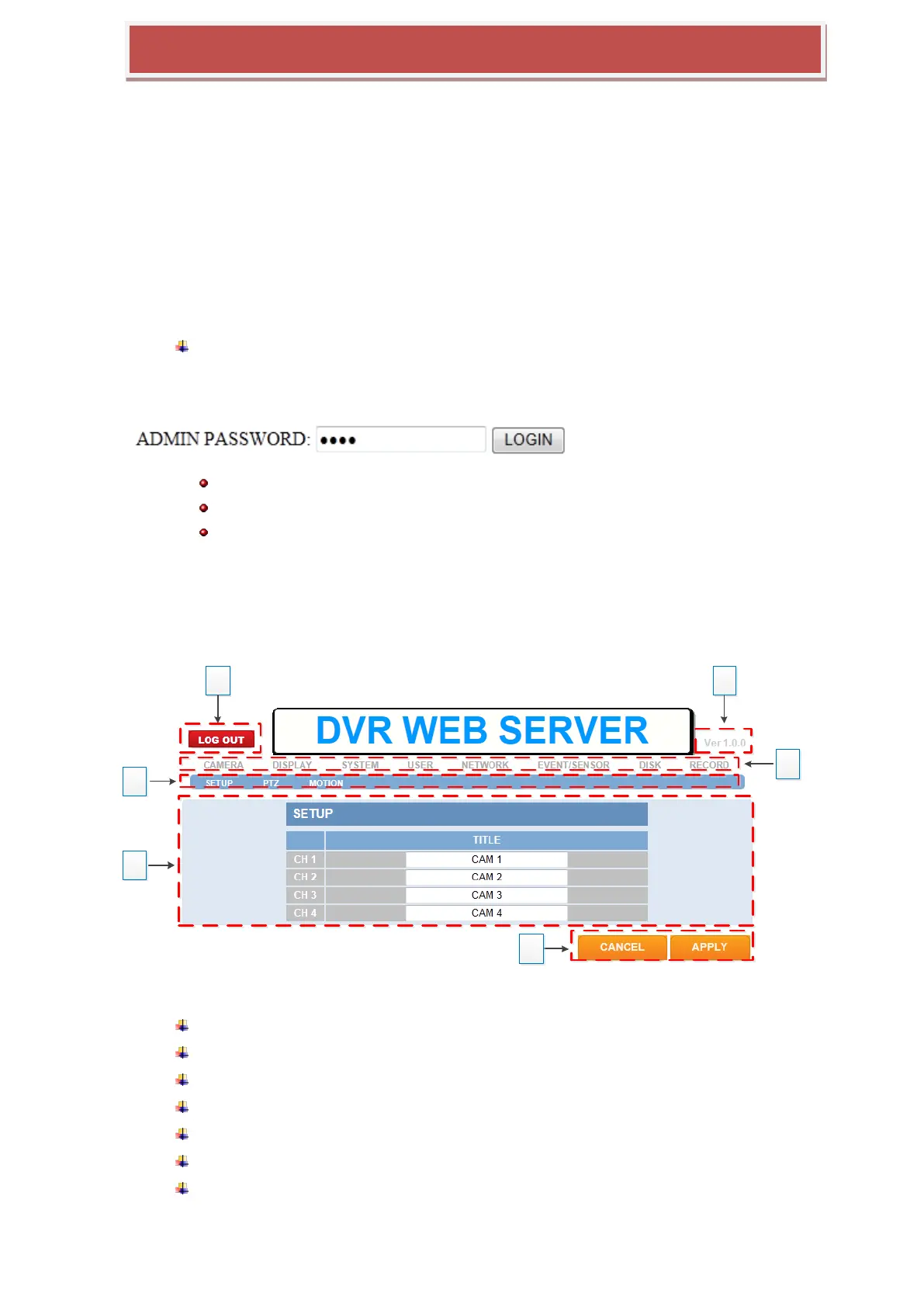
7.1.2.1 Initial Page of Web Configuration
1: log out from the configuration page
2: version number of this web configuration
3: Top menu of HYBRID-DVR
4: Sub menu of HYBRID-DVR
5: Setting or Information section
6: Cancling or applying the modification
CANCEL : ignore any modification and the modification is recovered to the previous
setting



 To Next Page