Quantum Receiver User Manual
Web GUI Screens
Issue No: A Page: 61
Ref: ?-Insert_Document_Part_No._Here-? Copyright © 2021 Vislink is a Vislink Technologies Inc. companies
6.3.7.1. ASI
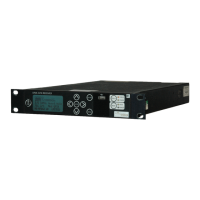
The Settings>Global>ASI panel enables configuration of input and output
Asynchronous Serial Interface (ASI).
Figure 6-47 Settings>Global>ASI
The ASI tab enables the signals to be chosen for the ASI input and output
ports. If Demod Cards 1-4 are fitted, all these options are available. Only three
Demod Cards can be fitted if Diversity and External ASI is configured (Demod 4
will be disabled). The settings will not be actioned until the Save button has
been clicked:
ASI Settings
Input Config – specifies the ASI input signal from the drop-down menu (Diversity,
External ASI, Diversity + Ext. ASI or Demodulator-1).
Output Config - specifies the ASI output signal from the drop-down menu
(Diversity, External ASI, Diversity + Ext. ASI or Demodulator-1).
6.3.7.2. Decryption
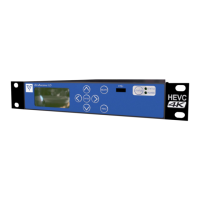
The Settings>Global>Decryption panel enables configuration of decryption.
Figure 6-48 Settings>Global>Decryption


 To Next Page