VR Technology Limited
VR Dive Computer Operations Manual 2009 rev E 28/01/2009
here will be a slight delay while the VR computes the plan.
the dive screen long pushes on the right switch will show page after page of
imulate and Diveplan work on current tissue state. If you have just dived with the
AS LIST
T
In
decompression stops as in normal Dive mode.
S
VR your residual inert gas loading will be taken into account by the VR in its
calculations.
G
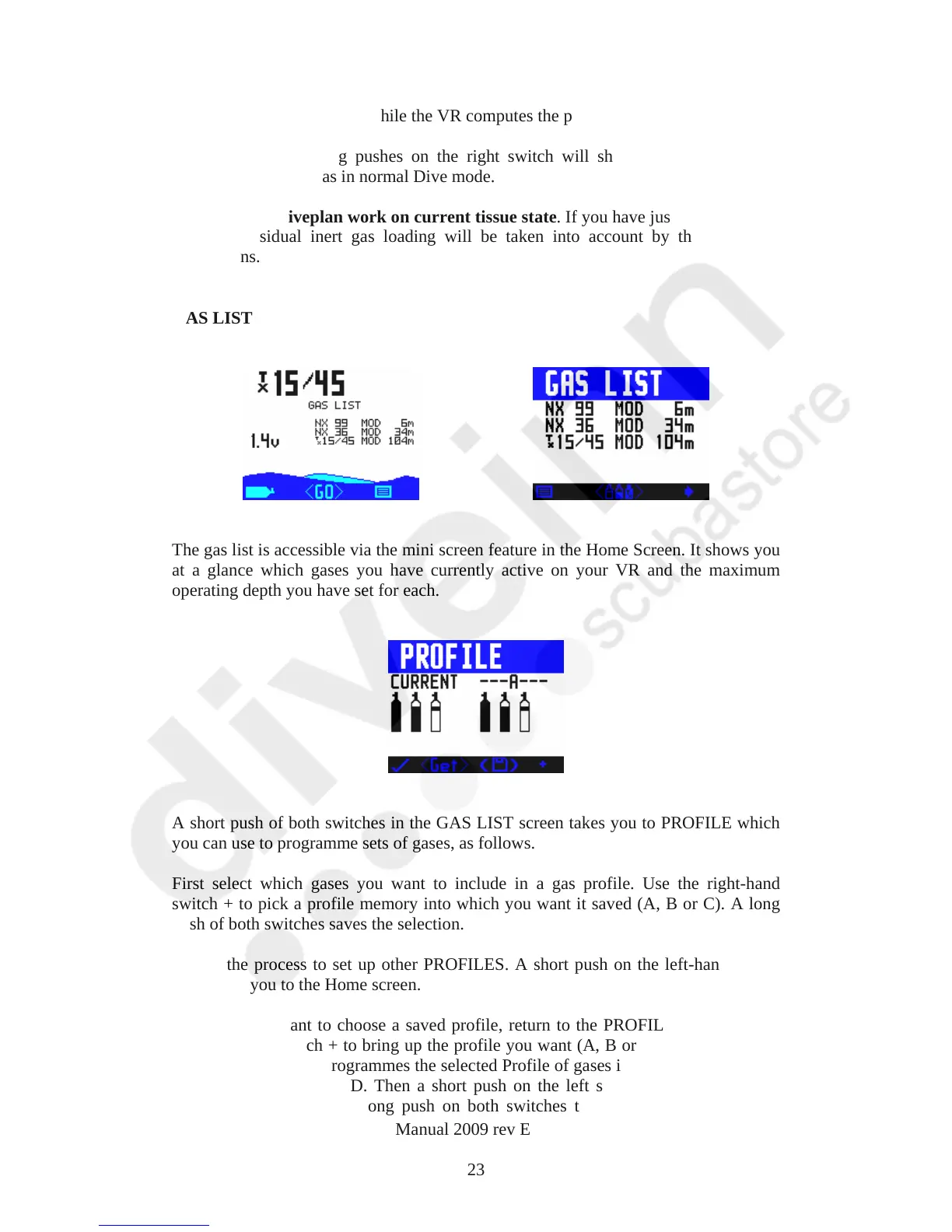
he gas list is accessible via the mini screen feature in the Home Screen. It shows you
T
at a glance which gases you have currently active on your VR and the maximum
operating depth you have set for each.
short push of both switches in the GAS LIST screen takes you to PROFILE which
irst select which gases you want to include in a gas profile. Use the right-hand
epeat the process to set up other PROFILES. A short push on the left-hand switch
ny time you want to choose a saved profile, return to the PROFILE menu and use
A
you can use to programme sets of gases, as follows.
F
switch + to pick a profile memory into which you want it saved (A, B or C). A long
push of both switches saves the selection.
R
will return you to the Home screen.
A
the right-hand switch + to bring up the profile you want (A, B or C). A short push of
both switches <Get> programmes the selected Profile of gases into your VR. You will
see the word RESTORED. Then a short push on the left switch takes you into the
ADJUST screen where a long push on both switches takes you into the SELECT
23



 To Next Page