VR Technology Limited
SELECT and ADJUST gases
From the Home screen, the SIMULATE screen AND the Dive screen, you can access
the gas SELECT and ADJUST features with a long push of the left-hand switch.
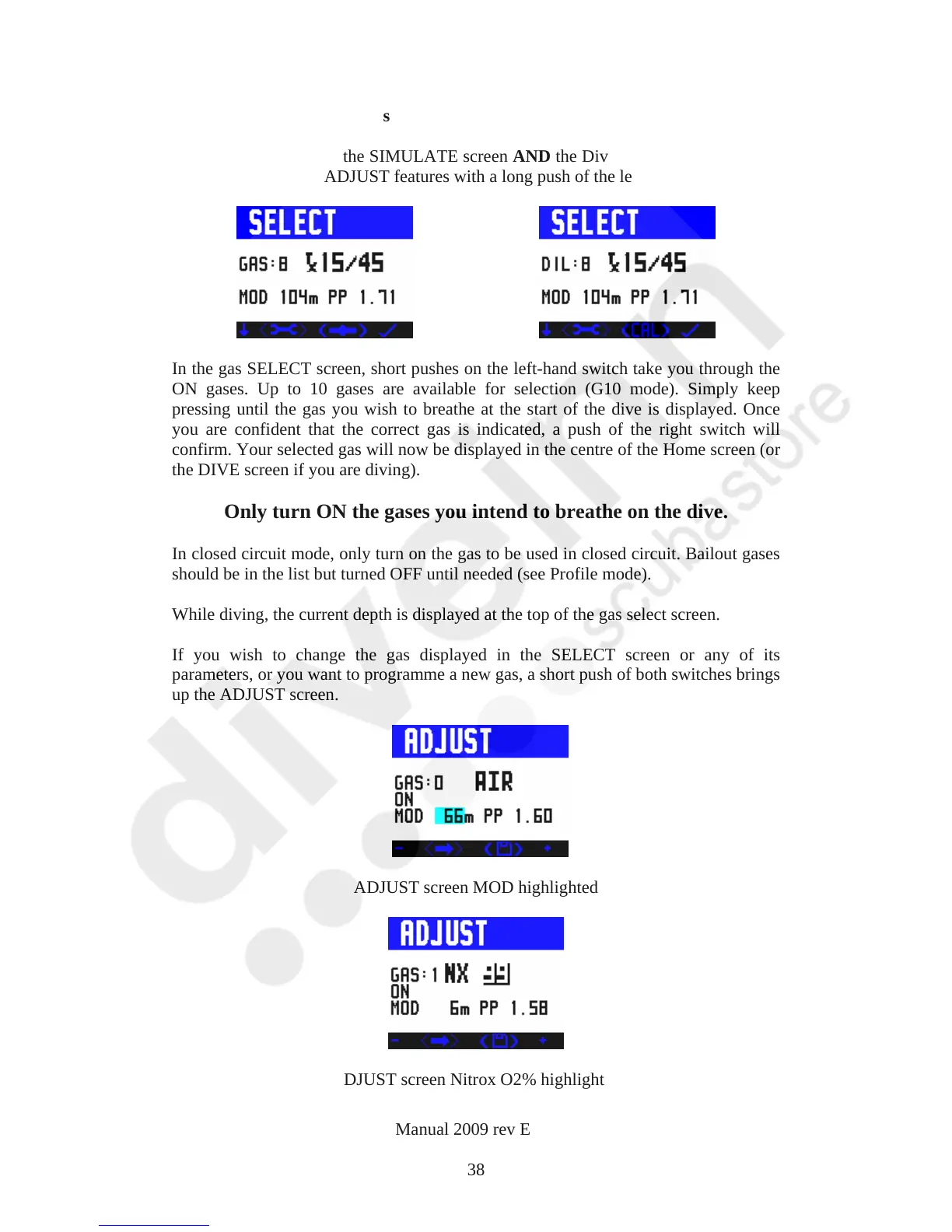
In the gas SELECT screen, short pushes on the left-hand switch take you through the
ON gases. Up to 10 gases are available for selection (G10 mode). Simply keep
pressing until the gas you wish to breathe at the start of the dive is displayed. Once
you are confident that the correct gas is indicated, a push of the right switch will
confirm. Your selected gas will now be displayed in the centre of the Home screen (or
the DIVE screen if you are diving).
Only turn ON the gases you intend to breathe on the dive.
In closed circuit mode, only turn on the gas to be used in closed circuit. Bailout gases
should be in the list but turned OFF until needed (see Profile mode).
While diving, the current depth is displayed at the top of the gas select screen.
If you wish to change the gas displayed in the SELECT screen or any of its
parameters, or you want to programme a new gas, a short push of both switches brings
up the ADJUST screen.
ADJUST screen MOD highlighted
ADJUST screen Nitrox O2% highlighted
VR Dive Computer Operations Manual 2009 rev E 28/01/2009
38



 To Next Page