VR Technology Limited
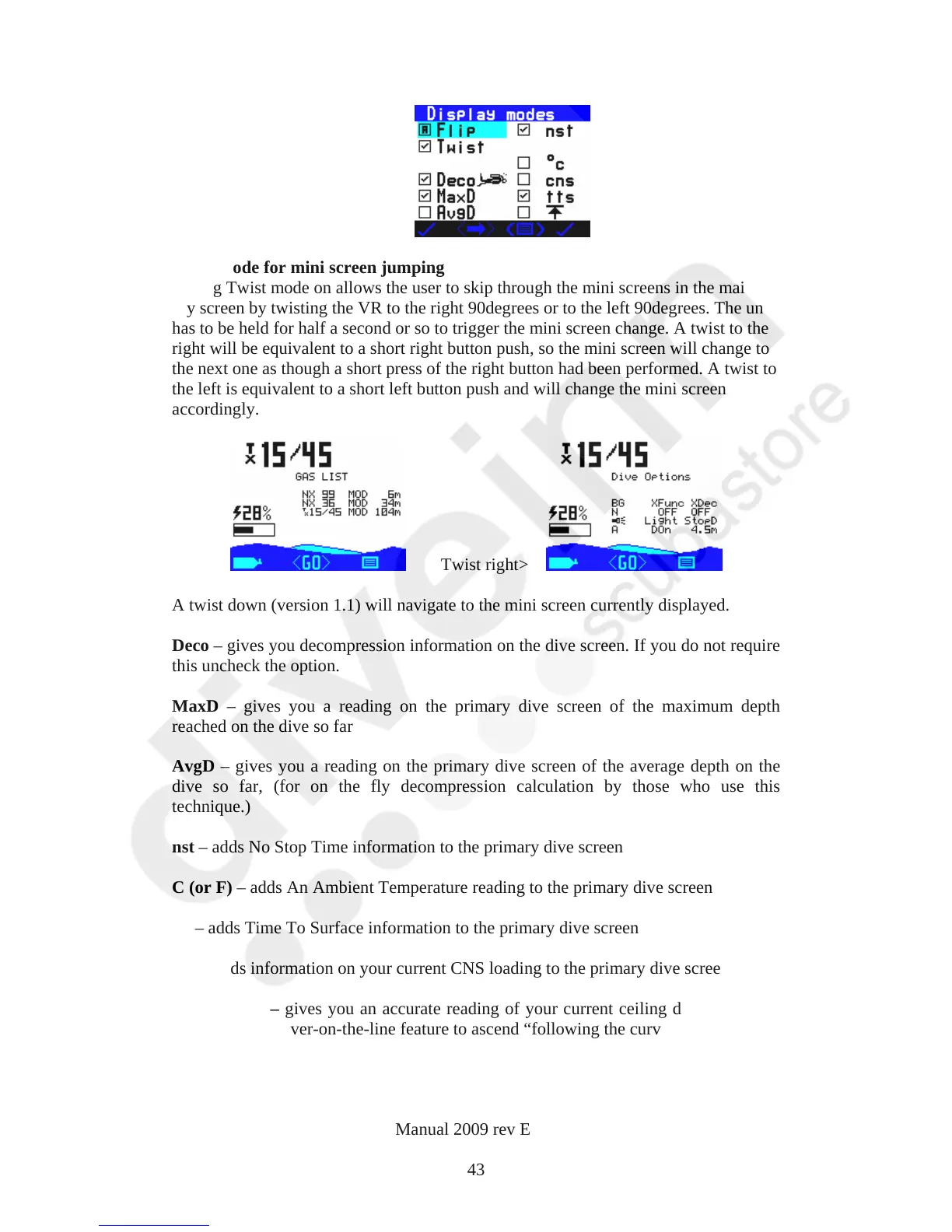
Twist mode for mini screen jumping
Setting Twist mode on allows the user to skip through the mini screens in the main
dry screen by twisting the VR to the right 90degrees or to the left 90degrees. The unit
has to be held for half a second or so to trigger the mini screen change. A twist to the
right will be equivalent to a short right button push, so the mini screen will change to
the next one as though a short press of the right button had been performed. A twist to
the left is equivalent to a short left button push and will change the mini screen
accordingly.
Twist right>
A twist down (version 1.1) will navigate to the mini screen currently displayed.
Deco – gives you decompression information on the dive screen. If you do not require
this uncheck the option.
MaxD – gives you a reading on the primary dive screen of the maximum depth
reached on the dive so far
AvgD – gives you a reading on the primary dive screen of the average depth on the
dive so far, (for on the fly decompression calculation by those who use this
technique.)
nst – adds No Stop Time information to the primary dive screen
C (or F) – adds An Ambient Temperature reading to the primary dive screen
tts – adds Time To Surface information to the primary dive screen
cns – adds information on your current CNS loading to the primary dive screen
Ceiling Icon – gives you an accurate reading of your current ceiling depth. Use this
along with the diver-on-the-line feature to ascend “following the curve”.
Log Screen
VR Dive Computer Operations Manual 2009 rev E 28/01/2009
43



 To Next Page