VR Technology Limited
Display Modes Screen
The Display Modes screen is a revolutionary feature which is new in 2009 VRs. For
the first time, a diver can choose which information he sees in his primary dive screen
and customise it to his own preferences. The VR is the only computer that allows a
diver to do this.
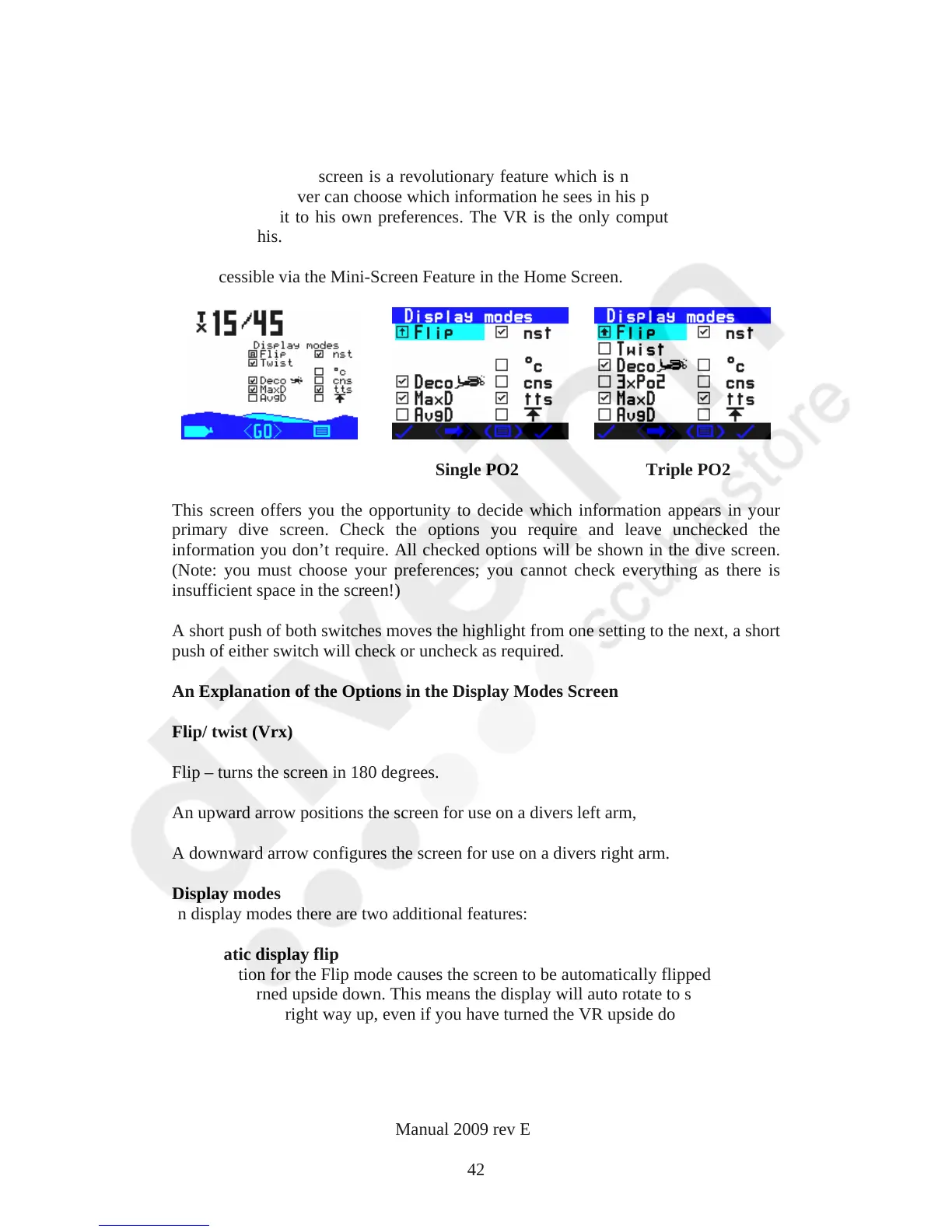
It is accessible via the Mini-Screen Feature in the Home Screen.
Single PO2 Triple PO2
This screen offers you the opportunity to decide which information appears in your
primary dive screen. Check the options you require and leave unchecked the
information you don’t require. All checked options will be shown in the dive screen.
(Note: you must choose your preferences; you cannot check everything as there is
insufficient space in the screen!)
A short push of both switches moves the highlight from one setting to the next, a short
push of either switch will check or uncheck as required.
An Explanation of the Options in the Display Modes Screen
Flip/ twist (Vrx)
Flip – turns the screen in 180 degrees.
An upward arrow positions the screen for use on a divers left arm,
A downwar
d arrow configures the screen for use on a divers right arm.
Display modes
In display modes there are two additional features:
Automatic display flip
The A option f
or the Flip mode causes the screen to be automatically flipped over if
the VR is turned upside down. This means the display will auto rotate to show the
information the right way up, even if you have turned the VR upside down.
VR Dive Computer Operations Manual 2009 rev E 28/01/2009
42



 To Next Page