VR Technology Limited
How to Switch Gases during a Dive.
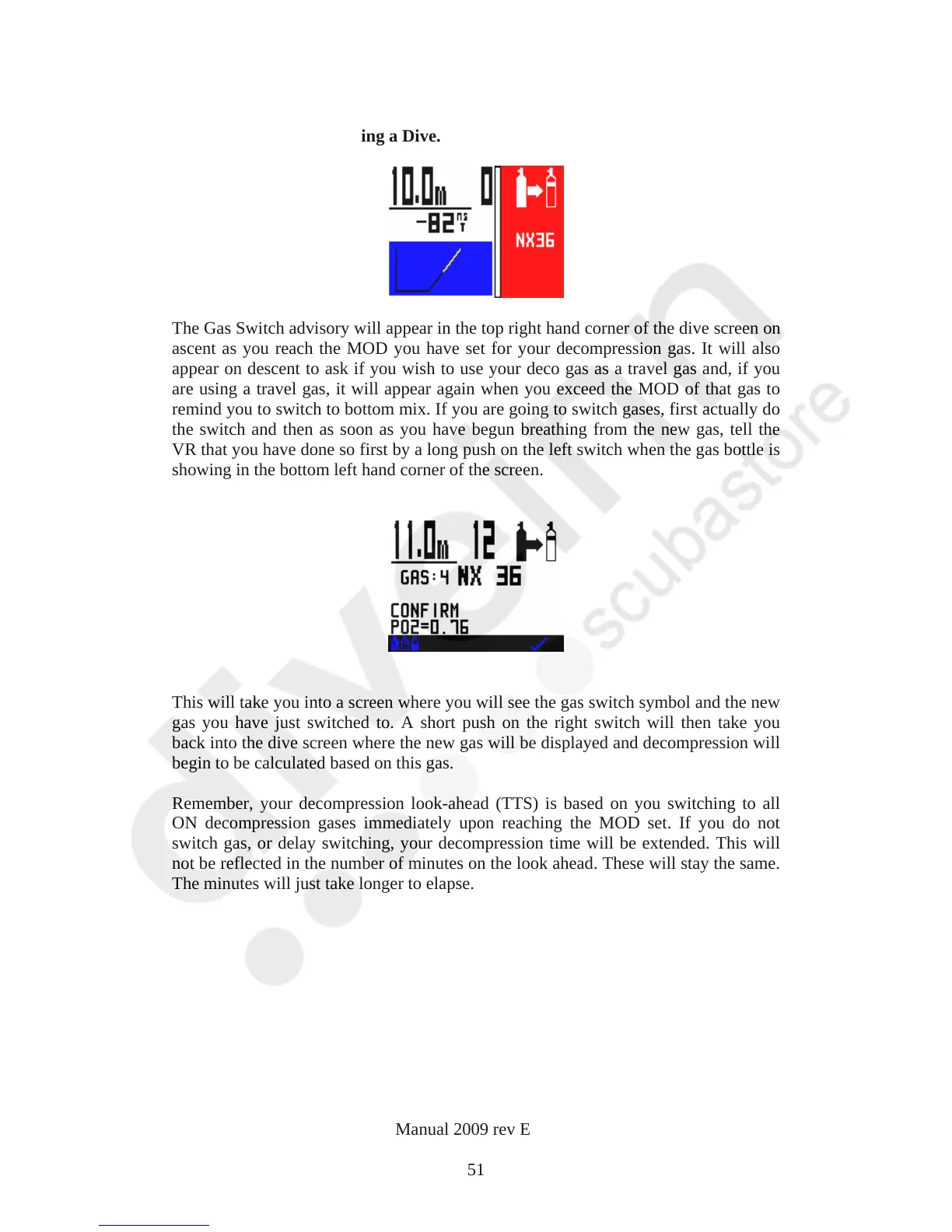
The Gas Switch advisory will appear in the top right hand corner of the dive screen on
ascent as you reach the MOD you have set for your decompression gas. It will also
appear on descent to ask if you wish to use your deco gas as a travel gas and, if you
are using a travel gas, it will appear again when you exceed the MOD of that gas to
remind you to switch to bottom mix. If you are going to switch gases, first actually do
the switch and then as soon as you have begun breathing from the new gas, tell the
VR that you have done so first by a long push on the left switch when the gas bottle is
showing in the bottom left hand corner of the screen.
This will take you into a screen where you will see the gas switch symbol and the new
gas you have just switched to. A short push on the right switch will then take you
back into the dive screen where the new gas will be displayed and decompression will
begin to be calculated based on this gas.
Remember, your decompression look-ahead (TTS) is based on you switching to all
ON decompression gases immediately upon reaching the MOD set. If you do not
switch gas, or delay switching, your decompression time will be extended. This will
not be reflected in the number of minutes on the look ahead. These will stay the same.
The minutes will just take longer to elapse.
VR Dive Computer Operations Manual 2009 rev E 28/01/2009
51



 To Next Page