June 11, 2015, 715004754 Rev. A
Page 55
3.4.4 Polarity connections
The Polarity and Polarity Enable contact closures on the rear panel of the 2414 RI
detector determine the peak polarity of the output signal according to the following
conditions (negative polarity results in negative, or inverted, peaks):
• Polarity serves as a positive/negative input.
• Polarity Enable serves as an external input (Polarity) enable.
• When Polarity Enable is open (not connected), the polarity is determined from
the polarity selected on the front panel or, if chromatography data software is
used, from the polarity method setting.
• When Polarity Enable is closed (connected to an instrument), polarity
determines peak polarity. Polarity open (disconnected) generates negative
polarity. Polarity closed (connected) generates positive polarity.
The following table summarizes the polarity options:
3.5 Connecting to an external column heater
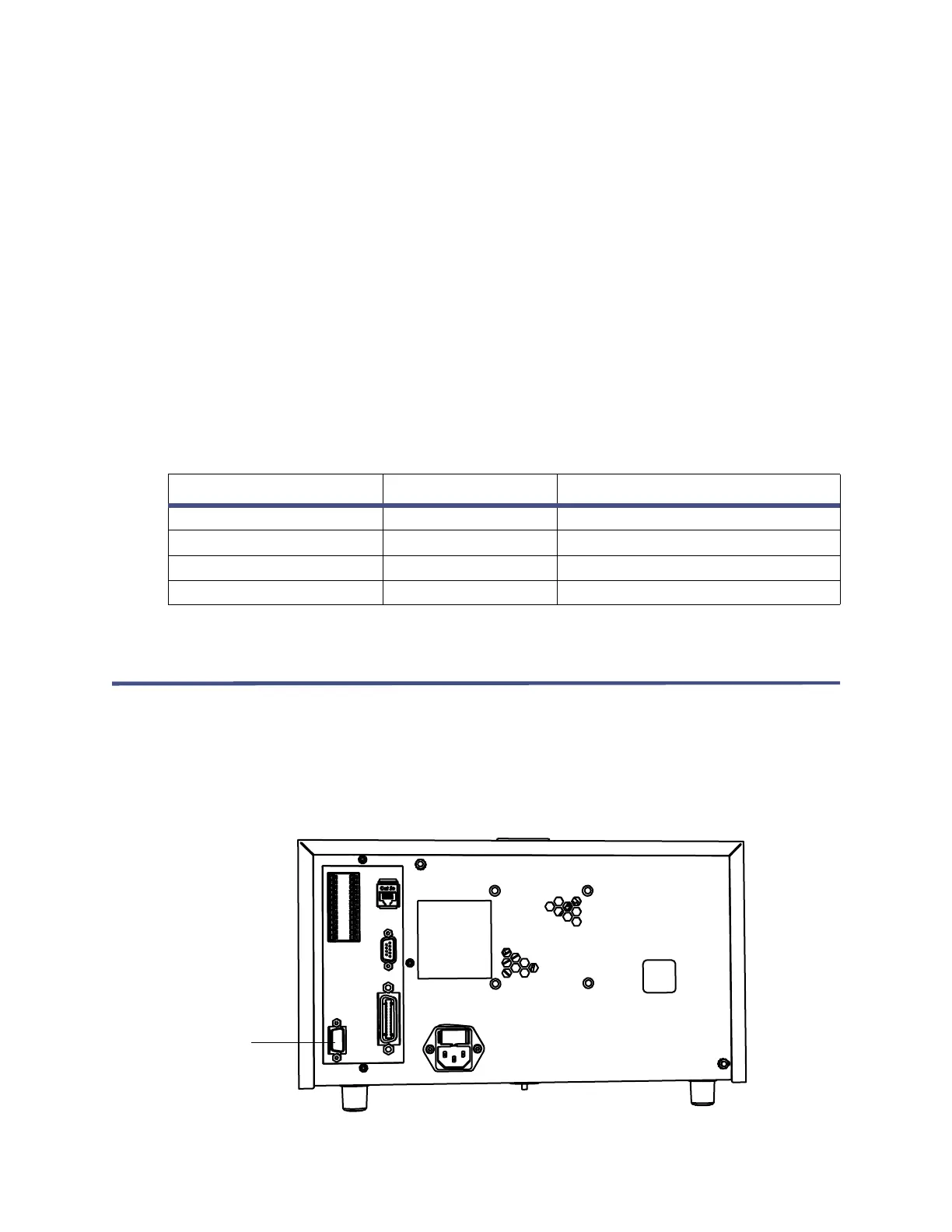
The 2414 RI detector can control one optional, external, column heater through the
EXT 1 port (external column heater port) on its rear panel. The port is a standard
9-pin DIN connector.
Figure 3–11: Location of external column heater port on 2414 RI
detector rear panel
Table 3–10: Polarity connection options
Polarity enable Polarity Detector out polarity
Open Open No Effect
Open Closed No Effect
Closed Open Negative (Inverted)
Closed Closed Unchanged
External
column
heater port



 To Next Page