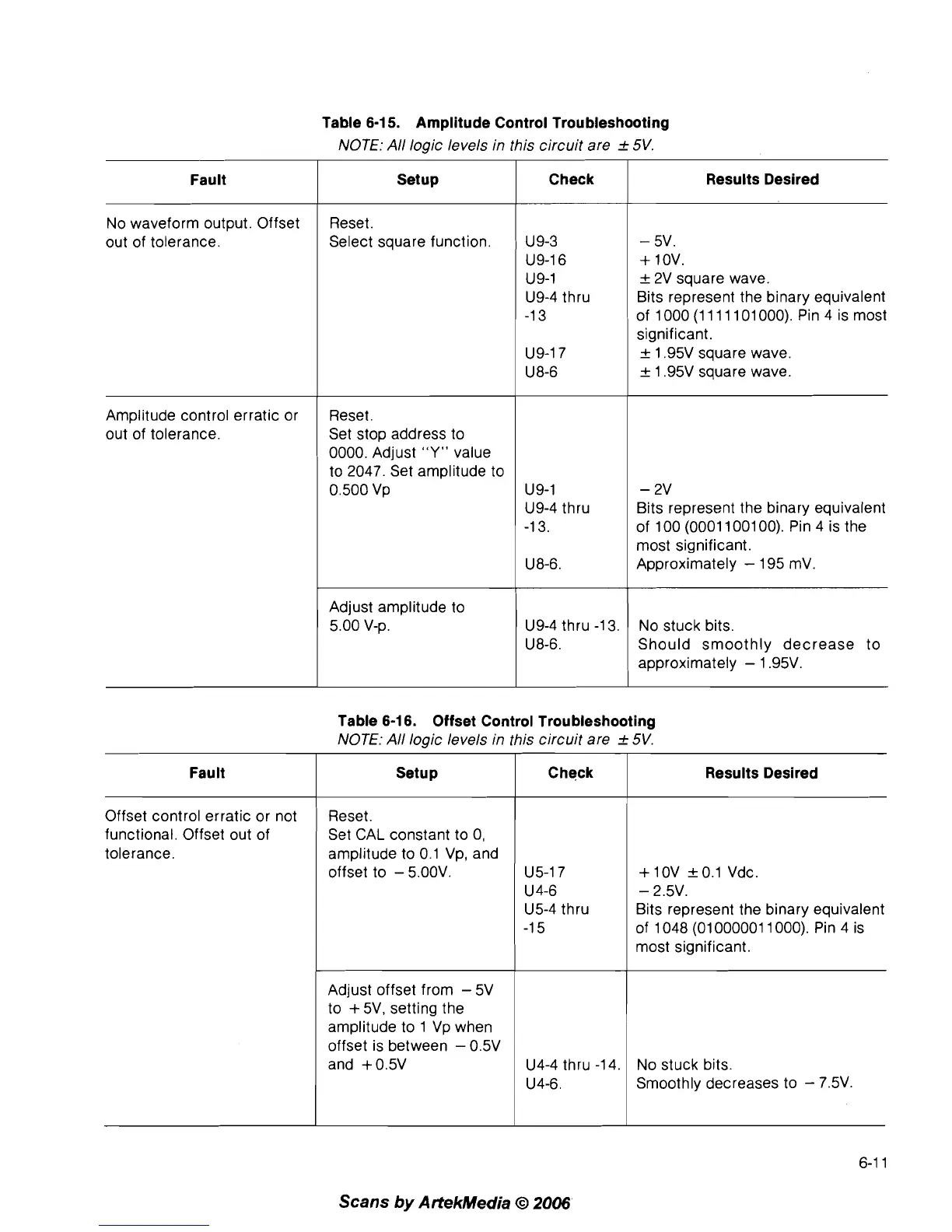
Table 6-1
5.
Amplitude Control Troubleshooting
NOTE: All logic levels in this circuit are
f
5V.
Table 6-1 6. Offset Control Troubleshooting
NOTE: All logic levels in this circuit are
f
5V.
Results Desired
-
5V.
+
1 OV.
_+
2V square wave.
Bits represent the binary equivalent
of 1000 (1 11 1 101 000). Pin 4 is most
significant.
_+
1.95V square wave.
_+
1.95V square wave.
-
2V
Bits represent the binary equivalent
of 100 (0001 1001 00). Pin 4 is the
most significant.
Approximately
-
195
mV.
No stuck bits.
Should smoothly decrease to
approximately
-
1.95V.
Fault
No waveform output. Offset
out of tolerance.
Amplitude control erratic or
out of tolerance.
6-1 1
Scans
by
ArtekMedia
O
2006
Setup
Reset.
Select square function.
Reset.
Set stop address to
0000. Adjust
"Y"
value
to 2047. Set amplitude to
0.500
Vp
Adjust amplitude to
5.00
V-p.
Results Desired
+
10V
_+
0.1 Vdc.
-
2.5V.
Bits represent the binary equivalent
of 1 048 (01 000001 1 000). Pin 4 is
most significant.
No stuck bits.
Smoothly decreases to
-
7.5V.
Fault
Offset control erratic or not
functional. Offset out of
tolerance.
Check
U9-3
U9-16
U9-1
U9-4 thru
-1 3
U9-17
U 8-6
U9-1
U9-4 thru
-1 3.
U8-6.
U9-4 thru -1 3.
U8-6.
Setup
Reset.
Set CAL constant to
0,
amplitude to 0.1
Vp,
and
offset to
-
5.00V.
Adjust offset from
-
5V
to
+
5V, setting the
amplitude to 1
Vp
when
offset is between
-
0.5V
and +0.5V
Check
U5-17
U 4-6
U5-4 thru
-1 5
U4-4 thru -1 4.
U4-6.



 To Next Page