APPENDIX
B
(Cont)
MODEL
75
REMOTE PROGRAMMING
To Dlsplay a Current Settlng: Press To Go To Local: Press Setup menu
To Recall Commands: Press Setup
menu key and soft key for that key until LOCAL is displayed above
menu key until BUFFR is displayed
setting.
F1. Press F1. above F3. Press F3 and rotate control
knob.
Control Codes
Prefixes (Numerics Follow)
*Sample Freq
F *Stop Address P Arb Data L
'Amplitude
A *Sync Address S Cali
bration N
'Offset
D 'Ramp Rate
M Set Terminator XV
*Burst Count
U Arb Address
K
Set Brk Point V
*Start Address T
Clear Brk Point W
Standard Waveforms
DC
C4 Ramp Up C3 Cosine
C6
Square C2 Ramp Down
C5 Inv Sine C7
Triangle C
1
Sine CO Haver Sine C8
Operation Modes Trigger Slope Reference
'Continuous BO 'Positive
QO *Internal RO
'Triggered
B1 'Negative 01 'External R1
'Gated 82
*Toggled 83
Burst 84
'Requires execute (I)
Commands
GPlB and RS-232-C
Execute
I
Man Trig Unassert
H Return G
Reset
Z
Hold Off XHO Display Counter XC
Man Trig Assert
J
Hold On
XH
1
Clear All Break Points
Y
RS-232-C Only
Go To Remote
!
Local Lockout Send Talk Msg
?
Go To Local
$
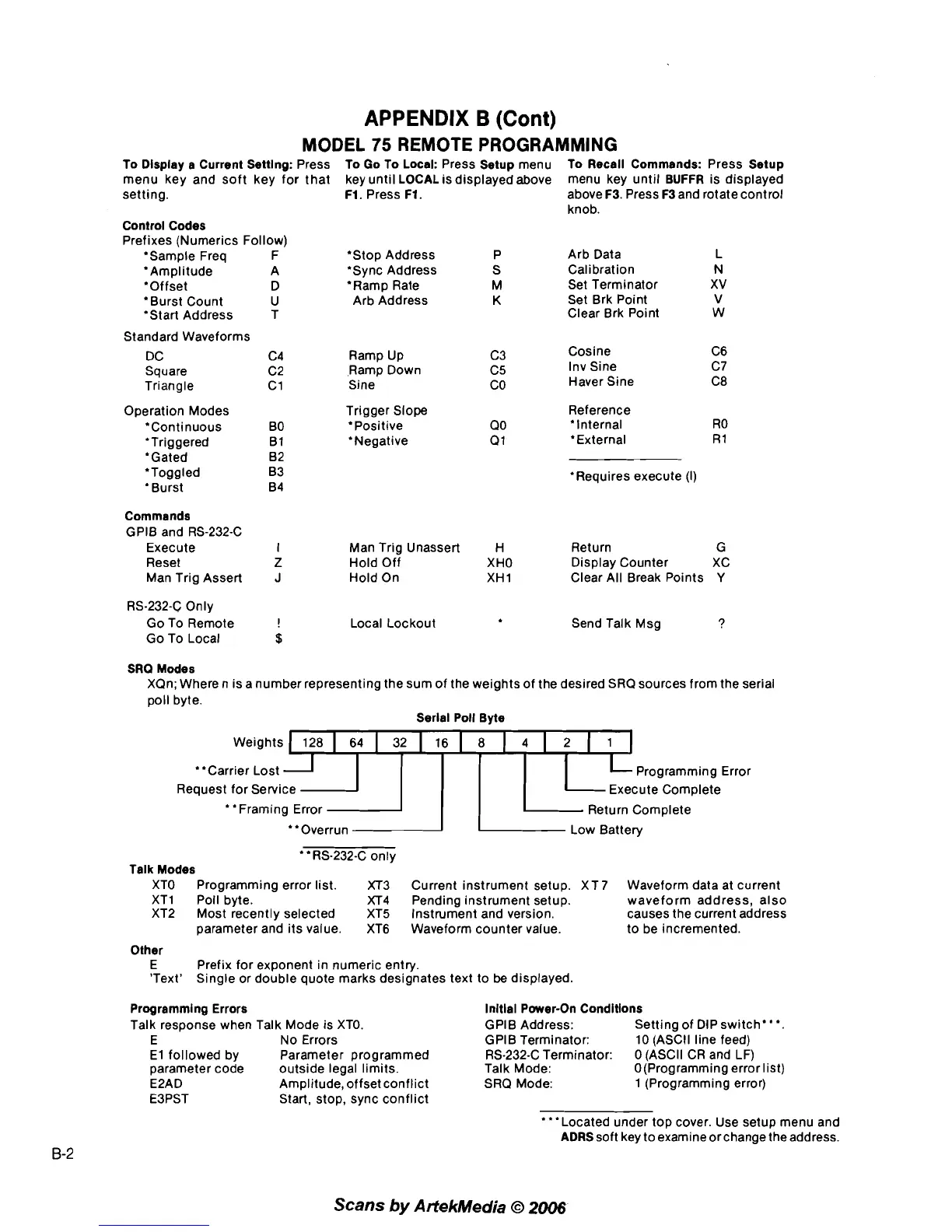
SRQ Modes
XQn; Where
n
is a number representing the sum of the weights of the desired SRQ sources from the serial
poll byte.
Serlal Poll Byte
weightsJX
"Carrier Lost Programming Error
Request for Service Execute Complete
Framing Error
Return Complete
"Overrun LOW Battery
'*RS-232-C only
Talk Modes
XTO Programming error list. XT3 Current instrument setup.
XT7 Waveform data at current
XTl Poll byte.
XT4 Pending instrument setup. waveform address, also
XT2 Most recently selected XT5 Instrument and version. causes the current address
parameter and its value. XT6 Waveform counter value. to be incremented.
Other
E Prefix for exponent in numeric entry.
'Text' Single or double quote marks designates text to
be
displayed.
Programming Errors
lnltlal Power-On Condltlons
Talk response when Talk Mode is XTO. GPlB Address:
Setting of DIP switch"'.
E No Errors
GPlB Terminator: 10 (ASCII line feed)
El followed by Parameter programmed RS-232-C Terminator:
0 (ASCII CR and LF)
parameter code outside legal limits. Talk Mode:
O(Programming error list)
E2AD Amplitude, offset conflict SRQ Mode: 1 (Programming error)
E3PST Start, stop, sync conflict
'**Located under top cover. Use setup menu and
ADRS soft key to examine or change the address.
Scans
by
Artekhledia
O
2006



 To Previous Page