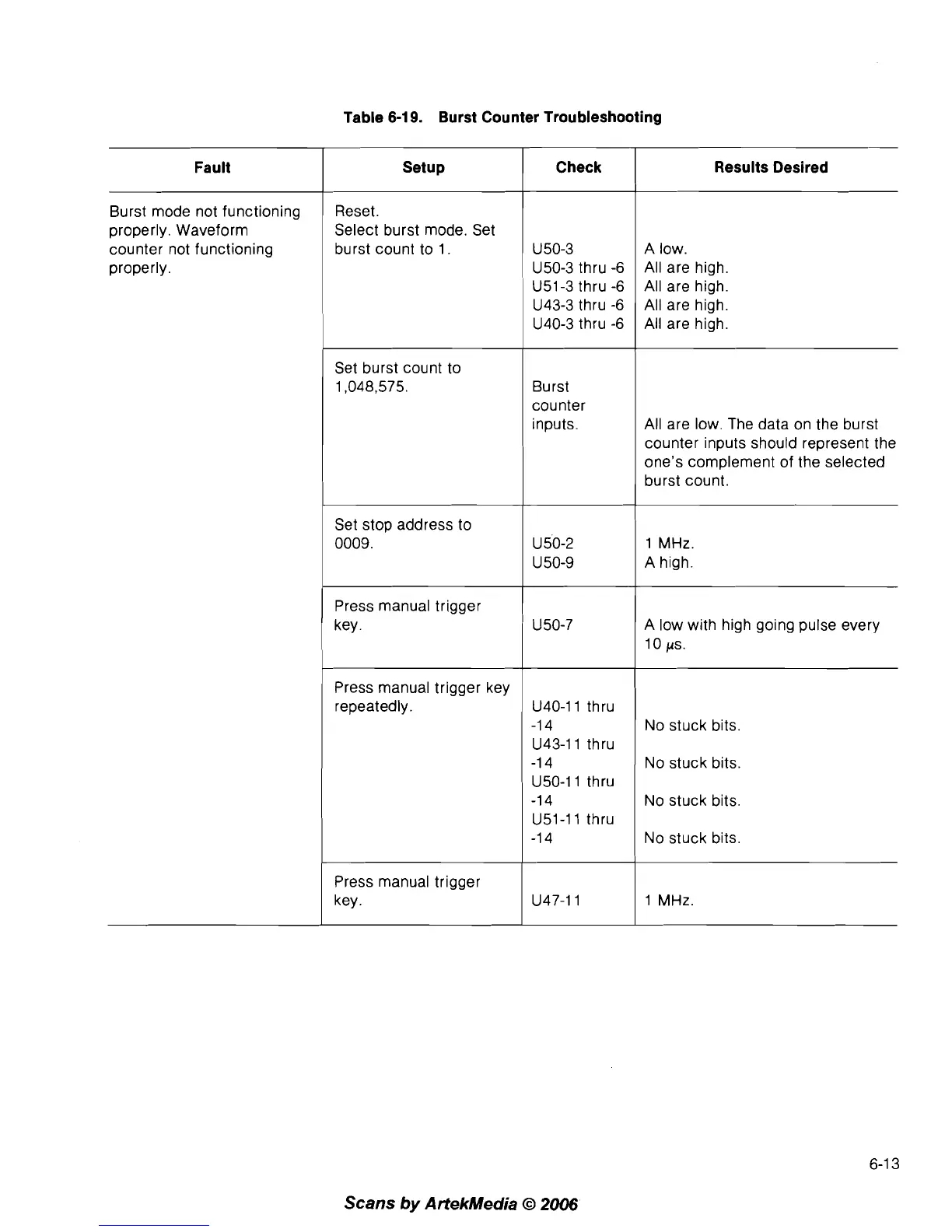
Table
6-19.
Burst Counter Troubleshooting
Scans
by
ArtekMedia
O
2006
Fault
Burst mode not functioning
properly. Waveform
counter not functioning
properly.
Check
U 50-3
U50-3
thru
-6
Setup
Reset.
Select burst mode. Set
burst count to
1.
Results Desired
A low.
All are high.
U51-3
thru
-6
All are high.
U43-3
thru
-6
All are high.
U40-3
thru
-6
All are high.
Set burst count to
1,048,575.
Set stop address to
0009.
Press manual trigger
key.
Press manual trigger key
repeatedly.
Press manual trigger
key.
Burst
counter
inputs.
U 50-2
U 50-9
U50-7
U40-11
thru
-1 4
U43-11
thru
-1 4
U50-11
thru
-1 4
U51-11
thru
-1 4
U47-11
All are low. The data on the burst
counter inputs should represent the
one's complement of the selected
burst count.
1 MHz.
A high.
A low with high going pulse every
10
/As.
No stuck bits.
No stuck bits.
No stuck bits.
No stuck bits.
1 MHz.



 To Next Page