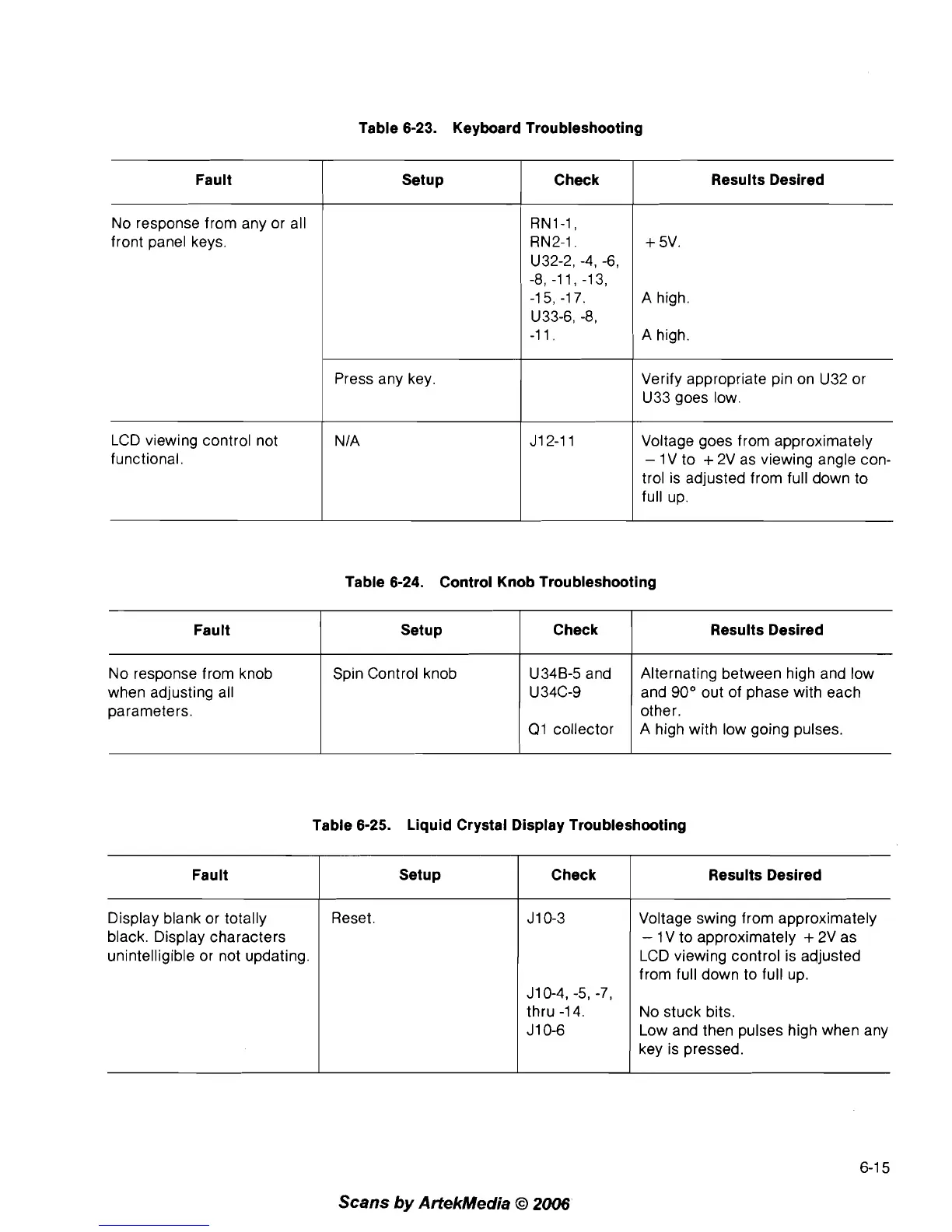
Table 6-23. Keyboard Troubleshooting
Fault
1
Setup
1
Check
1
Results Desired
No response from any or all
front panel keys.
1
Press any key.
A high.
A high.
Verify appropriate pin on U32 or
U33 goes low.
LCD viewing control not
functional.
Voltage goes from approximately
-
1
V to
+
2V as viewing angle con-
trol is adjusted from full down to
full up.
Fault
No response from knob
when adjusting all
parameters.
Fault
Table 6-24. Control Knob Troubleshooting
Setup
Spin Control knob
Check
U34B-5 and
U34C-9
Q1 collector
Results Desired
Alternating between high and low
and
90" out of phase with each
other.
A high with low going pulses.
Table 6-25. Liquid Crystal Display Troubleshooting
Display blank or totally
black. Display characters
unintelligible or not updating.
Setup
I
check
Reset
J10-4, -5,
-7,
thru
-1
4.
J 1 0-6
Results Desired
Voltage swing from approximately
-
1
V to approximately
+
2V as
LCD viewing control is adjusted
from full down to full up.
No stuck bits.
Low and then pulses high when any
key is pressed.
Scans
by
ArtekMedia
O
2006



 To Next Page