EasyManua.ls Logo

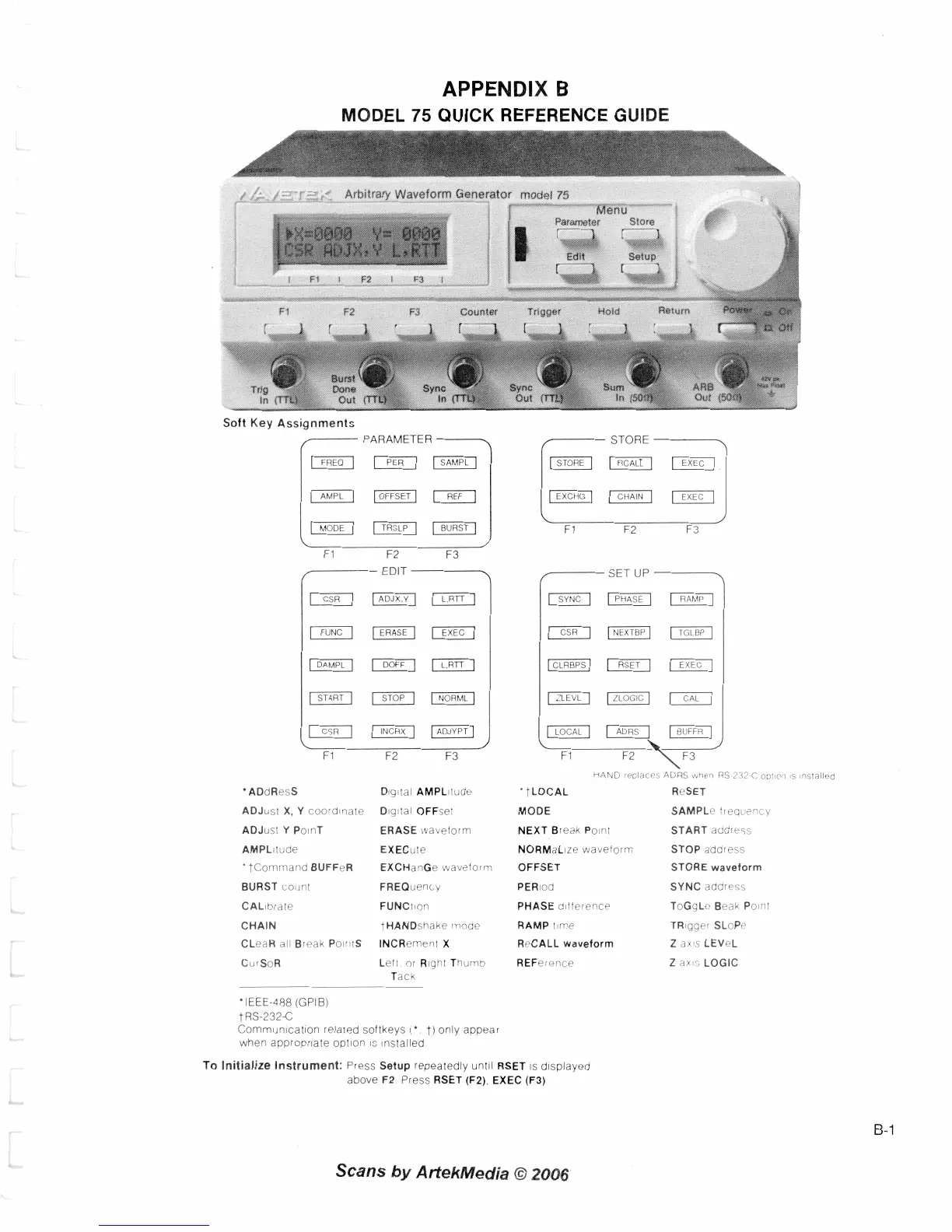
Wavetek 75 - APPENDIX B; MODEL 75 QUICK REFERENCE GUIDE; Soft Key Assignments

Default Icon
144 pages
Print Icon
To Next Page IconTo Next Page
To Previous Page IconTo Previous Page
Loading...
APPENDIX
B
MODEL
75
QUICK REFERENCE GUIDE
/I
,"
,
*
Arb~trary
Waveform Generator
model
75
r
we-
!@
84,
M
Parameter
enu
Store
L&J
Setup
Edit
w-s*.
-
#
a
ter
Trrg
Soft
Key
Assignments
(-
PARAMETER
-
HAND
rrolaces
'
tLOCAL
MODE
NEXT Break Po~nl
NORMaLize wavelorm
OFFSET
PERlod
PHASE dlference
RAMP rlme
ReCALL
waveform
REFerence
ADRS
r%hl.rl
RS
2
i2
C
oollon
s
nsfalled
ReSET
SAMPLc frequc'ic~
START address
STOP address
STORE
waveform
SYNC address
ToGqLc Beak Po~ril
TR~gger SLoPp
Z
axls LEVeL
Z
dx~s LOGIC
'
ADdResS
ADJusl X, Y coordlndle
ADJust Y Po~rlT
AMPLltude
'tCommand BUFFeR
BURST count
CAL~brate
CHAIN
CLeaR all Break Po~ntS
Cu:SoR
D~gtal AMPLllude
Dig:tal OFFsel
ERASE wavelorm
EXECule
EXCHanGe waveform
FREQuency
FUNCIion
tHANDshake niode
INCRernenl
X
Left or R~ghl Thumb
Tack
'IEEE-488 (GPIB)
tRS-232-C
Cornrnun~cat~on related softkeys
('
t)
only appear
when
appropriate
opton
IS
~nstalled
To
Initialize Instrument:
Press Setup repeatedly unlll RSET
IS
displayed
above F2
Press
RSET (F2). EXEC (F3)
Scans
by
AttekMedia
O
2006

Table of Contents

Related product manuals