EasyManua.ls Logo

Wavetek 75 - Output Amplifier Troubleshooting; Attenuator Troubleshooting

Default Icon
144 pages
Print Icon
To Next Page IconTo Next Page
To Previous Page IconTo Previous Page
Loading...
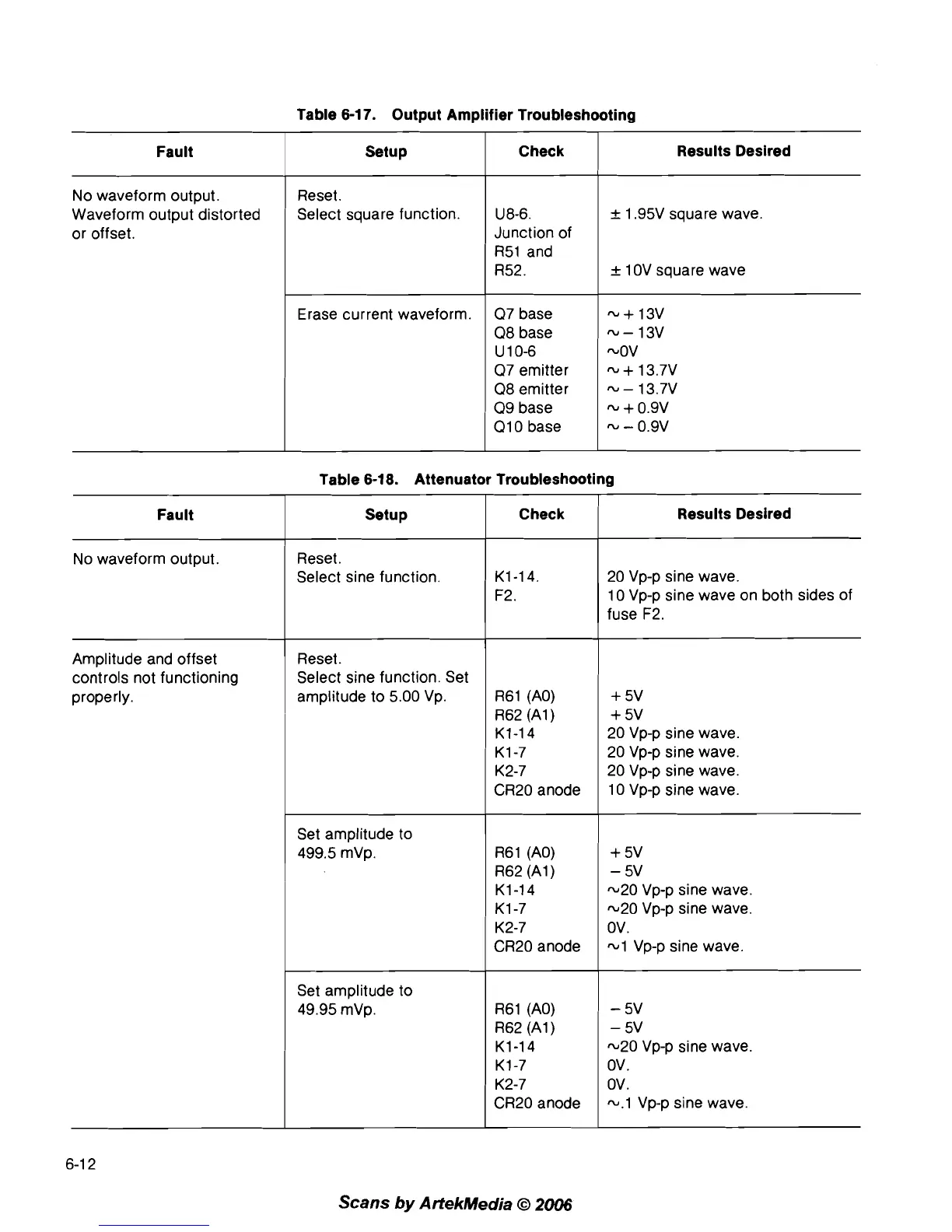
Table 6-1
7.
Output Amplifier Troubleshooting
Fault
No waveform output.
Waveform output distorted
or offset.
Setup
Reset.
Select square function.
Erase current waveform.
Check
I
Results Desired
07 base
08 base
U 1 0-6
07 emitter
08 emitter
09 base
01 0 base
U8-6.
Junction of
R51 and
R52.
Table 6-18. Attenuator Troubleshooting
*
1.95V square wave.
_+
1 0V square wave
Fault Setup
No waveform output.
Reset.
Select sine function.
Amplitude and offset
controls not functioning
properly.
Reset.
Select sine function. Set
amplitude to 5.00 Vp.
Check
I
Results Desired
20 Vp-p sine wave.
10 Vp-p sine wave on both sides of
fuse F2.
R61 (AO)
R62 (Al)
K1-14
K1-7
K2-7
CR20 anode
+
5v
+
5v
20 Vp-p sine wave.
20 Vp-p sine wave.
20 Vp-p sine wave.
10 Vp-p sine wave.
Set amplitude to
499.5
mVp.
Set amplitude to
49.95
mVp.
R61 (AO)
R62 (Al)
K1-14
K1-7
K2-7
CR20 anode
+
5v
-
5v
-20 Vp-p sine wave.
-20 Vp-p sine wave.
ov.
-1 Vp-p sine wave.
R61 (AO)
R62
(A1
)
K1-14
K1-7
K2-7
CR20 anode
-
5v
-
5v
-20 Vp-p sine wave.
ov.
ov.
-.1 Vp-p sine wave.
Scans
by
ArtekMedia
O
2006

Table of Contents

Related product manuals