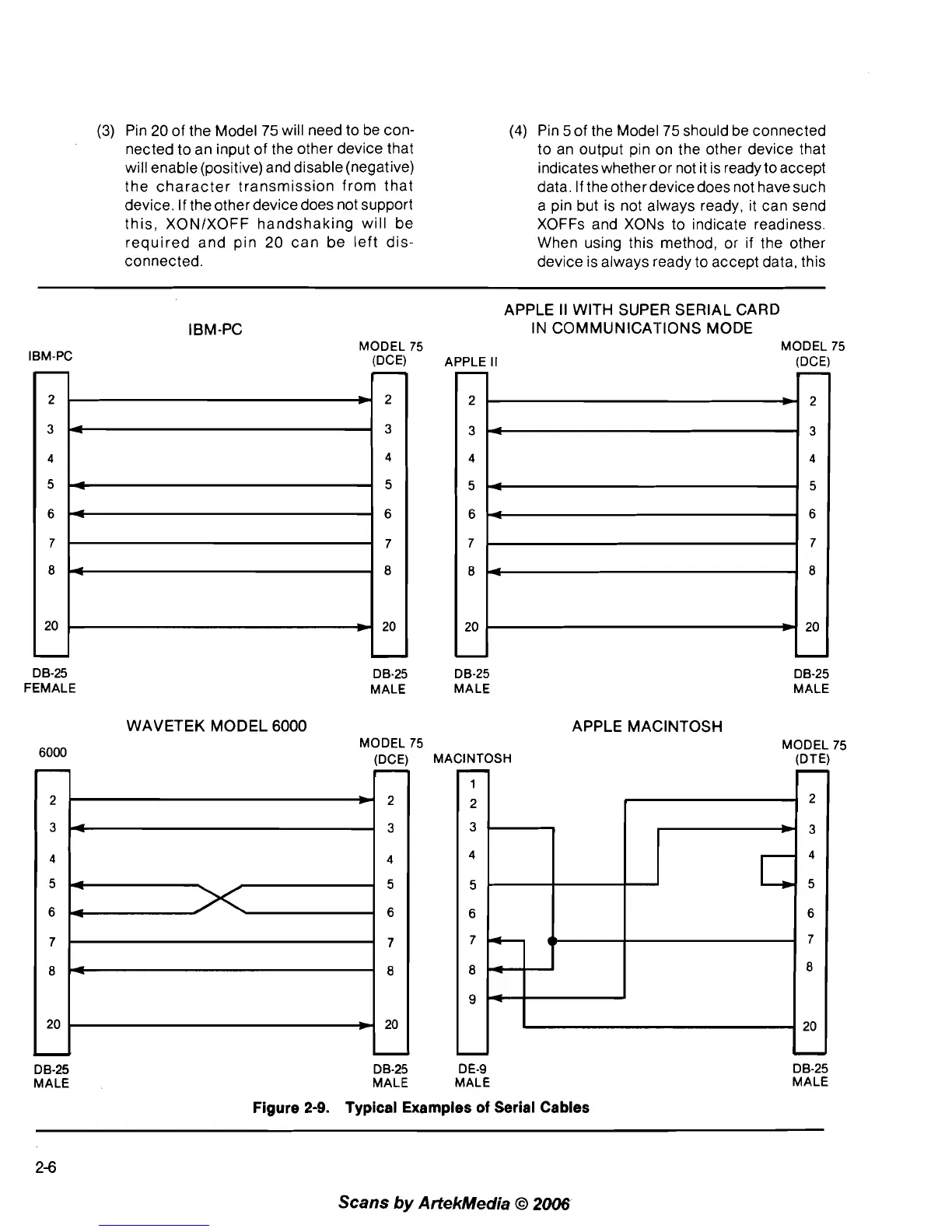
(3) Pin 20 of the Model 75 will need to be con-
nected to an input of the other device that
will enable (positive) and disable (negative)
the character transmission from that
device. If the other device does not support
this,
XONIXOFF handshaking will be
required and pin
20 can be left dis-
connected.
(4)
Pin 5 of the Model 75 should be connected
to an output pin on the other device that
indicates whether or not it is ready to accept
data. If the other devicedoes not have such
a pin but is not always ready, it can send
XOFFs and XONs to indicate readiness.
When using this method, or if the other
device is always ready to accept data, this
IBM-PC
APPLE
II
WITH SUPER SERIAL CARD
IBM-PC IN COMMUNICATIONS MODE
MODEL 75 MODEL 75
(DCE) APPLE II
DB-25
FEMALE
DB-25 DB-25
MALE MALE
DB-25
MALE
WAVETEK MODEL
6000
APPLE MACINTOSH
6000
MODEL 75 MODEL 75
(DCE) MACINTOSH (DTE)
D 6-25
MALE
D 6-25 DE-9
MALE MALE
Figure
2-9.
Typical Examples
of
Serial Cables
DB-25
MALE
2-6
Scans
by
Artekhledia
O
2006



 To Next Page