Wecon VD2 SA Series Servo Drives Manual (Lite V1.1)
WECON technology Co., Ltd
5.3.3 Factory reset
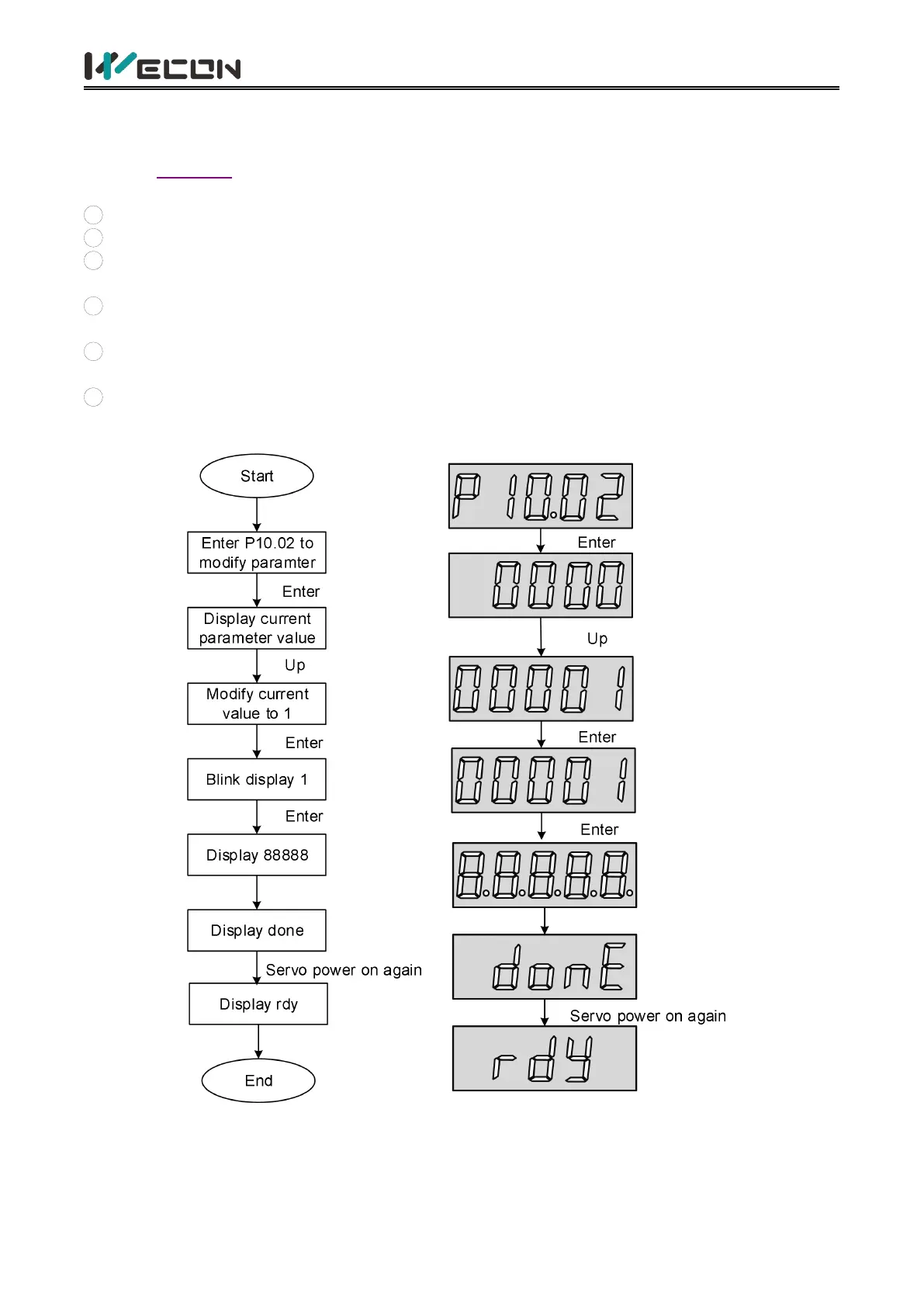
The factory settings can be restored through the servo drive panel. The specific operation steps are
shown in Figure 5-7.
Illustrate:
1
After power on, modify the function code to P10.02.
2
Press the "Enter" key to enter the next menu to set the parameters.
3
Press the "Confirm" button after the parameter setting is finished, and the setting value will
flash.
4
Press "Confirm" again, the panel digital tube will light up gradually from left to right until
8.8.8.8.8 is displayed.
5
Finally it displays “Done”, the servo drive will be re-powered and the operation of factory reset
is finished.
6
Reason for displaying Error: When the value of P10.02 exceeds the value range (0 to 1), Error is
displayed.
Figure 5-7 Steps for restoring factory settings



 To Next Page