Wecon VD2 SA Series Servo Drives Manual (Lite V1.1)
WECON technology Co., Ltd
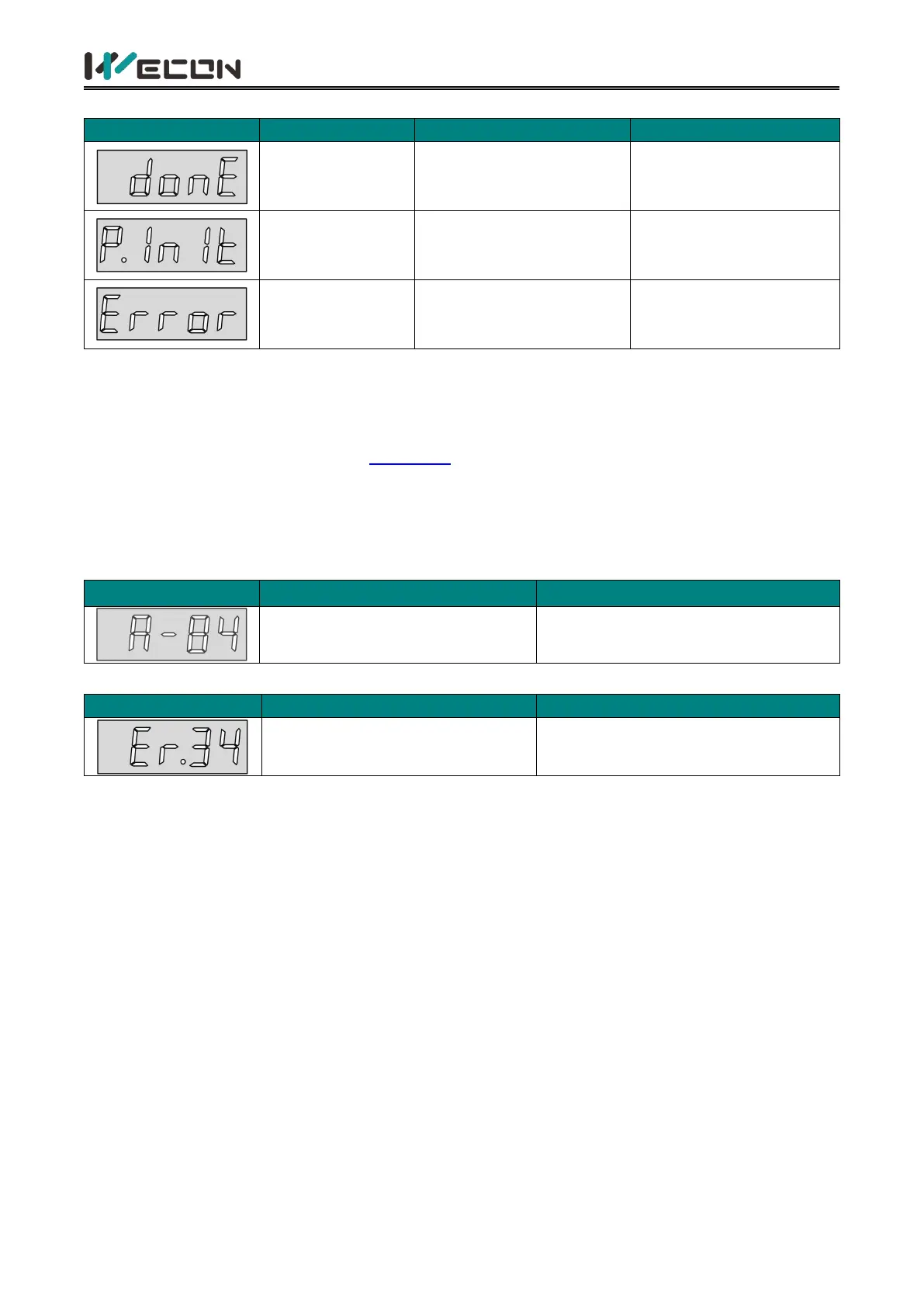
(4) Parameter setting display
Done
Parameter setting
completed
The servo drive is in the
process of parameter
factory reset
P.Init
Parameter reset
factory
The servo drive is in the
process of parameter
factory reset
Parameter setting exceeds
the limit (or not allowed
to exceed the limit)
Prompt that the
parameter setting
exceeds the limit
Table 5-3 Parameter setting display
5.2.4 Fault display
The panel can display current or historical fault and warning codes. For analysis and troubleshooting
of faults and warnings, please refer to "7 Faults" .
When a single fault or warning occurs, the panel immediately displays the current fault or warning
code; when multiple faults or warnings occur, the highest fault code is displayed. When a fault
occurs, when switching from the auxiliary function to the parameter display function, the
corresponding fault or warning code will be displayed. You can view the current fault and warning
codes and the past five fault and warning codes through the monitor display on the panel.
Parameter modification that
needs to be powered on again
Modified the parameters that need
to be re-powered to take effect
Table 5-4 Warning display example
Motor overload protection
Motor overload protection
Table 5-5 Fault display example



 To Next Page