Wecon VD2 SA Series Servo Drives Manual (Lite V1.1)
WECON technology Co., Ltd
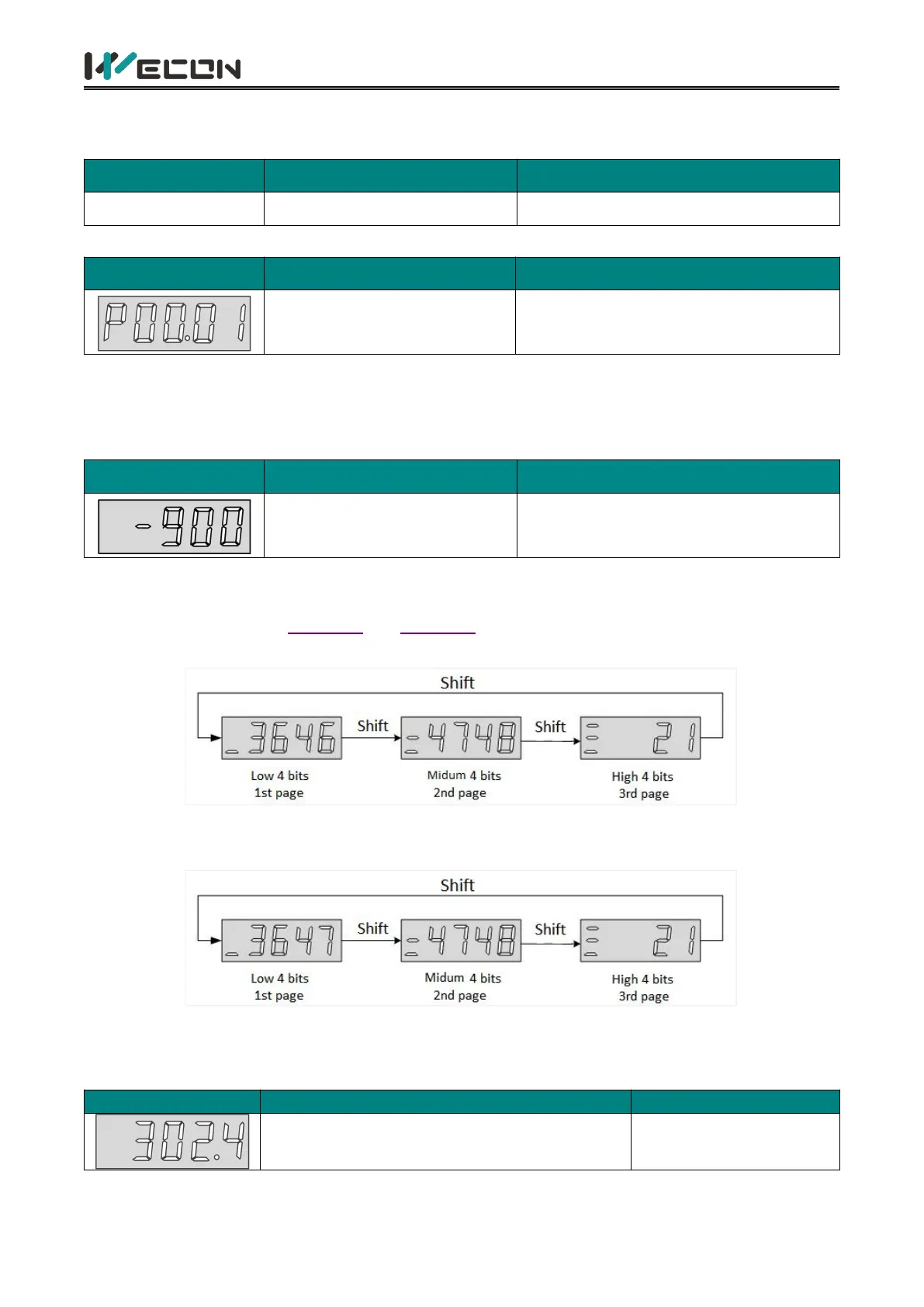
The parameter display is the display of different function codes. The format of the function code is
“PXX.YY”. “PXX” indicates the group number of function code, and “YY” indicates the number within
the function code group.
Function code group number
Number in function code group
For example: The function code P00.01 is displayed as follows.
00: Function code group number
01: Number in the function code group
(2) Display of different length data
1) Display Data with four bits and below
Using single page display, if it is a signed number, the highest bit of the data is "-".
For example: The monitoring volume U0-02 is displayed as follows.
2) Display Data more than five bits
Display in pages from low to high bits, and each 4 bits is a page. Display method: current page +
current value. As shown in Figure 5-3 and Figure 5-4, switch current page by pressing the "shift" key.
For example: 2147483646 is displayed as follows:
Figure 5-3 2147483646 display operation
For example: -2147483647 is displayed as follows:
Figure 5-4 -2147483647 display operation
(3) Decimal point display
The "." of the one-digit indicates the decimal point, and it does not flash. The example is as follows.



 To Next Page