Wecon VD2 SA Series Servo Drives Manual (Lite V1.1)
WECON technology Co., Ltd
5.2.1 Display switching
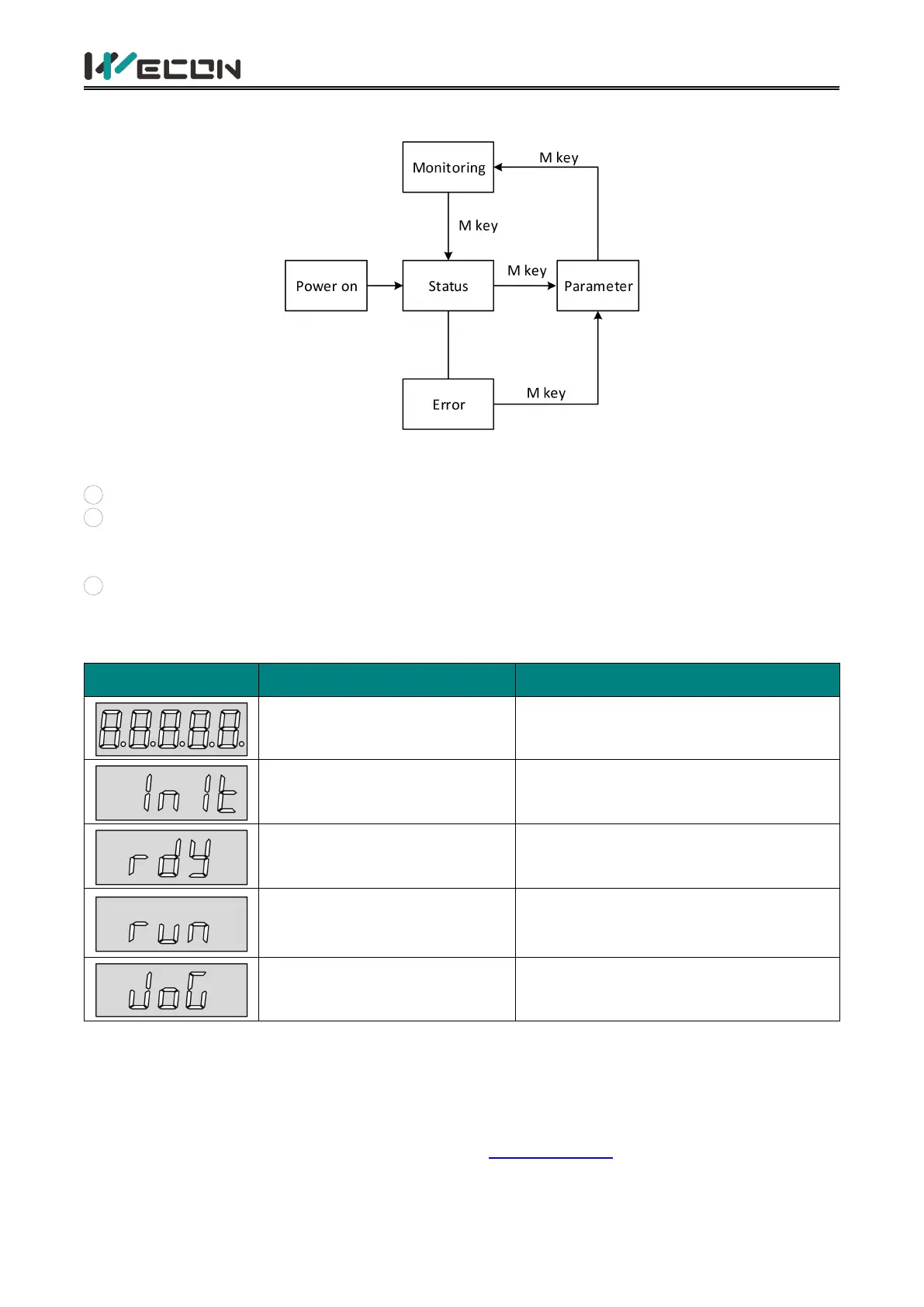
Figure 5-2 Switch between display types on the panel
Illustrate:
1
The power is turned on, and the panel display of the servo drive enters “Status Display Mode”.
2
After an operation failure occurs, the panel immediately switches to the bit failure display
mode. At this time, all the nixie tubes flash synchronously. Press the "mode" key to switch to the
parameter display mode.
3
Press the "Mode" key to switch between different display modes, and the switching conditions
are shown in Figure 5-2.
5.2.2 Status display
Servo drive is powered on
within 1 second
Servo drive is in initialization status
Very short time after displaying
"88888"
Initialization is complete
1 second after servo drive is
powered on, servo is ready
The servo is ready, waiting for the
enable signal given by servo drive
Servo enable signal is valid
The servo drive is in an operational
status, waiting for the instructions from
host computer
Servo drive is in jog operation
Table 5-2 Status display example
5.2.3 Parameter display
VD2 series servo drives are divided into 13 groups of function codes according to different
parameter functions, which could quickly locate the position of function codes according to the
function code groups. For specific parameters refer to “6 Parameters".
(1) Parameter group display



 To Next Page