22 | CFW300
English
Keypad (HMI) and Basic Programming
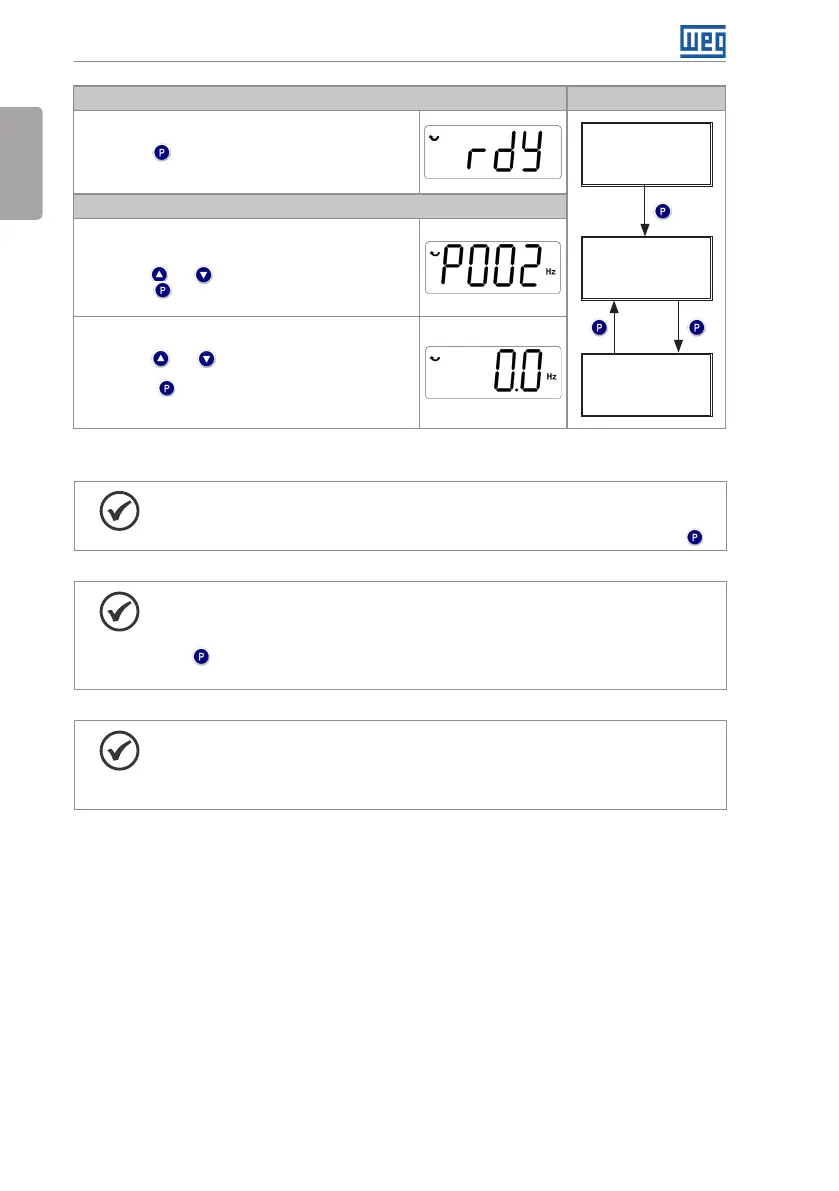
Monitoring Mode
It is the initial state of the HMI after its successful power-up
(without the occurrence of faults, alarms or undervoltage)
Press key to go to level 1 of the setting mode - selection
of parameters. Pressing any other key also switches to
setting mode
Monitoring
Setting
level 1
Setting
level 2
Setting Mode
Level 1:
This is the first level of the setting mode. The parameter
number is shown on the main display
Use keys and to find the desired parameter
Press key to go to level 2 of the setting mode - change
of the parameter values
Level 2:
The parameter value is shown on the main display
Use keys and to set the new value in the selected
parameter
Press key to confirm the modification (save the new
value). After confirming the modification, the HMI returns to
level 1 of the setting mode
Figure 4.3: HMI operating modes
NOTE!
When the inverter is in the fault state, the main display indicates the number
of the fault in the format Fxxx. Navigation is allowed after activation of key .
NOTE!
When the inverter is in the alarm state, the main display indicates the number
of the alarm in the format Axxx. The navigation is allowed after the activation of
key ; thus, the indication "A" goes to the unit of measurement display until the
situation causing the alarm is solved.
NOTE!
A list of parameters is presented in the quick reference of the parameters. For
further information about each parameter, refer to the CFW300 programming
manual.



 To Next Page